

Locator Heads Mod do Minecraft 26.3
Pokazuje głowy graczy na pasku lokalizatora i inne przydatne ustawienia.
- pobrań
- 9 pobrań
- wyświetleń
- 52 wyświetleń
- Zaktualizowano
- Zaktualizowano 03.10.2026
- 26.1 — 26.3
 Fabric
- Klient

Locator Heads
is a client-side Minecraft mod that displays nearby players as heads on your XP bar, making it easy to track their location and direction at a glance. Customize colors, borders, filtering options, and add a compass overlay to enhance your multiplayer experience.



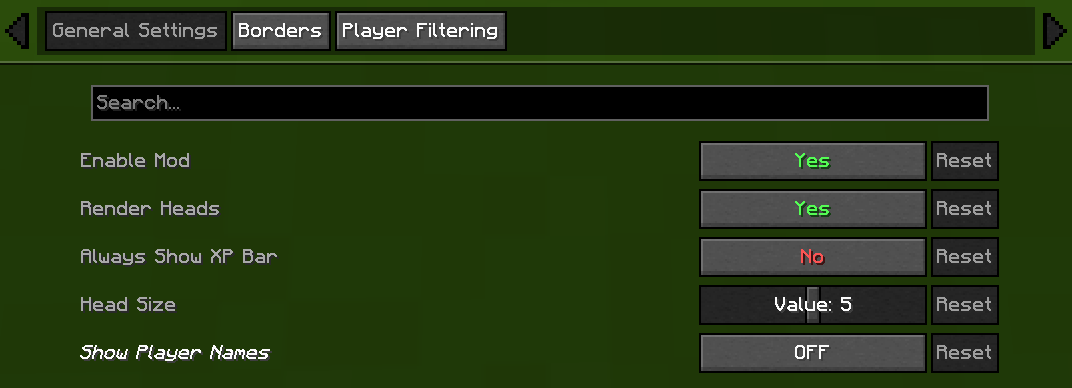
⚙️ General Settings
- Enable/Disable Mod
Chose weather or not mod is on or off.
- Render Heads
Choose if you want heads to be rendered (can be used to only show names)
- Always show XP bar
- Head Size
Change the size of the heads
- Show Player Names
Player Name Option - Description
Never - No names on the locator bar. (default) Always - Names permanently visible above all player heads. Looking At - Names appear only when you look within a 30° Player List - Names show when the in-game player list is open.

🧭 Compass
- Show Compass
Toggle the compass overlay on or off
- Compass Colour
Customize the color of the compass direction letters using hex color picker
- Compass Shadow
Toggle black outline around compass letters for better visibility

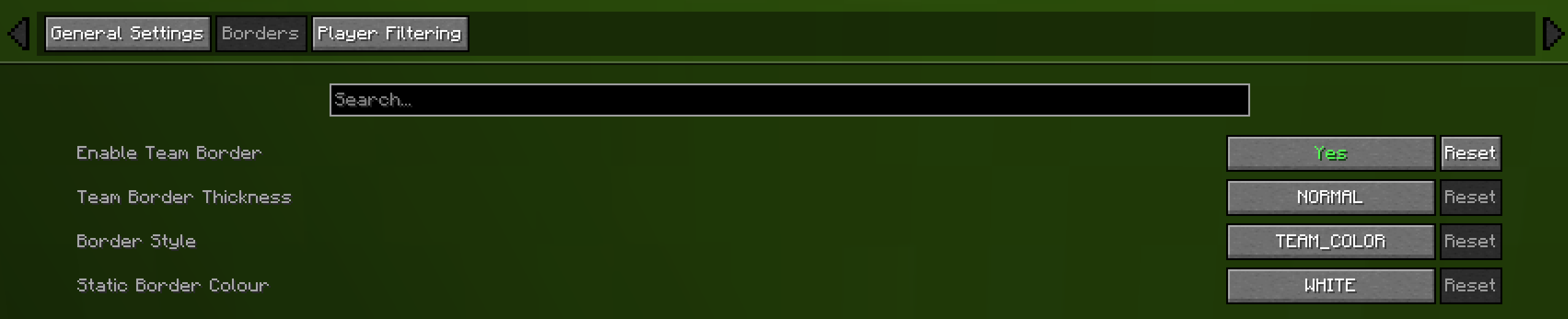
🎨 Borders
- Enable Border
If enabled the border is on
- Border Thickness
How many pixels thick the border should be
- Border Style
Can be eithere "TEAM_COLOUR" or "STATIC_COLOUR"
- Static Border Colour
Choose what colour the static border will have

🎯 Advanced Player Filtering
choose who appear on your locator bar:
- All Players (default)
Shows everyone.
- Include Only
Display only the players listed in your filter.
- Exclude Only
Hide only the players listed, showing all others.
Filter Syntax
- Separate names by commas (,), semicolons (;), colons (:), or periods (.).
Example: Jeb_, Dinnerbone; LadyAgnes

🔗 Dependencies
Required
Optional (Recommended)
Compatibility
Mod - Compatibility
Flashback - Automatically hides the locator bar and compass while viewing replays. Gnetum - Integrates with Gnetum's Info Bar to prevent HUD overlap.

👥 Credits
- Original Head Rendering Concept & Code — MCRcortex

🔧 Update Help
- 1.21.9 — Lemonszz
- 1.21.10 — aport73
💡 Feature Requests
- Always show XP bar — TechPro424
- Static border — Starrider37
- Compass — xisumavoid and Zedaph
Jak zainstalować Locator Heads
With Millida Launcher
Install Millida Launcher
The launcher is free: download it at millida.net/launcher and sign in with any nickname.
Click “Install” on this page
The launcher opens and installs the mod for Minecraft 26.1–26.3 on Fabric automatically, together with its dependencies: Fabric API.
Launch the game
A profile with it appears in the launcher: click “Play”.
Manually
Install Fabric
The loader must match the game version of the mod file, for example Minecraft 26.3. After installing it, a separate profile appears in your launcher.
Download the file for your version
In the version list above, pick the file locator-heads-2.5.0.jar (37 KB) for your game version.
Put it in the mods folder
The folder is inside .minecraft (Windows: %appdata%\.minecraft\mods). If it does not exist, create it. Required dependencies go there too: Fabric API.
Launch the loader profile
Open “Mods” in the main menu: Locator Heads should be in the list.
Locator Heads works on the player’s side only: there is no need to install it on a server.
Wersje
Z zależnościami
| Minecraft | Loader | Plik | Data | Akcje |
|---|---|---|---|---|
| 26.3 | Fabric | 26.336.5 KB 8 | ||
| 26.2 | Fabric | 26.236.5 KB 1 | ||
| 26.2 | Fabric | 26.236.8 KB | ||
| 26.2 | Fabric | 26.236.6 KB | ||
| 26.1.2 | Fabric | 26.1.235.8 KB | ||
| 26.1.2 | Fabric | 26.1.235.7 KB | ||
| 26.1.1 | Fabric | 26.1.134.9 KB | ||
| 26.1 | Fabric | 26.129.7 KB |
Co jest potrzebne do działania
- Cloth Config APIopcjonalne
- Fabric APIwymagane
- Mod Menuopcjonalne
Opinie
Oceń Locator Heads jako pierwszy


