

KleeSlabs Mod do Minecraft 26.3
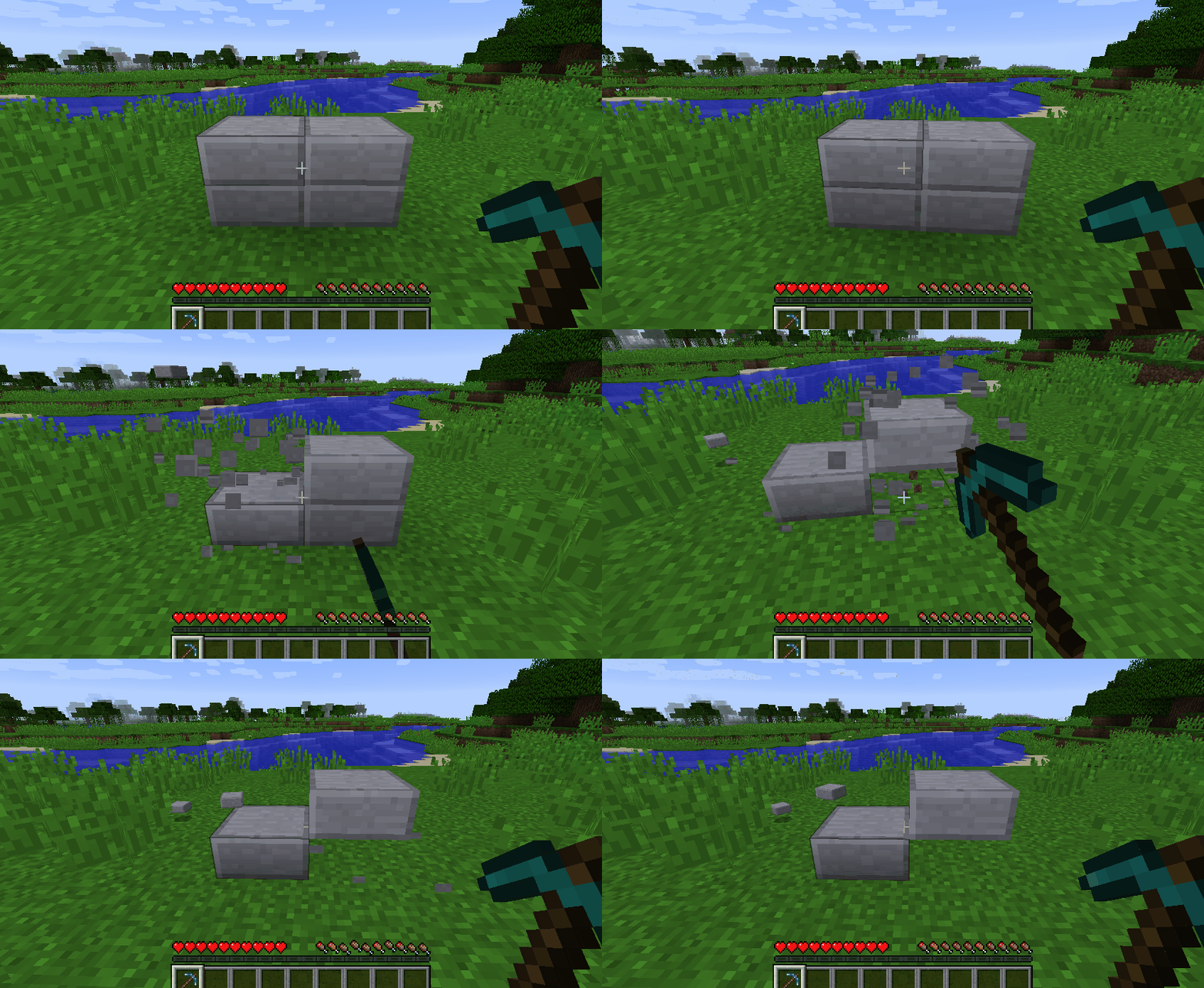
Niszcz tylko tę połowę podwójnej płyty, na którą patrzysz.
 NeoForge
 Fabric
O modzie KleeSlabs
This mod allows you to break only one half of a double slab. The half that is broken depends on which half you're looking at.
It supports Vanilla slabs as well as many modded slabs. Modded slabs that do not work yet should be reported on the Issue Tracker.
This mod requires Balm, which must be installed alongside the mod.
- Break only the half of a double slab that you're looking at
- Supports all Vanilla slabs
- Supports slabs from many different mods
This mod was made by suggestion of Kleetho during one of her livestreams, hence the name.
Jak zainstalować KleeSlabs
With Millida Launcher
Install Millida Launcher
The launcher is free: download it at millida.net/launcher and sign in with any nickname.
Click “Install” on this page
The launcher opens and installs the mod for Minecraft 26.1–26.3 on Fabric or NeoForge automatically, together with its dependencies: Balm, Fabric API.
Launch the game
A profile with it appears in the launcher: click “Play”.
Manually
Install Fabric or NeoForge
The loader must match the game version of the mod file, for example Minecraft 26.3. After installing it, a separate profile appears in your launcher.
Download the file for your version
In the version list above, pick the file kleeslabs-neoforge-26.3-26.3.0.2.jar (279 KB) for your game version and loader.
Put it in the mods folder
The folder is inside .minecraft (Windows: %appdata%\.minecraft\mods). If it does not exist, create it. Required dependencies go there too: Balm, Fabric API.
Launch the loader profile
Open “Mods” in the main menu: KleeSlabs should be in the list.
On a server
A server on Fabric or NeoForge
The mod only works on a server with the same loader and game version, for example 26.3.
File goes into the server’s mods folder
Stop the server, put the mod file into the mods folder and start the server again.
Or use the “To hosting” button
On Millida Hosting, the button at the top of the page uploads the file to your server and restarts it for you.
Wersje
Z zależnościami
| Minecraft | Loader | Plik | Data | Akcje |
|---|---|---|---|---|
| 26.3 | NeoForge | 26.3279 KB | ||
| 26.3 | Fabric | 26.3285 KB | ||
| 26.3 | NeoForge | 26.3279 KB | ||
| 26.3 | Fabric | 26.3285 KB | ||
| 26.1 | NeoForge | 26.1276 KB | — |
Co jest potrzebne do działania
- Balmwymagane
- Fabric APIwymagane
FAQ
Which Minecraft versions does KleeSlabs work on?
There are files for 26.3, 26.1.2, 26.1.1, 26.1. The newest is 26.3.
Is KleeSlabs for Forge or Fabric?
There are files for Fabric: 26.3 and for NeoForge: 26.1–26.3. There are no files for Forge: a mod for another loader will not start.
What does KleeSlabs need to work?
Required: Balm, Fabric API. Without them the mod will not start: dependencies go into the same mods folder.
Does KleeSlabs work on a server?
Yes. KleeSlabs works both in singleplayer and on a server.
Where can I download KleeSlabs safely?
On this page: the file kleeslabs-neoforge-26.3-26.3.0.2.jar (279 KB) is stored on Millida’s server, with no link shorteners. SHA-1 checksum: 3a6c89986480c33a01df26f3c2f222bd2dd24fa4.
Opinie
Oceń KleeSlabs jako pierwszy


