

 Quilt
Quilt Fabric
Inspecio
Better and more tooltips on items!
What's this mod?
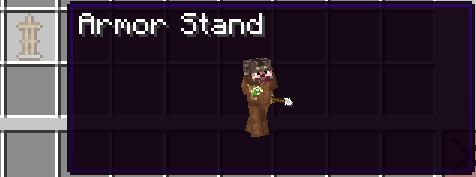
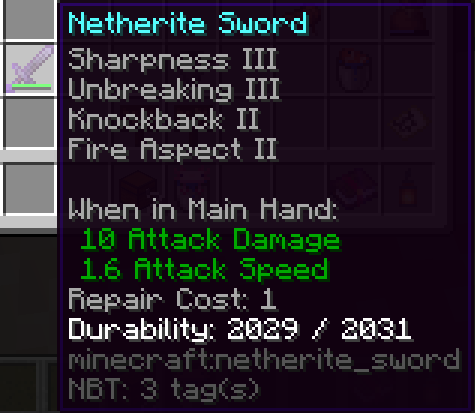
Inspecio adds new tooltips to items like shulker boxes, filled map, fish bucket, armor, food, banner patterns, etc.
Some of those are just replacement to the vanilla "text" tooltip with a more fancy one, others are extra information for the user!
Most of the mod is configurable, some parts can be enabled/disabled to your heart's desire!
Warning: the 1.18.2 version of Inspecio uses a (bundled) modified version of Fabric API, do not report issues to Fabric, but to Quilt instead.
It requires a specific API that literally does not exist in Fabric.
Pictures
Armor tooltip
Food tooltip
Potion tooltips
Shulker Box tooltips (and other storage blocks)
Normal:
Colored:
Compact:
Bee Hive Tooltip
Filled Map
Entities
Bucket of Axolotl
Spawn Eggs
More pictures may be found in the Images tab.
### Configuration
The configuration file of the mod is located in <minecraft directory>/config/inspecio.json.
You can use the command /inspecio config to manage configuration For more detailed information about the format of the configuration file please look at the project's GitHub.
Jak zainstalować Inspecio
With Millida Launcher
Install Millida Launcher
The launcher is free: download it at millida.net/launcher and sign in with any nickname.
Click “Install” on this page
The launcher opens and installs the mod for Minecraft 1.18.2–1.20 on Fabric or Quilt automatically.
Launch the game
A profile with it appears in the launcher: click “Play”.
Manually
Install Fabric or Quilt
The loader must match the game version of the mod file, for example Minecraft 1.20. After installing it, a separate profile appears in your launcher.
Download the file for your version
In the version list above, pick the file inspecio-1.8.1+1.20.jar (398 KB) for your game version and loader.
Put it in the mods folder
The folder is inside .minecraft (Windows: %appdata%\.minecraft\mods). If it does not exist, create it.
Launch the loader profile
Open “Mods” in the main menu: Inspecio should be in the list.
Minecraft 1.20 runs on Java 17: with a different Java version the game may close right after launch.
Wersje
Z zależnościami
| Minecraft | Loader | Plik | Data | Akcje |
|---|---|---|---|---|
| 1.20 | Quilt | Inspecio 1.8.1 (1.20)398 KB | ||
| 1.18.2 | Fabric | Inspecio v1.3.0 (1.18.2)445 KB |
Opinie
Oceń Inspecio jako pierwszy


