

Hidden Names Mod do Minecraft 1.20.1, 1.21.1
Ustaw zasady ukrywania swojego nameplate lub dostosuj swój nameplate!
 NeoForge
 Fabric
 Forge
ForgeO modzie Hidden Names
Hide and customize other player's names with commands
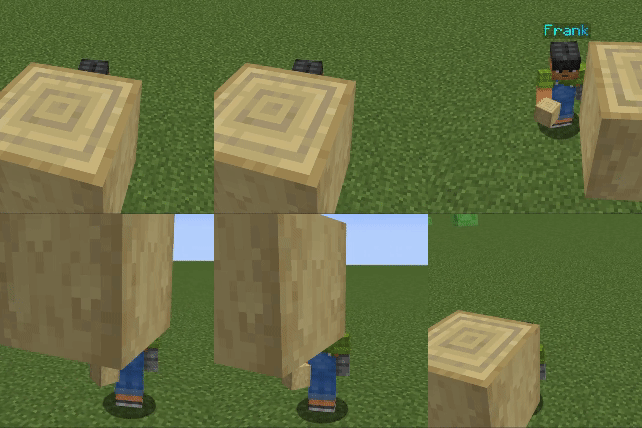
Commands
Commands
/hiddennames nameplateVisible [player(s)] [true/false] /hiddennames defaultVisible [true/false] /hiddennames blocksHideName [true/false] Blocks in the way hide the nameplate /hiddennames setName [player(s)] [colour] [animation] ["name"] The name argument has to be in quotes /hiddennames setName [player(s)] name ["name"]
/hiddennames setName [player(s)] colour [colour]
/hiddennames setName [player(s)] animation [animation] /hiddennames setName [player(s)] reset
All commands require op level 2 or more to execute.
Support Me
\- Join my Discord Server
Jak zainstalować Hidden Names
With Millida Launcher
Install Millida Launcher
The launcher is free: download it at millida.net/launcher and sign in with any nickname.
Click “Install” on this page
The launcher opens and installs the mod for Minecraft 1.20.1–1.21.4 on Fabric, Forge or NeoForge automatically.
Launch the game
A profile with it appears in the launcher: click “Play”.
Manually
Install Fabric, Forge or NeoForge
The loader must match the game version of the mod file, for example Minecraft 1.21.4. After installing it, a separate profile appears in your launcher.
Download the file for your version
In the version list above, pick the file hiddennames-1.21.0-1.0.6.jar (47 KB) for your game version and loader.
Put it in the mods folder
The folder is inside .minecraft (Windows: %appdata%\.minecraft\mods). If it does not exist, create it.
Launch the loader profile
Open “Mods” in the main menu: Hidden Names should be in the list.
On a server
A server on Fabric, Forge or NeoForge
The mod only works on a server with the same loader and game version, for example 1.21.4.
File goes into the server’s mods folder
Stop the server, put the mod file into the mods folder and start the server again.
Use the “To server” button
On Millida Hosting, the button at the top of the page uploads the file to your server and restarts it for you.
Minecraft 1.21.4 runs on Java 21: with a different Java version the game may close right after launch.
Wersje
Z zależnościami
| Minecraft | Loader | Plik | Data | Akcje |
|---|---|---|---|---|
| 1.20.6 | Forge | 1.20.646.1 KB | ||
| 1.21.4 | NeoForge | 1.21.446.9 KB 1 | ||
| 1.21.4 | NeoForge | 1.21.446.7 KB | ||
| 1.21.1 | Fabric | 1.21.148 KB |
FAQ
Which Minecraft versions does Hidden Names work on?
There are files for 1.20.1–1.21.4, 11 versions in total. The newest is 1.21.4.
Is Hidden Names for Forge or Fabric?
There are files for Fabric: 1.21.1, for Forge: 1.20.1–1.20.6 and for NeoForge: 1.21–1.21.4.
Does Hidden Names need other mods?
The author lists no required dependencies: the Fabric, Forge or NeoForge loader is enough.
Does Hidden Names work on a server?
Yes. Hidden Names works both in singleplayer and on a server.
Which Java does Hidden Names need?
Minecraft 1.21.4 runs on Java 21. If the game closes right after launch, the usual cause is the wrong Java version in the profile settings.
Where can I download Hidden Names safely?
On this page: the file hiddennames-1.21.0-1.0.6.jar (47 KB) is stored on Millida’s server, with no link shorteners. SHA-1 checksum: 1c3af6f4b2cc73fa1bcaf4fc8e6544b5536cfe70.
Opinie
Oceń Hidden Names jako pierwszy


