

Game Rules Mod do Minecraft 26.3
Modyfikuj zasady gry w swoich istniejących światach.
 Forge
Forge Fabric
 Quilt
Quilt NeoForge
O modzie Game Rules
Modify game rules in your existing worlds, all without enabling cheats/commands! Open the game rule edit screen through Mod Menu or with the special keybinding created for the mod (by default not bound to any key).
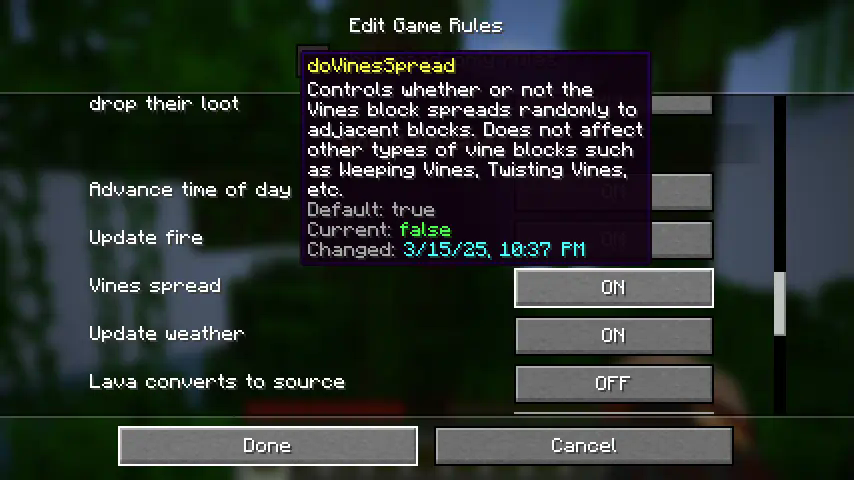
Every game rule in your world is available to edit. For multiplayer servers, editing game rules through the mod requires OP permissions.
An extra restriction exists for hardcore worlds - game rules in hardcore worlds can only be changed once! This was added as a balancing mechanism to allow long-running hardcore worlds to change settings like vine spreading (which may not have been an option years ago at world creation) without feeling too cheaty. The mod will show you the changed date and the exact time and date you changed each of the rules in your world, so that other folks might be able to hold you accountable!
The rules and behavior are still under evaluation (especially in relation to multiplayer servers), so if you have any thoughts or questions, feel free to open an issue on the mod's GitHub repo (https://github.com/Roundaround/mc-fabric-game-rules/issues).
A note on older versions
Game rules have evolved over time, so earlier versions of this mod may look or behave a bit differently. Previous versions also included multiple variants that caused some rules to be immutable; variants have since been cut for simplicity, so every game rule is now editable.
Links
Also on Modrinth · Source on GitHub · Report an issue
Jak zainstalować Game Rules
With Millida Launcher
Install Millida Launcher
The launcher is free: download it at millida.net/launcher and sign in with any nickname.
Click “Install” on this page
The launcher opens and installs the mod for Minecraft 26.3 on Fabric, Forge, NeoForge or Quilt automatically.
Launch the game
A profile with it appears in the launcher: click “Play”.
Manually
Install Fabric, Forge, NeoForge or Quilt
The loader must match the game version of the mod file, for example Minecraft 26.3. After installing it, a separate profile appears in your launcher.
Download the file for your version
In the version list above, pick the file gamerulesmod-forge-2.0.1+26.3.jar (424 KB) for your game version and loader.
Put it in the mods folder
The folder is inside .minecraft (Windows: %appdata%\.minecraft\mods). If it does not exist, create it.
Launch the loader profile
Open “Mods” in the main menu: Game Rules should be in the list.
Wersje
Z zależnościami
| Minecraft | Loader | Plik | Data | Akcje |
|---|---|---|---|---|
| 26.3 | Forge | 2.0.1 for 26.3 Forge424 KB | ||
| 26.3 | Fabric, Quilt | 2.0.1 for 26.3 Fabric424 KB | ||
| 26.3 | NeoForge | 2.0.1 for 26.3 NeoForge422 KB |
FAQ
Which Minecraft versions does Game Rules work on?
Only Minecraft 26.3: there are no files for other versions.
Is Game Rules for Forge or Fabric?
There are files for Fabric: 26.3, for Forge: 26.3, for NeoForge: 26.3 and for Quilt: 26.3.
Does Game Rules need other mods?
The author lists no required dependencies: the Fabric, Forge, NeoForge or Quilt loader is enough.
Where can I download Game Rules safely?
On this page: the file gamerulesmod-forge-2.0.1+26.3.jar (424 KB) is stored on Millida’s server, with no link shorteners. SHA-1 checksum: 3290b25a65803ca34d08d3dcc0e1a680119b5f22.
Opinie
Oceń Game Rules jako pierwszy


