

Game Menu Mod Option [Forge] do Minecraft 1.20.4
Ustawienia modów w menu gry jak przed 1.12.2
 NeoForge
 Forge
O modzie Game Menu Mod Option [Forge]
Opcja moda w menu gry
Dodano ustawienia MOD do menu gry jak przed 1.12.2
To jest MOD Forge
Funkcja powiadomienia o aktualizacji Forge została dodana jako zmiana w stosunku do przycisku MOD przed 1.12.2
Tę funkcję można przełączać w konfiguracji.
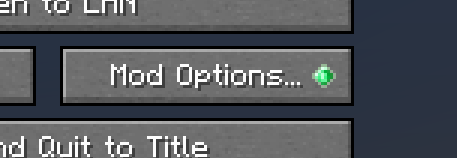
Dodano styl ModMenu od wersji v2.0.0
Można go włączyć w konfiguracji
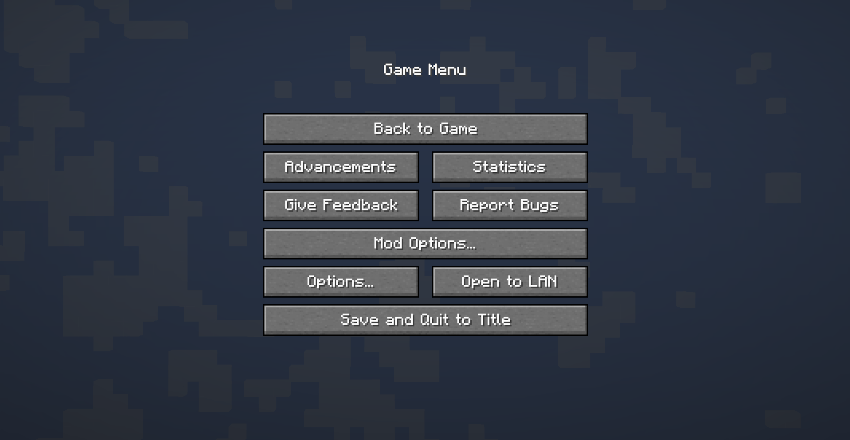
Forge doda przycisk modów bez instalowania tego moda po następujących wersjach.
MC1.20.1 - 47.1.25
MC1.19.4 - 45.1.15
MC1.19.2 - 43.2.20
Główna funkcjonalność tego moda nie jest już potrzebna, ale wyświetlanie powiadomienia o aktualizacji moda i możliwość przywrócenia przycisku modów w to samo miejsce co wcześniej nadal istnieją, więc będziemy go dalej aktualizować.
ModPack
Proszę używać go swobodnie.
Jak zainstalować Game Menu Mod Option [Forge]
With Millida Launcher
Install Millida Launcher
The launcher is free: download it at millida.net/launcher and sign in with any nickname.
Click “Install” on this page
The launcher opens and installs the mod for Minecraft 1.17.1–1.20.4 on Forge or NeoForge automatically.
Launch the game
A profile with it appears in the launcher: click “Play”.
Manually
Install Forge or NeoForge
The loader must match the game version of the mod file, for example Minecraft 1.20.4. After installing it, a separate profile appears in your launcher.
Download the file for your version
In the version list above, pick the file gamemenumodoption-neoforge-mc1.20.2-2.3.0.jar (242 KB) for your game version and loader.
Put it in the mods folder
The folder is inside .minecraft (Windows: %appdata%\.minecraft\mods). If it does not exist, create it.
Launch the loader profile
Open “Mods” in the main menu: Game Menu Mod Option [Forge] should be in the list.
Minecraft 1.20.4 runs on Java 17: with a different Java version the game may close right after launch.
Wersje
Z zależnościami
| Minecraft | Loader | Plik | Data | Akcje |
|---|---|---|---|---|
| 1.20.2 | NeoForge | GameMenuModOption-1.20.2-2.3.0-NeoForge242 KB 2 | ||
| 1.20.2 | Forge | GameMenuModOption-1.20.2-2.3.0-Forge242 KB | ||
| 1.17.1 | Forge | GameMenuModOption-1.17.1-1.986.5 KB 1 |
FAQ
Which Minecraft versions does Game Menu Mod Option [Forge] work on?
There are files for 1.20.4, 1.20.2, 1.17.1. The newest is 1.20.4.
Is Game Menu Mod Option [Forge] for Forge or Fabric?
There are files for Forge: 1.17.1–1.20.4 and for NeoForge: 1.20.2–1.20.4. There are no files for Fabric: a mod for another loader will not start.
Does Game Menu Mod Option [Forge] need other mods?
The author lists no required dependencies: the Forge or NeoForge loader is enough.
Which Java does Game Menu Mod Option [Forge] need?
Minecraft 1.20.4 runs on Java 17. If the game closes right after launch, the usual cause is the wrong Java version in the profile settings.
Where can I download Game Menu Mod Option [Forge] safely?
On this page: the file gamemenumodoption-neoforge-mc1.20.2-2.3.0.jar (242 KB) is stored on Millida’s server, with no link shorteners. SHA-1 checksum: 2aa0c107a050464a4a6412f068c552b058e5aafe.
Opinie
Oceń Game Menu Mod Option [Forge] jako pierwszy


