
FTB Materials Mod do Minecraft 1.20.1, 1.21.1
Mod z własnymi zasobami, który stara się zapewnić szeroki zakres surowców
 NeoForge
 Fabric
 Forge
ForgeFTB Materials
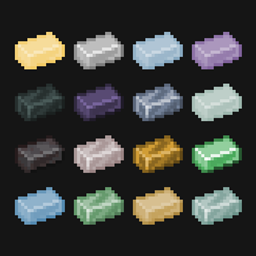
FTB Materials is our home-grown resources mod that attempts to provide a wide range of resources from a wide range of mods. It's designed to provide a unified set of resources and recipes to simplify resource unification in Modpack.
Our mod is likened to mods like Emendatus Enigmatica, All the Ores, etc but differs in a few ways. Primarily, it's designed to hold all resources, not just the ones we need, this is intended for mods like KubeJS to remove anything that is not needed. We do not require addons to provide additional resources, and we're un-opinionated on world gen allowing modpacks to unify mods ore gen to our resources.
Features
- Basic recipes for all resources, smelting, ingots to nuggets, nuggets to ingots, blocks of X, X to blocks of, etc
- Tags for all our resources
- All the Resources!…
- The list is literally two long but here are the current supported base resources. Please note, some materials listed are vanilla but this is to provide extra resources for the vanilla variants.
- Aluminum
- Apatite
- Bronze
- Charcoal
- Constantan
- Copper
- Diamond
- Electrum
- Gold
- Graphite
- Invar
- Iron
- Lead
- Lumium
- Netherite
- Nickel
- Obsidian
- Osmium
- Quartz
- Refined glowstone
- Signalum
- Silver
- Steel
- Sulfur
- Tin
- Uranium
- Zinc
- Redstone
- Fluorite
- Emerald
- Lapis lazuli
- Resonating ore
- Dimensional shard
- Antimony
- Bauxite
- Iridium
- Monazite
- Tungsten
- Titanium
- Platinum
- Stainless steel
- Plutonium
- Chromium
- Silicon
- All of the above resources have the possibility of having the following forms
- Material Ore
- Deepslate Material Ore
- Endstone Material Ore
- Nether Material Ore
- Block of Material
- Material Ingot
- Raw Material
- Block of Raw Material
- Material Nugget
- Material Dust
- Material Plate
- Material Gear
- Material Rod
- Material Gem
- Material Crystal
- Material Wire
- Material Shard
- Material Clump
- Material Dirty Dust
- Material Blade
Modpack Notes
Our mod is designed to work with mods like Almost Unified to provide the unification systems as we acknowledge that attempting to home-bake, first-class mod support, unification is a large undertaking and others have already done it very well. We also recommend using mods like KubeJS to remove any resources that are not needed in your modpack.
We aim to avoid changing resource Id's as much as possible to avoid breaking modpacks / mods over time.
Support
If you have any issues with this mod, please report them on our Issue Tracker. We also accept feature requests on our issue tracker as well 🎉.
Contributing
Although this mod is not a 'true' open source mod, we do still accept contributions as long as you are willing to sign a contributor agreement. The contributor agreement is a simple agreement that provides FTB ownership over the code you have contributed. This is to ensure that we can continue to provide this code in a 'visible-source' state, as well as holding the rights to change the licence in the future freely.
The contributor agreement is provided upon creating a pull request. If you have any questions, please contact us on our Discord Server or via our email at admin(at)feed-the-beast(dot)com
Licence
All rights reserved. We provide this source code in an 'as-is', 'visible-source' state for transparency and educational purposes. You may not use this code in any way, shape or form without our explicit permission.
Support
- For Modpack issues, please go here: https://go.ftb.team/support-modpack
- For Mod issues, please go here: https://go.ftb.team/support-mod-issues
- Just got a question? Check out our Discord: https://go.ftb.team/discord
Jak zainstalować FTB Materials
With Millida Launcher
Install Millida Launcher
The launcher is free: download it at millida.net/launcher and sign in with any nickname.
Click “Install” on this page
The launcher opens and installs the mod for Minecraft 1.20.1–26.1.2 on Fabric, Forge or NeoForge automatically.
Launch the game
A profile with it appears in the launcher: click “Play”.
Manually
Install Fabric, Forge or NeoForge
The loader must match the game version of the mod file, for example Minecraft 26.1.2. After installing it, a separate profile appears in your launcher.
Download the file for your version
In the version list above, pick the file ftb-materials-26.1.2.5.jar (3.4 MB) for your game version and loader.
Put it in the mods folder
The folder is inside .minecraft (Windows: %appdata%\.minecraft\mods). If it does not exist, create it.
Launch the loader profile
Open “Mods” in the main menu: FTB Materials should be in the list.
Wersje
Z zależnościami
| Minecraft | Loader | Plik | Data | Akcje |
|---|---|---|---|---|
| 26.1.2 | NeoForge | [NEOFORGE] FTB Materials 26.1.2.53.4 MB | ||
| 26.1.2 | NeoForge | [NEOFORGE] FTB Materials 26.1.2.43.4 MB | ||
| 1.20.1 | Forge | [FORGE] FTB Materials 20.1.13 MB | ||
| 1.20.1 | Fabric | [FABRIC] FTB Materials 20.1.13 MB | ||
| 1.21.1 | Fabric | [FABRIC] FTB Materials 21.1.0-beta.82.4 MB |
Opinie
Oceń FTB Materials jako pierwszy


