
 Fabric
 NeoForge
 Forge
ForgeO modzie Forgiveness
Have you ever had such that you crafted a lot of extra blocks and you had nowhere to put them, because of which they had to be thrown away. With this mod you will be able to return some blocks to their previous states.
All recipes
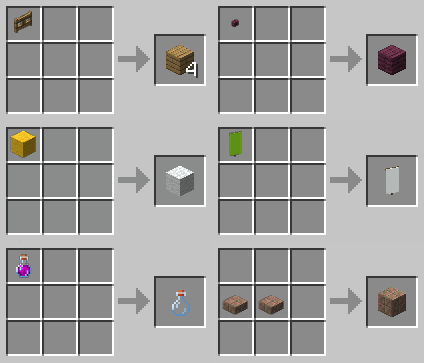
Thanks for recipes images mod
Main features
- Slabs back to Blocks;
- Stairs into Blocks;
- Glass Panes to Glass;
- Clay into Pieces of Clay;
- Quartz Block into Quartz;
- Brick Block to Bricks;
- Wool into Strings;
- Sticky Piston into Regular Piston;
- Colored Carpet to White Carpet;
- Colored Carpet to Colored Wool;
- Walls back to Block;
- Stripped Logs into Logs;
- Stripped Wood to Regular Wood;
- Dropper to Dispenser;
- Dispenser to Dropper;
- Melon to Melon Slices;
- Blue ice to packed ice;
- Packed ice to ice;
- Sticks to oak planks;
- Doors to it's planks(or iron);
- Buttons to it's planks(or stone/polished blackstone);
- Trapdoors to it's planks(or iron);
- Signs to planks;
- Hanging signs to stripped logs;
The list will be replenished, if you want to see something in this mod, then feel free to write in the comments.
Tools and armor recycling
This feature availible in separate mod Forgiveness | Durability
Q: Will you add crafts for tools and armor?
A: Yes, but in separate mod, because this feature requires mod to be installed both on server and client.
Q: Will you add nether wart block to nether wart craft?
A: No, because nether wart block can be easily obtain from crimson trees in nether.
Q: Can I use it in my modpack?
A: Yes, feel free to include this mod in any modpacks.
Datapack version
Click Here To Support My Projects
Jak zainstalować Forgiveness
With Millida Launcher
Install Millida Launcher
The launcher is free: download it at millida.net/launcher and sign in with any nickname.
Click “Install” on this page
The launcher opens and installs the mod for Minecraft 1.20.1–26.2 on Fabric, Forge or NeoForge automatically.
Launch the game
A profile with it appears in the launcher: click “Play”.
Manually
Install Fabric, Forge or NeoForge
The loader must match the game version of the mod file, for example Minecraft 26.2. After installing it, a separate profile appears in your launcher.
Download the file for your version
In the version list above, pick the file Forgiveness-26.2-1.8.2-fabric.jar (203 KB) for your game version and loader.
Put it in the mods folder
The folder is inside .minecraft (Windows: %appdata%\.minecraft\mods). If it does not exist, create it.
Launch the loader profile
Open “Mods” in the main menu: Forgiveness should be in the list.
Wersje
Z zależnościami
| Minecraft | Loader | Plik | Data | Akcje |
|---|---|---|---|---|
| 26.1.2 | NeoForge | Forgiveness-26.1.2-1.8.1-neoforge188 KB | ||
| 26.2 | Fabric | Forgiveness-26.2-1.8.2-fabric203 KB | ||
| 1.21.4 | NeoForge | Forgiveness-1.21.4-1.6.0-neoforge168 KB | ||
| 1.21.4 | Fabric | Forgiveness-1.21.4-1.6.0-fabric180 KB | ||
| 1.21 | Forge | Forgiveness-1.21-1.5.0-forge175 KB | ||
| 1.20.1 | Forge | Forgiveness-1.20.1-1.4.0-forge157 KB |
FAQ
Which Minecraft versions does Forgiveness work on?
There are files for 26.2, 26.1.2, 1.21.4, 1.21, 1.20.1. The newest is 26.2.
Is Forgiveness for Forge or Fabric?
There are files for Fabric: 1.21.4–26.2, for Forge: 1.20.1–1.21 and for NeoForge: 1.21.4–26.1.2.
Does Forgiveness need other mods?
The author lists no required dependencies: the Fabric, Forge or NeoForge loader is enough.
How do I download Forgiveness?
With Millida Launcher: it installs Forgiveness into a modpack by itself, for the right game version and loader. The launcher is free.
Opinie
Oceń Forgiveness jako pierwszy


