
- pobrań
- 7 pobrań
- wyświetleń
- 26 wyświetleń
- Zaktualizowano
- Zaktualizowano 17.10.2026
- 1.12.2
 Forge
Forge
O modzie Entity Culling
Entity Culling - 1.16.5 - 2.1.4 i nowsze wersje są kompatybilne tylko z Optifine G8! Entity Culling - 1.16.5 - 2.1.3 i starsze wersje są kompatybilne tylko z Optifine G7! Entity Culling - 1.12.2 - 2.0.8 i nowsze wersje są kompatybilne tylko z Optifine G5! Entity Culling - 1.12.2 - 2.0.7 i starsze wersje są kompatybilne tylko z Optifine F5!
Ten mod wymaga MixinBootstrap (curseforge, modrinth) i RenderLib (curseforge, modrinth) do działania (tylko MC 1.12.2)! Mixin 0.7-0.8 Compatibility (curseforge, modrinth) może być pomocny, gdy inny mod używa starszej wersji mixin i w związku z tym nie możesz uruchomić gry (tylko MC 1.12.2).
Entity Culling to mod wydajnościowy działający po stronie klienta, którego celem jest pomijanie renderowania ukrytych (tile-)entity. W vanilla renderowane są po prostu wszystkie (tile-)entity znajdujące się w polu widzenia gracza. Oznacza to, że setki (tile-)entity mogą zjadać twoje fps, mimo że nawet ich nie widzisz, ponieważ są ukryte za ścianą.
Culling ukrytych entity Domyślnie ten mod używa implementacji occlusion culling opartej na OpenGL, która daje pixel-perfect culling bounding boxów z zaledwie jedną klatką opóźnienia i bardzo małym narzutem.
Jeśli twoja karta graficzna nie obsługuje OpenGL 4.3, ten mod używa implementacji cullingu opartej na raytracingu. Culling raytraced jest bardziej obciążający dla CPU, podczas gdy culling OpenGL jest bardziej obciążający dla GPU, więc w zależności od twojego sprzętu możesz preferować jeden z nich. Może to skutkować ogromną poprawą FPS, gdy na ekranie znajduje się wiele (tile-)entity, które nie są widoczne, ponieważ są zasłonięte.
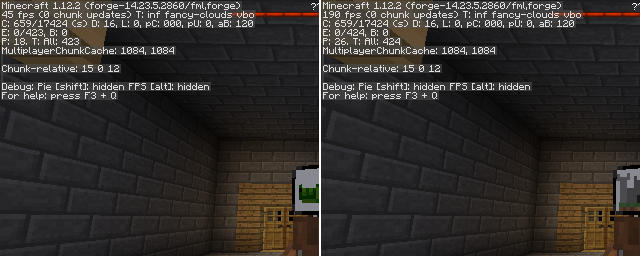
Test z EntityCulling-1.12.2-6.0.2 wewnątrz lochu Chocolate Quest Repoured z około 200 entity na ekranie pokazuje ogromną poprawę!
Jak zainstalować Entity Culling
With Millida Launcher
Install Millida Launcher
The launcher is free: download it at millida.net/launcher and sign in with any nickname.
Click “Install” on this page
The launcher opens and installs the mod for Minecraft 1.12.2 on Forge automatically.
Launch the game
A profile with it appears in the launcher: click “Play”.
Manually
Install Forge
The loader must match the game version of the mod file, for example Minecraft 1.12.2. After installing it, a separate profile appears in your launcher.
Download the file for your version
In the version list above, pick the file EntityCulling-1.12.2-6.5.0.jar (62 KB) for your game version.
Put it in the mods folder
The folder is inside .minecraft (Windows: %appdata%\.minecraft\mods). If it does not exist, create it.
Launch the loader profile
Open “Mods” in the main menu: Entity Culling should be in the list.
Minecraft 1.12.2 runs on Java 8: with a different Java version the game may close right after launch.
Wersje
Z zależnościami
| Minecraft | Loader | Plik | Data | Akcje |
|---|---|---|---|---|
| 1.12.2 | Forge | EntityCulling-1.12.2-6.5.0.jar62.4 KB 6 | ||
| 1.12.2 | — | EntityCulling-1.12.2-6.3.1.jar64.4 KB 1 | ||
| 1.12.2 | — | EntityCulling-1.12.2-6.0.2.jar54.1 KB |
FAQ
Which Minecraft versions does Entity Culling work on?
Only Minecraft 1.12.2: there are no files for other versions.
Is Entity Culling for Forge or Fabric?
Only for Forge: 1.12.2. There are no files for Fabric or NeoForge: a mod for another loader will not start.
Does Entity Culling need other mods?
The author lists no required dependencies: the Forge loader is enough.
Which Java does Entity Culling need?
Minecraft 1.12.2 runs on Java 8. If the game closes right after launch, the usual cause is the wrong Java version in the profile settings.
Where can I download Entity Culling safely?
On this page: the file EntityCulling-1.12.2-6.5.0.jar (62 KB) is stored on Millida’s server, with no link shorteners. SHA-1 checksum: cf4a4a6b11b1721fbda1edeb32bdc3b1ac3a8560.
Opinie
Oceń Entity Culling jako pierwszy


