

DarkSmelting Mod do Minecraft 1.21.1, 26.2
Przetop zbroje, narzędzia i broń na odpowiadające im sztabki
 NeoForge
 Forge
Forge Fabric
O modzie DarkSmelting
Get a server today and play with your friends! Click HERE or below banner & Use Code GAMERPOTION to get 25 off!

DarkSmelting
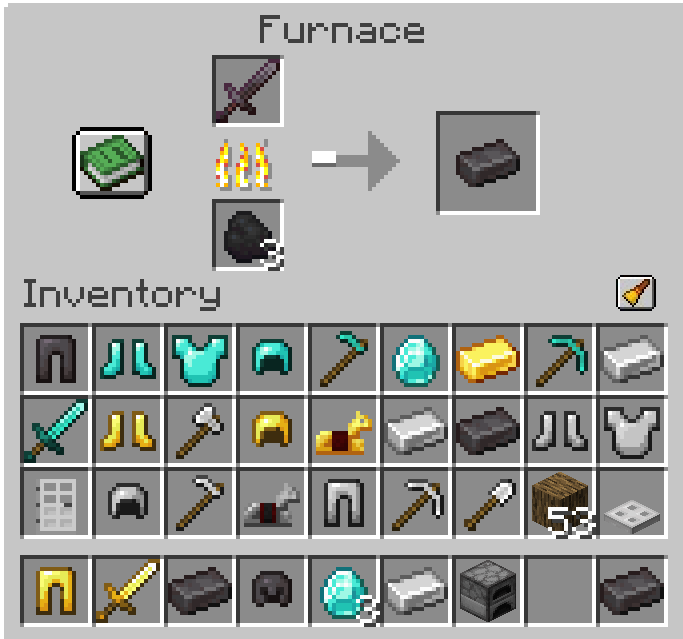
Smelt Armor, Tools and Weapons into their equivalent ingots | View Changelog
Server side is supported. You can install this on the server and not need to have it installed on the client.
Created by the same authors who made DarkRPG (for a full RPG experience, get the DarkRPG modpack and enjoy quests and rpg gameplay)
Features
(Your vanilla experience will be further enhanced thanks to these features)
Playing modded Minecraft can sometimes leave you with excess weapons and armor which take up space and go to waste. You can now smelt all the vanilla armors, tools and weapons into ingots. (Includes all Iron, Diamond, Gold, Netherite Armor, Tools, Weapons and Horse Armors, Bucket, Iron Door, Iron Trap Door, Iron Bars)
Permission - Feel free to use in your modpacks.
Click the banner below to get your server today! or go to BisectHosting.com and make sure to use the code 'gamerpotion' to get your 25% off.
Jak zainstalować DarkSmelting
With Millida Launcher
Install Millida Launcher
The launcher is free: download it at millida.net/launcher and sign in with any nickname.
Click “Install” on this page
The launcher opens and installs the mod for Minecraft 1.20.4–26.2 on Fabric, Forge or NeoForge automatically.
Launch the game
A profile with it appears in the launcher: click “Play”.
Manually
Install Fabric, Forge or NeoForge
The loader must match the game version of the mod file, for example Minecraft 26.2. After installing it, a separate profile appears in your launcher.
Download the file for your version
In the version list above, pick the file darksmelting-neoforge-26.1-1.2.0.jar (9 KB) for your game version and loader.
Put it in the mods folder
The folder is inside .minecraft (Windows: %appdata%\.minecraft\mods). If it does not exist, create it.
Launch the loader profile
Open “Mods” in the main menu: DarkSmelting should be in the list.
On a server
A server on Fabric, Forge or NeoForge
The mod only works on a server with the same loader and game version, for example 26.2.
File goes into the server’s mods folder
Stop the server, put the mod file into the mods folder and start the server again.
Use the “To server” button
On Millida Hosting, the button at the top of the page uploads the file to your server and restarts it for you.
Wersje
Z zależnościami
| Minecraft | Loader | Plik | Data | Akcje |
|---|---|---|---|---|
| 26.2 | NeoForge | 26.29 KB | ||
| 26.2 | Forge | 26.27.7 KB | ||
| 26.2 | Fabric | 26.224 KB | ||
| 1.21.1 | Fabric | 1.21.121.2 KB | ||
| 1.21.1 | NeoForge | 1.21.17.9 KB | ||
| 1.21.1 | Forge | 1.21.18.6 KB | ||
| 1.21.1 | Fabric | 1.21.121.2 KB | ||
| 1.20.4 | Forge | 1.20.49.1 KB |
Opinie
Oceń DarkSmelting jako pierwszy


