
Custom LAN Mod do Minecraft 1.16.5, 1.21.8
Daje ci większą kontrolę nad twoim zintegrowanym serwerem poprzez menu Otwórz w sieci LAN.
 Fabric
 Quilt
QuiltO modzie Custom LAN
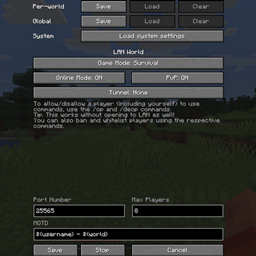
A Fabric mod that allows you to:
- Customize more of your integrated server (Online Mode, PvP, Max Players, MOTD)
- Use ampersands (&) for formatting codes instead of section signs (§) and variables (e.g. ${username}, ${world}) in the MOTD
- Change the settings mid-game (including the port) and stop the server without quitting the world
- Save the settings globally or per-world (they are loaded automatically with per-world settings taking priority over the global ones, which take priority over the system defaults)
- Change who can use cheats individually using the /op and /deop commands and cheat in singleplayer without opening to LAN (replaces the Allow Cheats button)
- Manage bans with /ban, /ban-ip, /banlist, /pardon and /pardon-ip, and whitelist players with /whitelist (use /whitelist on/off to enable/disable)
- Expose your server outside of your LAN without port forwarding using tunnels (currently only ngrok is supported)
It also allows you to start the LAN world by pressing Enter, doesn't force the gamemode (e.g. anyone who left in Creative mode will still be in Creative when they join even if the world is set to Survival), and extends the /publish command, which can now change settings mid-game as well (use a port of -1 to randomize it):
/publish [<port>] [<onlineMode>] [<pvpEnabled>] [<maxPlayers>] [<defaultGameMode>] [<tunnel>] [<motd>]
/publish [perworld|global|system] [<port>] [<onlineMode>] [<pvpEnabled>] [<maxPlayers>] [<defaultGameMode>] [<tunnel>] [<motd>] /publish stop
It requires Fabric Loader and Cloth Config API, but Fabric API is not required.
It has been backported to all Minecraft versions supported by Fabric (except the snapshots)! I'm not planning on porting it to Forge myself for now, but you're more than welcome to send me a pull request.
Explanation of MOTD formatting codes and variables
In the MOTD, ampersands (&) are replaced with section signs (§) to allow you to enter formatting codes (e.g. &9Hello, &a&lworld! makes Hello, blue and world! green and bold). You can use two ampersands in a row (&&) to get an actual ampersand (&).
The following variables will be expanded using Apache Commons Text's StringSubstitutor:
- ${username} - the host's username (e.g. “DimiDimit”)
- ${world} - the world's name (e.g. “New World”)
Explanation of saved settings
The settings can be saved per-world or globally. When the Open to LAN screen is opened, the settings are loaded automatically in that order, and they can also be loaded manually using the Load buttons.
Using the /publish command without specifying which saved settings to use (perworld, global or system) uses the same order if the world hasn't been opened to LAN, or the current values instead of any saved settings if it has. Specifying the saved settings uses those particular settings or the system defaults if they haven't been saved, without checking any others, even if the world has been opened to LAN (e.g. if perworld is specified and no per-world settings are saved, the system defaults will be used even if there are saved global settings). The settings specified as arguments will override the saved settings or current values (e.g. /publish perworld 12345 false will use the per-world settings, except that the port will be 12345 and online mode will be disabled).
The global settings are stored in .minecraft/config/customlan.toml, while the per-world ones are stored in data/customlan.dat in the respective world's directory.
Explanation of /op and /deop
/op and /deop work like in dedicated servers. You can also use them on yourself, the host. Doing this will add/remove the “Cheats” label on the world (as if you've NBT edited the allowCommands field), and you can use these commands without opening to LAN as well, replacing the Vanilla method of opening to LAN, cheating, quitting the world and entering it again.
Operators are persisted per-world in an ops.json file inside that world's directory. To allow operators to assign and remove other operators, as well as ban and whitelist players, change their level in the ops.json file to 3 or higher (the default is 2, while level 4 allows them to use /publish). You, as the host, can always assign and remove operators, even if you're not an operator yourself.
Explanation of bans and whitelists
These commands also work like in dedicated servers, though you cannot ban or whitelist the host. Enabling the whitelist does not kick all non-whitelisted players (i.e. enforce-whitelist is always false).
The files used are also per-world and the same as on dedicated servers-banned-players.json, banned-ips.json, whitelist.json-though whether the whitelist is enabled is stored in data/customlan.dat.
Jak zainstalować Custom LAN
With Millida Launcher
Install Millida Launcher
The launcher is free: download it at millida.net/launcher and sign in with any nickname.
Click “Install” on this page
The launcher opens and installs the mod for Minecraft 1.16.2–1.21.8 on Fabric or Quilt automatically.
Launch the game
A profile with it appears in the launcher: click “Play”.
Manually
Install Fabric or Quilt
The loader must match the game version of the mod file, for example Minecraft 1.21.8. After installing it, a separate profile appears in your launcher.
Download the file for your version
In the version list above, pick the file custom-lan-1.21.6-1.21.8-v2.3.2.jar (1.5 MB) for your game version and loader.
Put it in the mods folder
The folder is inside .minecraft (Windows: %appdata%\.minecraft\mods). If it does not exist, create it.
Launch the loader profile
Open “Mods” in the main menu: Custom LAN should be in the list.
Minecraft 1.21.8 runs on Java 21: with a different Java version the game may close right after launch.
Wersje
Z zależnościami
| Minecraft | Loader | Plik | Data | Akcje |
|---|---|---|---|---|
| 1.21.8 | Fabric, Quilt | [1.21.6-1.21.8] Custom LAN 2.3.21.5 MB | ||
| 1.16.3 | — | [1.16.2+] Custom LAN 1.0.0304 KB |
FAQ
Which Minecraft versions does Custom LAN work on?
There are files for 1.16.2–1.21.8, 7 versions in total. The newest is 1.21.8.
Is Custom LAN for Forge or Fabric?
There are files for Fabric: 1.21.6–1.21.8 and for Quilt: 1.21.6–1.21.8. There are no files for Forge or NeoForge: a mod for another loader will not start.
Does Custom LAN need other mods?
The author lists no required dependencies: the Fabric or Quilt loader is enough.
Which Java does Custom LAN need?
Minecraft 1.21.8 runs on Java 21. If the game closes right after launch, the usual cause is the wrong Java version in the profile settings.
Where can I download Custom LAN safely?
On this page: the file custom-lan-1.21.6-1.21.8-v2.3.2.jar (1.5 MB) is stored on Millida’s server, with no link shorteners. SHA-1 checksum: a334d3536765e066549df369c1eff20aa7df93ac.
Opinie
Oceń Custom LAN jako pierwszy


