

Create Factory Logistics Mod do Minecraft 1.20.1, 1.21.1
Zastanawiałeś się kiedyś, dlaczego istnieją paczki logistyczne, ale nie ma słoików logistycznych? Naprawmy to!
 NeoForge
 Forge
Forgetldr
An addon for the Create 6 mod featuring a unique way of fluid transportation in your logistics network - the Jar. It works like packages for items but for liquids, so it can be neatly integrated into your frog-chain logistical system.
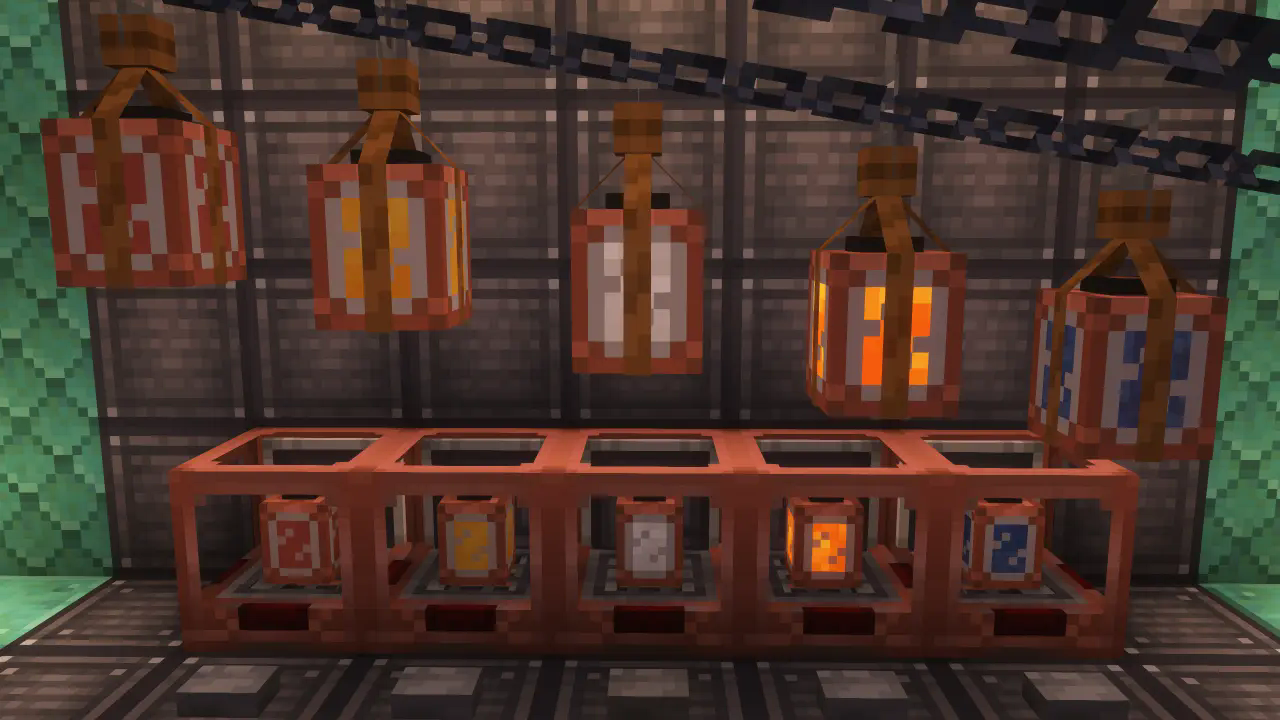
Included content
- The Jar

- Bottler (same as regular packager, but for fluids!)

- Fluid gauge: extend your auto-crafting workflows via fluid ingredients or outputs

- more is planned!

Early Access Warning!
Right now we're in early access stage so make sure to report any misbehaves or missing features to our GitHub issues. Also, we are open to the new suggestions and ideas, so tell us if you have any.

Jak zainstalować Create Factory Logistics
With Millida Launcher
Install Millida Launcher
The launcher is free: download it at millida.net/launcher and sign in with any nickname.
Click “Install” on this page
The launcher opens and installs the mod for Minecraft 1.20.1–1.21.1 on Forge or NeoForge automatically.
Launch the game
A profile with it appears in the launcher: click “Play”.
Manually
Install Forge or NeoForge
The loader must match the game version of the mod file, for example Minecraft 1.21.1. After installing it, a separate profile appears in your launcher.
Download the file for your version
In the version list above, pick the file create_factory_logistics-1.21.1-1.6.1-all.jar (1.2 MB) for your game version and loader.
Put it in the mods folder
The folder is inside .minecraft (Windows: %appdata%\.minecraft\mods). If it does not exist, create it.
Launch the loader profile
Open “Mods” in the main menu: Create Factory Logistics should be in the list.
On a server
A server on Forge or NeoForge
The mod only works on a server with the same loader and game version, for example 1.21.1.
File goes into the server’s mods folder
Stop the server, put the mod file into the mods folder and start the server again.
Use the “To server” button
On Millida Hosting, the button at the top of the page uploads the file to your server and restarts it for you.
Minecraft 1.21.1 runs on Java 21: with a different Java version the game may close right after launch.
Wersje
Z zależnościami
| Minecraft | Loader | Plik | Data | Akcje |
|---|---|---|---|---|
| 1.21.1 | NeoForge | 1.21.11.2 MB 1 | ||
| 1.21.1 | NeoForge | 1.21.11.2 MB | ||
| 1.21.1 | NeoForge | 1.21.11.2 MB | ||
| 1.21.1 | NeoForge | 1.21.11.2 MB | ||
| 1.21.1 | NeoForge | 1.21.11.2 MB | ||
| 1.21.1 | NeoForge | 1.21.11.2 MB | ||
| 1.21.1 | NeoForge | 1.21.11.1 MB | ||
| 1.20.1 | Forge | 1.20.11.1 MB |
FAQ
Which Minecraft versions does Create Factory Logistics work on?
There are files for 1.21.1, 1.20.1. The newest is 1.21.1.
Is Create Factory Logistics for Forge or Fabric?
There are files for Forge: 1.20.1 and for NeoForge: 1.21.1. There are no files for Fabric: a mod for another loader will not start.
Does Create Factory Logistics need other mods?
The author lists no required dependencies: the Forge or NeoForge loader is enough.
Does Create Factory Logistics work on a server?
Yes. Create Factory Logistics works both in singleplayer and on a server.
Which Java does Create Factory Logistics need?
Minecraft 1.21.1 runs on Java 21. If the game closes right after launch, the usual cause is the wrong Java version in the profile settings.
Where can I download Create Factory Logistics safely?
On this page: the file create_factory_logistics-1.21.1-1.6.1-all.jar (1.2 MB) is stored on Millida’s server, with no link shorteners. SHA-1 checksum: 4bc1f1a2241e37152e19143f86843837827c0a7c.
Opinie
Oceń Create Factory Logistics jako pierwszy


