
Clean Tooltips Mod do Minecraft 1.20.1, 1.21.10
Ulepsza podpowiedzi, tworząc czysty i spójny wygląd! Podpowiedź wytrzymałości i więcej!
 NeoForge
 Fabric
 Forge
ForgeO modzie Clean Tooltips
Clean Tooltips
Ever felt like the default tooltips could be fancied up a bit? Then this is exactly what you're looking for.
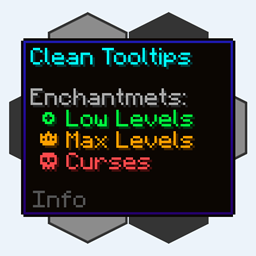
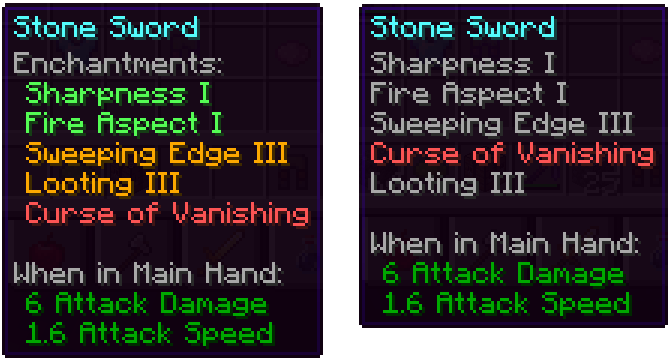
Mainly the mod overhauls the way enchantments get displayed in the tooltip:
- they now have their own "Enchantents:" subcategory
- color coding to easier tell apart good enchantments (green) and curses (red)
- max level enchantments will be displayed in gold
- curses are always ordered at the bottom of the list
With the mod installed: Without the mod installed (Vanila):
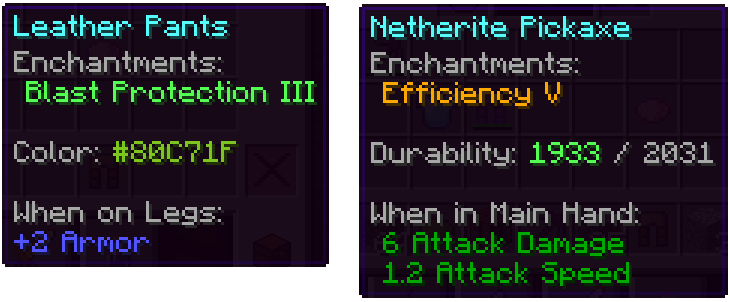
Besides that, other parts got also improved:
- the color line on dyed items now actually shows the used color
- damaged items show their remaining durability in the tooltip
We have many more ideas on how tooltips could be improved for future updates. Besides adding new features, the next updates will also add many configurability options.
Jak zainstalować Clean Tooltips
With Millida Launcher
Install Millida Launcher
The launcher is free: download it at millida.net/launcher and sign in with any nickname.
Click “Install” on this page
The launcher opens and installs the mod for Minecraft 1.20.1–1.21.10 on Fabric, Forge or NeoForge automatically.
Launch the game
A profile with it appears in the launcher: click “Play”.
Manually
Install Fabric, Forge or NeoForge
The loader must match the game version of the mod file, for example Minecraft 1.21.10. After installing it, a separate profile appears in your launcher.
Download the file for your version
In the version list above, pick the file clean_tooltips-1.1-neoforge-1.21.10.jar (24 KB) for your game version and loader.
Put it in the mods folder
The folder is inside .minecraft (Windows: %appdata%\.minecraft\mods). If it does not exist, create it.
Launch the loader profile
Open “Mods” in the main menu: Clean Tooltips should be in the list.
Minecraft 1.21.10 runs on Java 21: with a different Java version the game may close right after launch.
Wersje
Z zależnościami
| Minecraft | Loader | Plik | Data | Akcje |
|---|---|---|---|---|
| 1.21.10 | NeoForge | clean_tooltips-1.1-neoforge-1.21.10.jar24.4 KB | ||
| 1.21.10 | Fabric | clean_tooltips-1.1-fabric-1.21.10.jar23.1 KB 2 | ||
| 1.20.1 | Forge | clean_tooltips-1.0-forge-1.20.1.jar25.8 KB 1 |
FAQ
Which Minecraft versions does Clean Tooltips work on?
There are files for 1.21.10, 1.20.1. The newest is 1.21.10.
Is Clean Tooltips for Forge or Fabric?
There are files for Fabric: 1.21.10, for Forge: 1.20.1 and for NeoForge: 1.21.10.
Does Clean Tooltips need other mods?
The author lists no required dependencies: the Fabric, Forge or NeoForge loader is enough.
Which Java does Clean Tooltips need?
Minecraft 1.21.10 runs on Java 21. If the game closes right after launch, the usual cause is the wrong Java version in the profile settings.
Where can I download Clean Tooltips safely?
On this page: the file clean_tooltips-1.1-neoforge-1.21.10.jar (24 KB) is stored on Millida’s server, with no link shorteners. SHA-1 checksum: 594541adddbc0d20e2361a8fef21b5ed960c2588.
Opinie
Oceń Clean Tooltips jako pierwszy


