
Branded Logs Mod do Minecraft 1.20.1, 1.21.3
Wypisuje informacje o twoim modpacku do logów i logów awarii!
 NeoForge
 Fabric
 Forge
ForgeBranded Logs
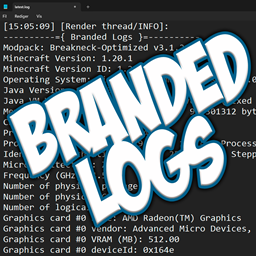
This is a simple mod that allows modpack creators to print additional information about their modpack into the game's logs. This includes the name of the modpack and its version, as well as information about the user's machine, operating system, Java version, and RAM allocation.
This mod was greatly inspired by [Log More Info].
Why would anyone need this?
As a modpack author, you may often receive logs from players asking for help with an issue or crash. With this mod, there will no longer be any confusion about which version of your modpack a log was generated from. You will also no longer have to ask them about the hardware or Java configuration of their system, as that can easily be deduced from the logs!
How to use it
The mod will automatically parse modpack information from supported launchers right out of the box. However, if a configuration file from Better Compatibility Checker (bcc.json) is present, it will always take priority.
Supported Launchers:
- ✅ CurseForge App (minecraftinstance.json)
- ✅ Prism Launcher (instance.cfg)
- ✅ ATLauncher (instance.json)
- ✅ GDLauncher (instance.json)
- ❌ Modrinth App (No longer uses profile.json file)
To enable the mod to retrieve the version number and name of your modpack in an unsupported launcher, you need to include a configuration file from Better Compatibility Checker in your pack. You can either use the Better Compatibility Checker mod to generate the config file, or create one manually using the template below:
./config/bcc.json
{"modpackName": "INSERT_MODPACK_NAME_HERE", "modpackVersion": "INSERT_MODPACK_VERSION_HERE"}
Dependencies
Optional: Better Compatibility Checker
Jak zainstalować Branded Logs
With Millida Launcher
Install Millida Launcher
The launcher is free: download it at millida.net/launcher and sign in with any nickname.
Click “Install” on this page
The launcher opens and installs the mod for Minecraft 1.20–1.21.3 on Fabric, Forge or NeoForge automatically.
Launch the game
A profile with it appears in the launcher: click “Play”.
Manually
Install Fabric, Forge or NeoForge
The loader must match the game version of the mod file, for example Minecraft 1.21.3. After installing it, a separate profile appears in your launcher.
Download the file for your version
In the version list above, pick the file brandedlogs-neoforge-2.2.0+1.21.3.jar (307 KB) for your game version and loader.
Put it in the mods folder
The folder is inside .minecraft (Windows: %appdata%\.minecraft\mods). If it does not exist, create it.
Launch the loader profile
Open “Mods” in the main menu: Branded Logs should be in the list.
Minecraft 1.21.3 runs on Java 21: with a different Java version the game may close right after launch.
Wersje
Z zależnościami
| Minecraft | Loader | Plik | Data | Akcje |
|---|---|---|---|---|
| 1.21.3 | NeoForge | v2.2.0 for NeoForge 1.21.3307 KB | ||
| 1.20.1 | Forge | v2.2.0 for Forge 1.20.1310 KB 2 | ||
| 1.21.3 | Fabric | v2.2.0 for Fabric 1.21.3132 KB |
Opinie
Oceń Branded Logs jako pierwszy


