

Bosses'Rise Mod do Minecraft 1.20.1, 1.21.1
🐉 Wprowadź bossów w stylu Souls-like do swojego świata
 NeoForge
 Forge
O modzie Bosses'Rise







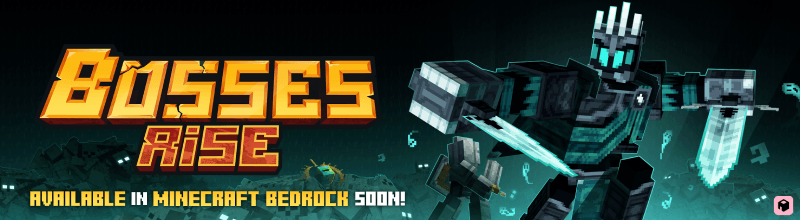
Bosses'Rise brings 5 Souls-like bosses to Minecraft: multi-phase fights, custom arenas and gear worth the scars.

📋 About
Bosses'Rise turns boss fights into real encounters. Each boss has its own arena, its own moveset and phases that change how you have to play, so winning comes from reading the fight instead of tanking it.

⚔️ What's Inside
5 Souls-like boss fights - multi-phase encounters with distinct attack patterns Unique bosses - the Infernal Dragon, the Underworld Knight, the Yeti, the Kraken and more Custom arenas - bosses generate in their own hand-built structures across your world Rewarding loot - dedicated equipment and rewards for every boss you bring down New mobs - fresh creatures that make each boss region feel alive
🐲 Vote for the next Boss
Join the newsletter above and vote for the next boss, our upcoming mods, etc.
🚀 Supported Versions
- 1.21.1 - NeoForge
- 1.20.1 - Forge
Jak zainstalować Bosses'Rise
With Millida Launcher
Install Millida Launcher
The launcher is free: download it at millida.net/launcher and sign in with any nickname.
Click “Install” on this page
The launcher opens and installs the mod for Minecraft 1.20.1–1.21.1 on Forge or NeoForge automatically, together with its dependencies: Geckolib.
Launch the game
A profile with it appears in the launcher: click “Play”.
Manually
Install Forge or NeoForge
The loader must match the game version of the mod file, for example Minecraft 1.21.1. After installing it, a separate profile appears in your launcher.
Download the file for your version
In the version list above, pick the file block_factorys_bosses-2.1.2-neo-1.21.1.jar (23 MB) for your game version and loader.
Put it in the mods folder
The folder is inside .minecraft (Windows: %appdata%\.minecraft\mods). If it does not exist, create it. Required dependencies go there too: Geckolib.
Launch the loader profile
Open “Mods” in the main menu: Bosses'Rise should be in the list.
On a server
A server on Forge or NeoForge
The mod only works on a server with the same loader and game version, for example 1.21.1.
File goes into the server’s mods folder
Stop the server, put the mod file into the mods folder and start the server again.
Use the “To server” button
On Millida Hosting, the button at the top of the page uploads the file to your server and restarts it for you.
Minecraft 1.21.1 runs on Java 21: with a different Java version the game may close right after launch.
Wersje
Z zależnościami
| Minecraft | Loader | Plik | Data | Akcje |
|---|---|---|---|---|
| 1.21.1 | NeoForge | 1.21.122.8 MB 68 | ||
| 1.20.1 | Forge | 1.20.122.9 MB 111 | ||
| 1.21.1 | NeoForge | 1.21.123.2 MB | ||
| 1.20.1 | Forge | 1.20.123.1 MB 3 | ||
| 1.20.1 | Forge | 1.20.122.9 MB | ||
| 1.21.1 | NeoForge | 1.21.122.9 MB | ||
| 1.21.1 | NeoForge | 1.21.119.9 MB | ||
| 1.20.1 | Forge | 1.20.119.9 MB |
Co jest potrzebne do działania
- Geckolibwymagane
Materiały, które tego wymagają
FAQ
Which Minecraft versions does Bosses'Rise work on?
There are files for 1.21.1, 1.20.1. The newest is 1.21.1.
Is Bosses'Rise for Forge or Fabric?
There are files for Forge: 1.20.1 and for NeoForge: 1.21.1. There are no files for Fabric: a mod for another loader will not start.
What does Bosses'Rise need to work?
Required: Geckolib. Without it the mod will not start: dependencies go into the same mods folder.
Does Bosses'Rise work on a server?
Yes. Bosses'Rise works both in singleplayer and on a server.
Which Java does Bosses'Rise need?
Minecraft 1.21.1 runs on Java 21. If the game closes right after launch, the usual cause is the wrong Java version in the profile settings.
Where can I download Bosses'Rise safely?
On this page: the file block_factorys_bosses-2.1.2-neo-1.21.1.jar (23 MB) is stored on Millida’s server, with no link shorteners. SHA-1 checksum: 249a5f2ba43fd341d4a2831691c154d92aa5a12d.
Opinie
Oceń Bosses'Rise jako pierwszy


