
Blue Flame Burning Mod do Minecraft 1.20.1, 1.21.1
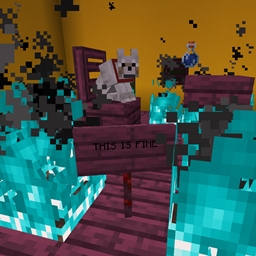
Sprawia, że ogień dusz pali istoty niebieskim płomieniem zamiast zwykłym
 NeoForge
 Forge
ForgeO modzie Blue Flame Burning
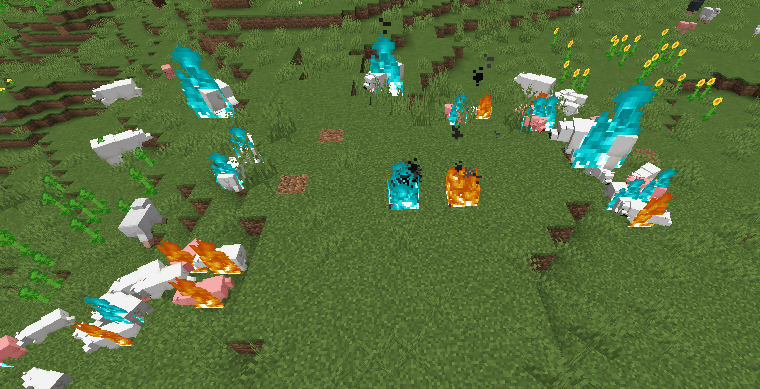
Sprawia, że duszy ogień podpala istoty niebieskim płomieniem zamiast zwykłego, nudnego żółtego, gdy zostaną podpalone przez źródło duszy ognia.
- Duszy ogień, podpalając gracza lub istotę, sprawi, że będzie się ona palić niebieskim płomieniem
- Płonący na niebiesko zombie podpalający inne istoty sprawi, że one również będą płonąć na niebiesko
- Wsparcie dla modowanych płynów, które podpalają gracza
Zmiana dodana przez ten mod jest wyłącznie wizualna.
Mod jest wymagany po obu stronach.
Wejdź na Discord, jeśli potrzebujesz pomocy lub masz pytania: https://discord.gg/69YVMbvhTC
W trakcie tworzenia tego moda ucierpiało wiele niedźwiedzi polarnych
Jak zainstalować Blue Flame Burning
With Millida Launcher
Install Millida Launcher
The launcher is free: download it at millida.net/launcher and sign in with any nickname.
Click “Install” on this page
The launcher opens and installs the mod for Minecraft 1.18.2–1.21.1 on Forge or NeoForge automatically.
Launch the game
A profile with it appears in the launcher: click “Play”.
Manually
Install Forge or NeoForge
The loader must match the game version of the mod file, for example Minecraft 1.21.1. After installing it, a separate profile appears in your launcher.
Download the file for your version
In the version list above, pick the file blueflame-1.21.1-1.1.1.jar (18 KB) for your game version and loader.
Put it in the mods folder
The folder is inside .minecraft (Windows: %appdata%\.minecraft\mods). If it does not exist, create it.
Launch the loader profile
Open “Mods” in the main menu: Blue Flame Burning should be in the list.
Minecraft 1.21.1 runs on Java 21: with a different Java version the game may close right after launch.
Wersje
Z zależnościami
| Minecraft | Loader | Plik | Data | Akcje |
|---|---|---|---|---|
| 1.21.1 | NeoForge | blueflame-1.21.1-1.1.1.jar17.5 KB 1 | ||
| 1.20.1 | NeoForge, Forge | blueflame-1.20.0-1.0.3.jar26 KB | ||
| 1.18.2 | Forge | blueflame-1.18.2-0.1.0.0.jar26.2 KB |
FAQ
Which Minecraft versions does Blue Flame Burning work on?
There are files for 1.21.1, 1.20.1, 1.20, 1.18.2. The newest is 1.21.1.
Is Blue Flame Burning for Forge or Fabric?
There are files for Forge: 1.18.2–1.20.1 and for NeoForge: 1.20–1.21.1. There are no files for Fabric: a mod for another loader will not start.
Does Blue Flame Burning need other mods?
The author lists no required dependencies: the Forge or NeoForge loader is enough.
Which Java does Blue Flame Burning need?
Minecraft 1.21.1 runs on Java 21. If the game closes right after launch, the usual cause is the wrong Java version in the profile settings.
Where can I download Blue Flame Burning safely?
On this page: the file blueflame-1.21.1-1.1.1.jar (18 KB) is stored on Millida’s server, with no link shorteners. SHA-1 checksum: 0e78defafd6cf08759c656a54f8a33315e3ab924.
Opinie
Oceń Blue Flame Burning jako pierwszy


