

 NeoForge
 Fabric
Our Media


Better Block Entities
BBE is a client side mod that drastically improves block entity rendering, and we aim to improve and regularly update the mod between Minecraft versions.
Will I lose animations like FastChest and similar mods? No you won’t, that’s the neat part. You get the HUGE performance increase without compromising animations! (If you want, you can turn this off if you don’t like it) On top of that, we also optimize more than only chests, like:
- Shulker Boxes
- Signs
- Decorated Pots
- Beds
- Bells
- Chests (ender, trapped, and all the new copper variants)
- Banners
- Copper Golem Statues
We are planning on adding even more block entities to that list in the future!

How does the mod work?
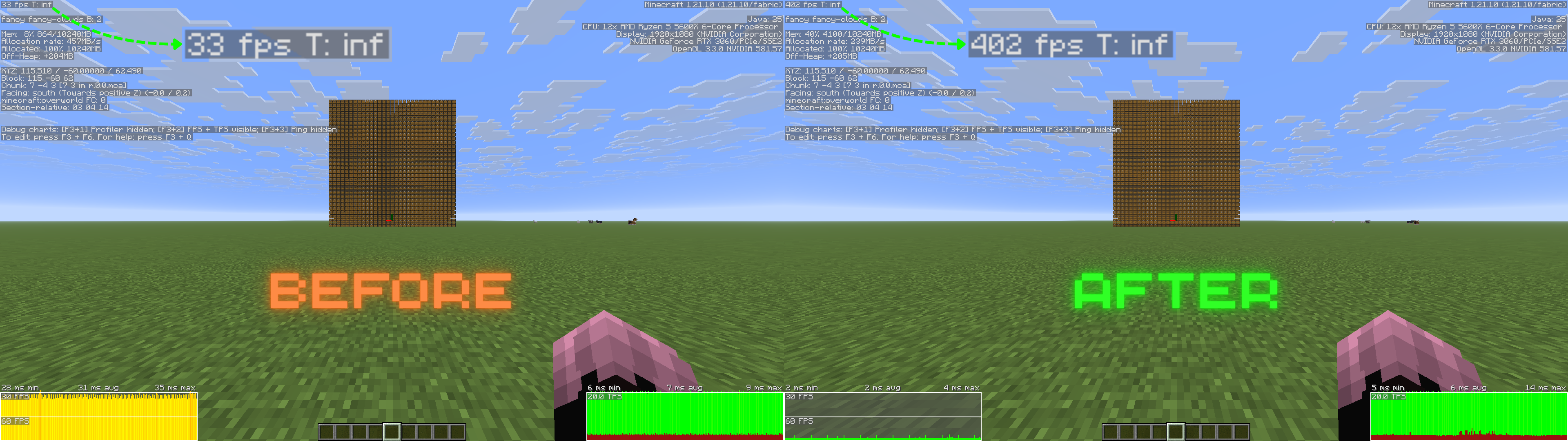
The mod works by rendering certain supported block entities conditionally in the regular terrain or in “meshes.” The mod switches between using Minecraft’s intended path of rendering for block entities when they are animating, and statically meshing them into the terrain when they are not. This improves FPS by a lot and scales depending on how many block entities you have. Expect at least a 3× increase! We also offer options to turn off certain optimizations for each individual supported block through our config screen.
Some added benefits :
- Being able to see these block entities from much further away (just like regular blocks)
- Much nicer looking lighting / Ambient Occlusion (Smooth Lighting)
Mod Compatibility
Currently, Sodium is a dependency, but we plan on making it optional in the future. *¹Fabric API is not a dependency as of Minecraft 1.21.11.
Mod Support: We aim to support as many mods as possible, but as many other developers know, it’s hard to support them all and incompatibilities will occur. If your mod does not work with BBE and you feel like it should, please reach out to us in our Discord server. Out of the box we support nearly all your favorite optimization mods like:
- Sodium
- Lithium
- Nvidium
- ImmediatelyFast
- C2ME
As of 1.3.0 Release Candidate 1 BBE is compatible with EMF/ETF (SEE EMF DISCLAIMER). You are also now able to load resource packs that change block entity models through block model files (packs like Redstone Tweaks, (Bee's) Cozier Beds, etc...), meaning you can have BBE's FPS boost and 3D models/animations at the same time, without sacrificing one or the other.
EMF DISCLAIMER The compatibility with EMF is still being worked on and will only be available for 1.21.11 versions and above. Certain packs may cause models to render slightly out of place or rotated weirdly. Not all EMF packs will work by default and it will be up to the pack creator to make sure compatibility with BBE if they want their pack models to render correctly.
Before and Afters
FAQ and Help
For the fastest and most interactive support possible we suggest you bring up your issue in our Discord server
Q- What Minecraft versions will the mod be supporting? A- Minecraft versions from 1.21.6 and above.
Q- Are backports planned? A- No backports are planned.
Q- What other mods/dependencies do I need? A- For now, Fabric API and Sodium. *¹
Q- Are other mod loaders going to be supported? A- Yes, a NeoForge variant is planned.
Q- Is BBE compatible with resource packs and shaders? A- Yes! You can use Resource Packs and Shaders with BBE no problem. Check the "Mod Compatibility" section above for more info on EMF/ETF.
Jak zainstalować Better Block Entities
With Millida Launcher
Install Millida Launcher
The launcher is free: download it at millida.net/launcher and sign in with any nickname.
Click “Install” on this page
The launcher opens and installs the mod for Minecraft 1.21–26.3 on Fabric or NeoForge automatically, together with its dependencies: Sodium.
Launch the game
A profile with it appears in the launcher: click “Play”.
Manually
Install Fabric or NeoForge
The loader must match the game version of the mod file, for example Minecraft 26.3. After installing it, a separate profile appears in your launcher.
Download the file for your version
In the version list above, pick the file bbe-neoforge-1.4.0+mc26.3.jar (201 KB) for your game version and loader.
Put it in the mods folder
The folder is inside .minecraft (Windows: %appdata%\.minecraft\mods). If it does not exist, create it. Required dependencies go there too: Sodium.
Launch the loader profile
Open “Mods” in the main menu: Better Block Entities should be in the list.
Better Block Entities works on the player’s side only: there is no need to install it on a server.
Wersje
Z zależnościami
| Minecraft | Loader | Plik | Data | Akcje |
|---|---|---|---|---|
| 26.2 | NeoForge | 26.2201 KB | ||
| 26.2 | Fabric | 26.2202 KB 3 | ||
| 26.3 | NeoForge | 26.3201 KB 1 | ||
| 26.3 | Fabric | 26.3203 KB 16 | ||
| 26.3 | Fabric | 26.3203 KB 4 | ||
| 1.21.1 | NeoForge | 1.21.1173 KB 1 | ||
| 1.21.1 | Fabric | 1.21.1175 KB 3 | ||
| 26.2 | NeoForge | 26.2201 KB 1 | — |
Opinie
Oceń Better Block Entities jako pierwszy


