

 NeoForge
 Forge
AppliedE
A Minecraft mod made as an add-on to both Applied Energistics 2 and ProjectE providing more tightly-coupled integration between the two mods. Unlike conventional add-ons integrating the two together, AppliedE works by turning ProjectE's EMC into a distinct "key type" able to be displayed, reported and manipulated by an ME network and converted into items upon request via AE2's auto-crafting facilities.
Currently, the mod is in early beta stages. Beware of any critical bugs, particularly on multiplayer servers, and please report them on the issue tracker as they arise.
Basic Usage
The first step towards using this add-on is to make an ME Transmutation Module. The module retrieves all transmutation/EMC knowledge from the player who placed down the module to provide ME networks with information on stored EMC and transmutable items. It can be placed anywhere at all on the network to function.
Multiple modules may be placed down on one network by any number of different players / knowledge providers, but only one module per knowledge provider will contribute to the stored EMC figure and available "craftable" known items. If multiple knowledge providers are employed by the modules on a network, any inserted and extracted EMC will be equally (as is possible) distributed among all providers.
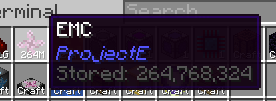
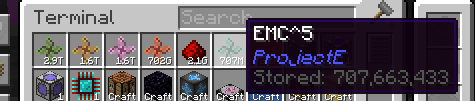
The module also includes additional safeguards to prevent overflow issues in ME networks, by adding a "tier" system to the EMC stored on a network based on subsequent powers of an arbitrarily large number of EMC units.
For further information on how to use the add-on, please consult the in-game AE2 guide's new section added by this add-on.
License
All code is licensed under LGPLv3, in adherence to the same license used by Applied Energistics 2 and with some code borrowed from AE2 itself.
All assets are licensed under CC BY-NC-SA 3.0, in adherence to the same license used by AE2 and with most deriving from AE2's and ProjectE's own assets. Some assets have been provided externally as courtesy of Sea_Kerman.
Jak zainstalować AppliedE
With Millida Launcher
Install Millida Launcher
The launcher is free: download it at millida.net/launcher and sign in with any nickname.
Click “Install” on this page
The launcher opens and installs the mod for Minecraft 1.20.1–1.21.1 on Forge or NeoForge automatically.
Launch the game
A profile with it appears in the launcher: click “Play”.
Manually
Install Forge or NeoForge
The loader must match the game version of the mod file, for example Minecraft 1.21.1. After installing it, a separate profile appears in your launcher.
Download the file for your version
In the version list above, pick the file appliede-1.0.8-beta.jar (213 KB) for your game version and loader.
Put it in the mods folder
The folder is inside .minecraft (Windows: %appdata%\.minecraft\mods). If it does not exist, create it.
Launch the loader profile
Open “Mods” in the main menu: AppliedE should be in the list.
Minecraft 1.21.1 runs on Java 21: with a different Java version the game may close right after launch.
Wersje
Z zależnościami
| Minecraft | Loader | Plik | Data | Akcje |
|---|---|---|---|---|
| 1.21.1 | NeoForge | 1.0.8-beta (NeoForge 1.21.1)213 KB 11 | ||
| 1.20.1 | NeoForge, Forge | 0.14.3 ([Neo]Forge 1.20.1)223 KB 4 | ||
| 1.20.1 | NeoForge, Forge | 0.13.3-beta ([Neo]Forge 1.20.1)222 KB |
Opinie
Oceń AppliedE jako pierwszy


