
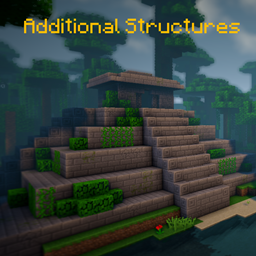
Additional Structures Mod do Minecraft 1.20.1, 1.12.2
Dodaje ponad 250 nowych struktur, które idealnie integrują się z twoim światem!
 NeoForge
 Forge
Forge📖 Opis
Ten mod dodaje do gry około 250 nowych małych i średnich struktur, aby powiększyć twój świat!
- obsługuje mody generujące biomy, takie jak Terralith, Traverse, Biomes O' Plenty, Biome Bundle i inne!
- integracja z Mystcraft (MC 1.12)
- z opcjami konfiguracji pozwalającymi zmienić wartości spawnu każdego typu struktury! (MC 1.12)
- działa z komendą /locate
- z sprawdzaniem aktualizacji
- różne struktury generują się w waniliowych i modowanych biomach w Overworldzie i Endzie!
- Datapack konfiguracyjny
Chcesz zmodyfikować lub zmienić niektóre wartości struktur na 1.18+? Oto jak to zrobić!
Tutaj znajdziesz wszystkie struktury z aktualnej wersji!
Używasz Fabric lub Quilt? Wtedy użyj tej wersji!
📷 Prezentacja
🗃️ Zależności
Wymagane:
- Magma Core [≥ MC 1.21.5]
- Zapewnia podstawowy kod i funkcje, takie jak sprawdzanie aktualizacji
- CurseForge | Modrinth
Obsługiwane:
- Mystcraft [MC 1.12]
- Dodane symbole cech struktur AS
- CurseForge | Modrinth
- Antique Atlas [≥ MC 1.21]
- Znacznik mapy dla niektórych struktur na mapie
- CurseForge | Modrinth
Jak zainstalować Additional Structures
With Millida Launcher
Install Millida Launcher
The launcher is free: download it at millida.net/launcher and sign in with any nickname.
Click “Install” on this page
The launcher opens and installs the mod for Minecraft 1.12–1.21.10 on Forge or NeoForge automatically.
Launch the game
A profile with it appears in the launcher: click “Play”.
Manually
Install Forge or NeoForge
The loader must match the game version of the mod file, for example Minecraft 1.21.10. After installing it, a separate profile appears in your launcher.
Download the file for your version
In the version list above, pick the file AdditionalStructures-1.21.10-(v.8.1.1-NEO).jar (1.5 MB) for your game version and loader.
Put it in the mods folder
The folder is inside .minecraft (Windows: %appdata%\.minecraft\mods). If it does not exist, create it.
Launch the loader profile
Open “Mods” in the main menu: Additional Structures should be in the list.
Minecraft 1.21.10 runs on Java 21: with a different Java version the game may close right after launch.
Wersje
Z zależnościami
| Minecraft | Loader | Plik | Data | Akcje |
|---|---|---|---|---|
| 1.21.9 | NeoForge | AdditionalStructures v.8.1.1-NEO1.5 MB 1 | ||
| 1.20.2 | Forge | Additional Structures v.4.2.21.5 MB 23 | ||
| 1.12.1 | — | Additional Structures v.2.2.2782 KB 5 |
FAQ
Which Minecraft versions does Additional Structures work on?
There are files for 1.12–1.21.10, 12 versions in total. The newest is 1.21.10.
Is Additional Structures for Forge or Fabric?
There are files for Forge: 1.20–1.20.6 and for NeoForge: 1.21.9–1.21.10. There are no files for Fabric: a mod for another loader will not start.
Does Additional Structures need other mods?
The author lists no required dependencies: the Forge or NeoForge loader is enough.
Which Java does Additional Structures need?
Minecraft 1.21.10 runs on Java 21. If the game closes right after launch, the usual cause is the wrong Java version in the profile settings.
Where can I download Additional Structures safely?
On this page: the file AdditionalStructures-1.21.10-(v.8.1.1-NEO).jar (1.5 MB) is stored on Millida’s server, with no link shorteners. SHA-1 checksum: 05bfd35a858149e7e18e7eecd841f14dee9e504b.
Opinie
Oceń Additional Structures jako pierwszy


