

| Smaller tools |
this is a texture pack that makes some tools and items smaller to cover less of the screen. It also contains slight re-textures and is compatible with vibrant visuals.
- Can be overlapped with other packs
- Smaller sheild (lowered sheild) also added
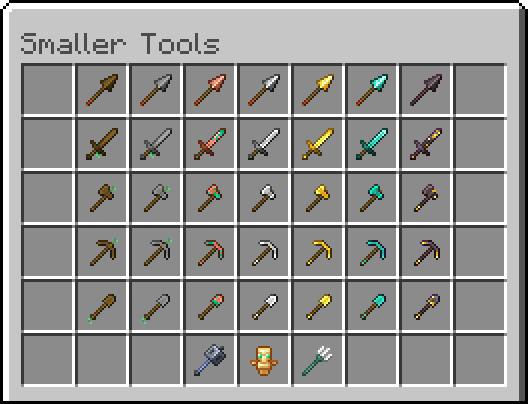
here are the tools that have been made small:
- All sword variants
- All axe variants
- All pickaxe variants
- All shovel variants
- All hoe variants
- All spear variants
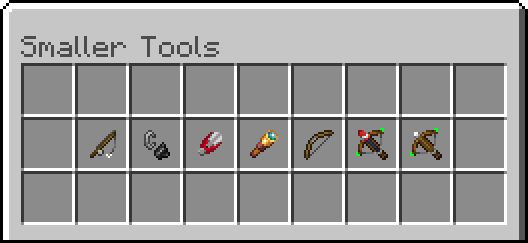
- Bow
- Cross-Bow
- Totem of undying
- Mace
- Trident
- Fishing rod
- Flint and steel
- All potion bottles slightly smaller (Optional download)
- Also has slight charge animations for bow and crossbow
If you just want the smaller tools without the retexture then download "Smaller tools OG"
Smaller tools 설치 방법
With Millida Launcher
Install Millida Launcher
The launcher is free: download it at millida.net/launcher and sign in with any nickname.
Click “Install” on this page
The launcher opens and installs the resource pack for Minecraft 1.21 automatically.
Launch the game
A profile with it appears in the launcher: click “Play”.
Manually
Download the archive
Pick the file Smaller_tools (Without potions).mcpack (55 KB) for your game version. No need to unpack it.
Put it in the resourcepacks folder
The easiest way: “Options”, then “Resource Packs”, then “Open Pack Folder”, and drag the archive there.
Enable the pack
In the same window, move the pack to the right-hand “Selected” column and click “Done”.
버전
의존성 포함
| Minecraft | 로더 | 파일 | 날짜 | 작업 |
|---|---|---|---|---|
| 1.21 | — | Smaller_tools (Without potions).mcpack55.3 KB 2 |
리뷰
Smaller tools의 첫 평가를 남겨 보세요



