

Minecraft 1.21용 Redstone Guide 리소스 팩
"How to Play" 섹션을 새로운 "Redstone Guide"로 대체합니다. Redstone Guide는 레드스톤의 기능과 응용에 대해 알려줍니다.
Redstone Guide 리소스 팩 정보
With the Redstone Guide, you can learn more about redstone's functionality and application. Each redstone component is explained in detail, including its uses. The guide features images to help you understand better, along with a step-by-step tutorial with pictures for building redstone mechanisms and contraptions. Additionally, it includes various redstone tips and tricks to assist you in creating your own redstone creations.
Reference Materials
This guide compiles information from various sources, primarily minecraft.fandom.com, selecting and revising content relevant to Bedrock Edition. This curated compilation aims to offer players a comprehensive resource for learning about redstone mechanics and applications, ensuring accuracy and clarity in the presented information.
How To Use?
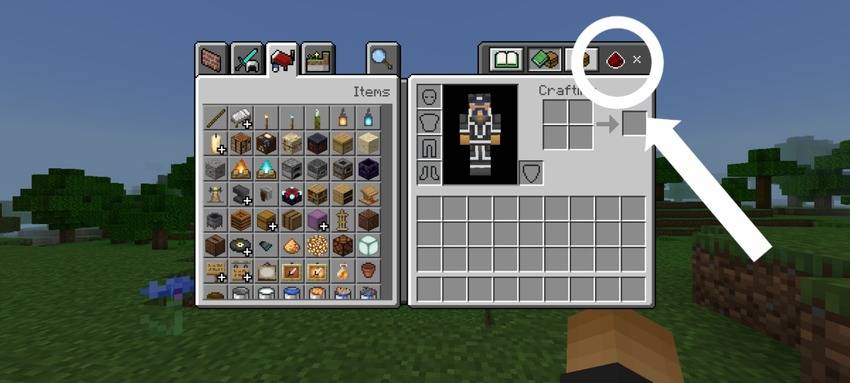
The "How To Play" section in settings has been replaced with a new "Redstone Guide" section. You can access the guide in settings after applying the pack. Additionally, you will find the guide in your inventory with a redstone icon, allowing easy access while playing.
Features
Definition Category
- Provide definitions for redstone terms such as stackable, seamless, flush, etc., as they relate to redstone structures.
Redstone Components
- Great for beginners! If you're unfamiliar with how each redstone component works, this guide is perfect for you.
Redstone Tips
- Here are some redstone tips that may help you enhance your knowledge. (Not recommended for complete beginners!)
3 Major Tutorials
- Circuits
- Contraption
- Mechanism
Some Screenshots
Watch Showcase:
Pack Variants
This pack contains numerous images, resulting in larger file sizes.
- Redstone Guide: This version contains the original high-resolution images.
- Redstone Guide (Lite): This version resizes the images to compress their size and reduce the overall file size.
Redstone Guide 설치 방법
With Millida Launcher
Install Millida Launcher
The launcher is free: download it at millida.net/launcher and sign in with any nickname.
Click “Install” on this page
The launcher opens and installs the resource pack for Minecraft 1.19–1.21 automatically.
Launch the game
A profile with it appears in the launcher: click “Play”.
Manually
Download the archive
Pick the file RedstoneGuideLite.mcpack (60 MB) for your game version. No need to unpack it.
Put it in the resourcepacks folder
The easiest way: “Options”, then “Resource Packs”, then “Open Pack Folder”, and drag the archive there.
Enable the pack
In the same window, move the pack to the right-hand “Selected” column and click “Done”.
버전
의존성 포함
| Minecraft | 로더 | 파일 | 날짜 | 작업 |
|---|---|---|---|---|
| 1.19 | — | Redstone Guide (Lite)59.9 MB |
FAQ
Which Minecraft versions does Redstone Guide work on?
There are files for 1.21, 1.20, 1.19. The newest is 1.21.
Where can I download Redstone Guide safely?
On this page: the file RedstoneGuideLite.mcpack (60 MB) is stored on Millida’s server, with no link shorteners. SHA-1 checksum: ab838877ba9768efad67a73b0290c0d5d285f292.
리뷰
Redstone Guide의 첫 평가를 남겨 보세요



