

Minecraft 1.20.1, 1.21.1용 Ores Aura 리소스 팩
이 팩은 특히 어두운 동굴에서 채굴할 때 광석을 더 쉽고 빠르게 발견할 수 있게 해줍니다.
- 다운로드
- 65 다운로드
- 조회수
- 294 조회수
- 업데이트됨
- 업데이트됨 26.09.2026
- 1.20 — 26.3
 바닐라 게임
- 클라이언트
Aura Ores
Simple Glowing Ores
What is this?
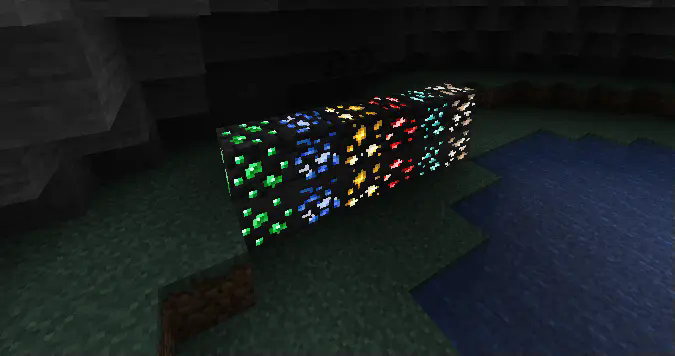
Aura Ores is a resource pack that adds an emissive glow to ores. It keeps the standard Vanilla textures but makes them visible in the dark, making mining easier without needing to place torches everywhere.
Requirements
Important: For the ores to glow, you must install a mod that supports connected/emissive textures. Without these, the pack will look like default Minecraft.
Mod Loader - Requirement
Fabric - Continuity (Recommended) or OptiFabric Forge / Neo - OptiFine
Note: If using Continuity, make sure "Emissive Textures" is enabled in the resource pack settings.
Features
Feature - Description
High Visibility - Spot Diamonds, Gold, and Iron easily in the dark. Vanilla Style - Retains the original ore textures; only the colored parts glow. Lightweight - Simple texture changes with minimal performance impact.
Check Out My Other Mods
If you find Aura Ores useful, check out my utility mods:
Mod Name - Description
FPS Overlay - A lightweight, customizable FPS counter. Elytra End - End style elytra Right Click Harvest - Harvest crops instantly just by right-clicking. Tools Durability - Warns you before your tools break. Biome Notifier - Shows the biome name when you enter a new area.
View my full profile
Installation
How to Install (Click to Expand)
- Download the Aura Ores .zip file.
- Do not unzip it.
- Place the file into your .minecraft/resourcepacks folder.
- Launch the game and go to Options > Resource Packs.
- Move Aura Ores to the Selected column (Right side).
- Important: Ensure it is placed above any other texture packs.
Ores Aura 설치 방법
With Millida Launcher
Install Millida Launcher
The launcher is free: download it at millida.net/launcher and sign in with any nickname.
Click “Install” on this page
The launcher opens and installs the resource pack for Minecraft 1.20–26.3 automatically, together with its dependencies: Continuity.
Launch the game
A profile with it appears in the launcher: click “Play”.
Manually
Download the archive
Pick the file Ores Aura.zip (617 KB) for your game version. No need to unpack it.
Put it in the resourcepacks folder
The easiest way: “Options”, then “Resource Packs”, then “Open Pack Folder”, and drag the archive there.
Enable the pack
In the same window, move the pack to the right-hand “Selected” column and click “Done”.
버전
의존성 포함
| Minecraft | 로더 | 파일 | 날짜 | 작업 |
|---|---|---|---|---|
| 26.3 | — | 26.3617 KB 12 | ||
| 26.2 | — | 26.2617 KB 6 | ||
| 26.1 | — | 26.1617 KB 2 | ||
| 1.21.11 | — | 1.21.11617 KB 10 |
실행에 필요한 것
리뷰
Ores Aura의 첫 평가를 남겨 보세요



