
Minecraft 1.21용 Mini Debug Menu 리소스 팩
이 리소스 팩은 Minecraft Java Edition 디버그 메뉴의 여러 기능을 Bedrock Edition으로 가져옵니다. 플랫폼 제한으로 모든 기능을 복제할 수는 없지만, 이 팩에는 필수적이고 유용한 도구 일부가 포함되어 있습니다.
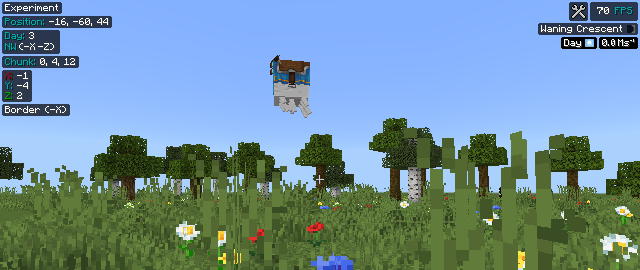
Features:
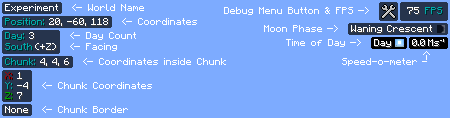
- World Name: Shows the name of the world currently being played

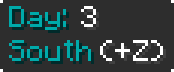
- Day count and Direction: Shows the current day count and the Direction facing
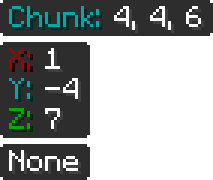
- Chunk Information: Shows inforation about the chunk you're currently in
- Your location relative to the chunk
- The coordinate of the chunk
- Chunk Border
- FPS: Shows FPS count. [The button only shows in touch devices]

- Moon Phase: Shows current moon phase

- Time of Day and Speed-o-meter: Shows the current time (e.g.- Day, Noon etc.) of day. Speed-o-meter measures the speed of the player

N.B: Make sure to turn on "Show coordinates" and "Show days played"
Subpacks:
- Always shown: All data are always shown on screen.
- Toggle: Same as "Always shown" but the debug menu appears if F8 is pressed. [Or the button for Android/iOS]
Known Issue:
- Time of Day and Speed-o-meter doesn't show while Gliding with Elytra. It is very hard to fix.
MSG:
I'm changing this from a resource pack to an add-on for incompatibility issues. But that'll disable the achievements. So, this is the last version of this pack that's still only resource pack.
I'm trying to find a way to update the information instantly or at least very fast. Then I'll upload the add-on.
Warning: If you have a resource pack that modifies the style of the position text, then it might cause crash. To avoid any issues, keep this pack on top.
MCPEDL Link: Mini Debug Menu
*** - If you find any bugs or issues, feel free to let me know in my Discord
Mini Debug Menu 설치 방법
With Millida Launcher
Install Millida Launcher
The launcher is free: download it at millida.net/launcher and sign in with any nickname.
Click “Install” on this page
The launcher opens and installs the resource pack for Minecraft 1.18–1.21 automatically.
Launch the game
A profile with it appears in the launcher: click “Play”.
Manually
Download the archive
Pick the file Mini Debug Menu [V-1.3].mcpack (42 KB) for your game version. No need to unpack it.
Put it in the resourcepacks folder
The easiest way: “Options”, then “Resource Packs”, then “Open Pack Folder”, and drag the archive there.
Enable the pack
In the same window, move the pack to the right-hand “Selected” column and click “Done”.
버전
의존성 포함
| Minecraft | 로더 | 파일 | 날짜 | 작업 |
|---|---|---|---|---|
| 1.18 | — | Mini Debug Menu [V-1.3]41.9 KB 1 |
FAQ
Which Minecraft versions does Mini Debug Menu work on?
There are files for 1.21, 1.20, 1.19, 1.18. The newest is 1.21.
Where can I download Mini Debug Menu safely?
On this page: the file Mini Debug Menu [V-1.3].mcpack (42 KB) is stored on Millida’s server, with no link shorteners. SHA-1 checksum: 0717e172e3610b9db425bfd3087cc75e63855325.
리뷰
Mini Debug Menu의 첫 평가를 남겨 보세요



