

Lower Shield 리소스 팩 정보
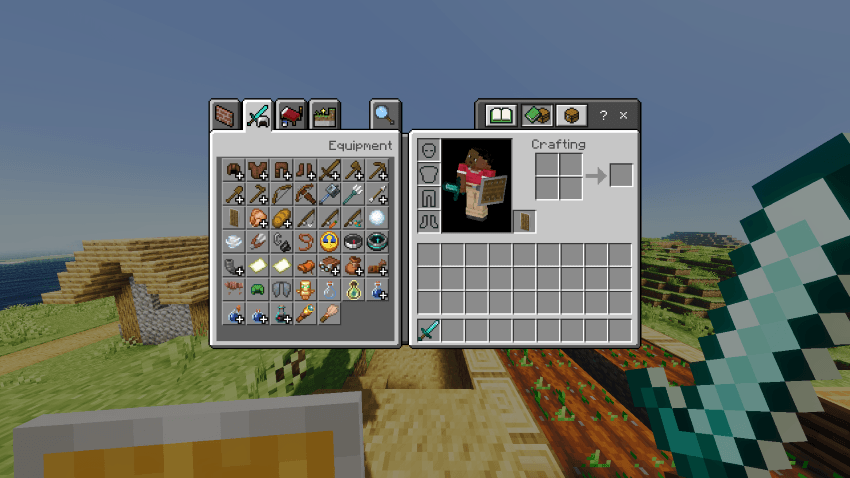
This resource pack reduces the size of shields in first-person view. By shrinking the model, shields block far less of your screen, giving you better visibility during combat, exploration, and everyday gameplay.
✔️ Only the first-person view is affected
In third-person, shields look completely normal.
In the inventory and hotbar, shields remain unchanged.
That means no impact on gameplay or design consistency - just a smoother, less obstructed first-person experience.
Lower Shield 설치 방법
With Millida Launcher
Install Millida Launcher
The launcher is free: download it at millida.net/launcher and sign in with any nickname.
Click “Install” on this page
The launcher opens and installs the resource pack for Minecraft 1.21.111 automatically.
Launch the game
A profile with it appears in the launcher: click “Play”.
Manually
Download the archive
Pick the file lowershield.mcpack (67 KB) for your game version. No need to unpack it.
Put it in the resourcepacks folder
The easiest way: “Options”, then “Resource Packs”, then “Open Pack Folder”, and drag the archive there.
Enable the pack
In the same window, move the pack to the right-hand “Selected” column and click “Done”.
버전
의존성 포함
| Minecraft | 로더 | 파일 | 날짜 | 작업 |
|---|---|---|---|---|
| 1.21.111 | — | lowershield.mcpack66.9 KB 1 |
FAQ
Which Minecraft versions does Lower Shield work on?
Only Minecraft 1.21.111: there are no files for other versions.
Where can I download Lower Shield safely?
On this page: the file lowershield.mcpack (67 KB) is stored on Millida’s server, with no link shorteners. SHA-1 checksum: 5266eacbc57c55f0b696008ad819a1ef3637e492.
리뷰
Lower Shield의 첫 평가를 남겨 보세요


