
Minecraft 26.30용 Jyls Visualizer 리소스 팩
미학에 중점을 둔 매우 뛰어난 강렬하고 생생한 비주얼 팩입니다.
WHAT IS THIS?
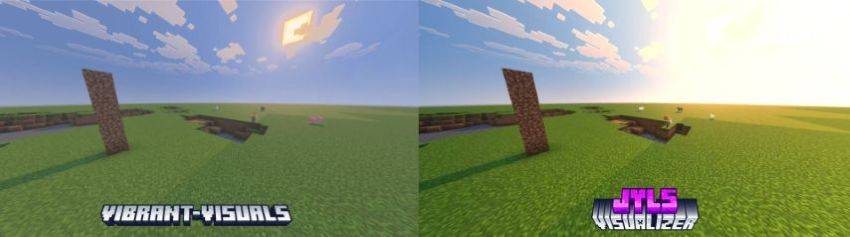
This is a shader pack that will enhance your Vibrant Visuals or any Vibrant Visuals packs like Prizma, Definitive, and more!! This brings a more saturated and actual vibrant and brighter than you could have imagined!
HOW TO DOWNLOAD AND USE?
Android:
There are many things to choose from, which loader would you like. There is Ambient MCBE, MB Loader, Levi Launcher for Android, and more. Just make sure to turn on load render dragon shaders on each of them! Most of these launchers can be found on the Play Store!

Windows:
You can use betterRenderDragon or Levi launcher. Levi launcher has a feature called load render dragon shaders on the instance settings!

IOS:
There isn't an easy way to load shaders... You need to jailbreak it, unfortunately...
Jyls Visualizer 설치 방법
With Millida Launcher
Install Millida Launcher
The launcher is free: download it at millida.net/launcher and sign in with any nickname.
Click “Install” on this page
The launcher opens and installs the resource pack for Minecraft 26.30 automatically.
Launch the game
A profile with it appears in the launcher: click “Play”.
Manually
Download the archive
Pick the file jylsv-1.1-merged.mcpack (160 KB) for your game version. No need to unpack it.
Put it in the resourcepacks folder
The easiest way: “Options”, then “Resource Packs”, then “Open Pack Folder”, and drag the archive there.
Enable the pack
In the same window, move the pack to the right-hand “Selected” column and click “Done”.
버전
의존성 포함
| Minecraft | 로더 | 파일 | 날짜 | 작업 |
|---|---|---|---|---|
| 26.30 | — | jylsv-1.1-merged.mcpack160 KB |
FAQ
Which Minecraft versions does Jyls Visualizer work on?
Only Minecraft 26.30: there are no files for other versions.
리뷰
Jyls Visualizer의 첫 평가를 남겨 보세요


