
Minecraft 1.20.1, 1.21용 Invisible Item Frames 리소스 팩
Invisible Item Frames는 일반 및 발광 아이템 액자를 완전히 투명하게 만들어 아이템이 벽에 자연스럽게 떠 있게 해주는 깔끔하고 가벼운 마인크래프트 베드락 리소스 팩입니다.
About
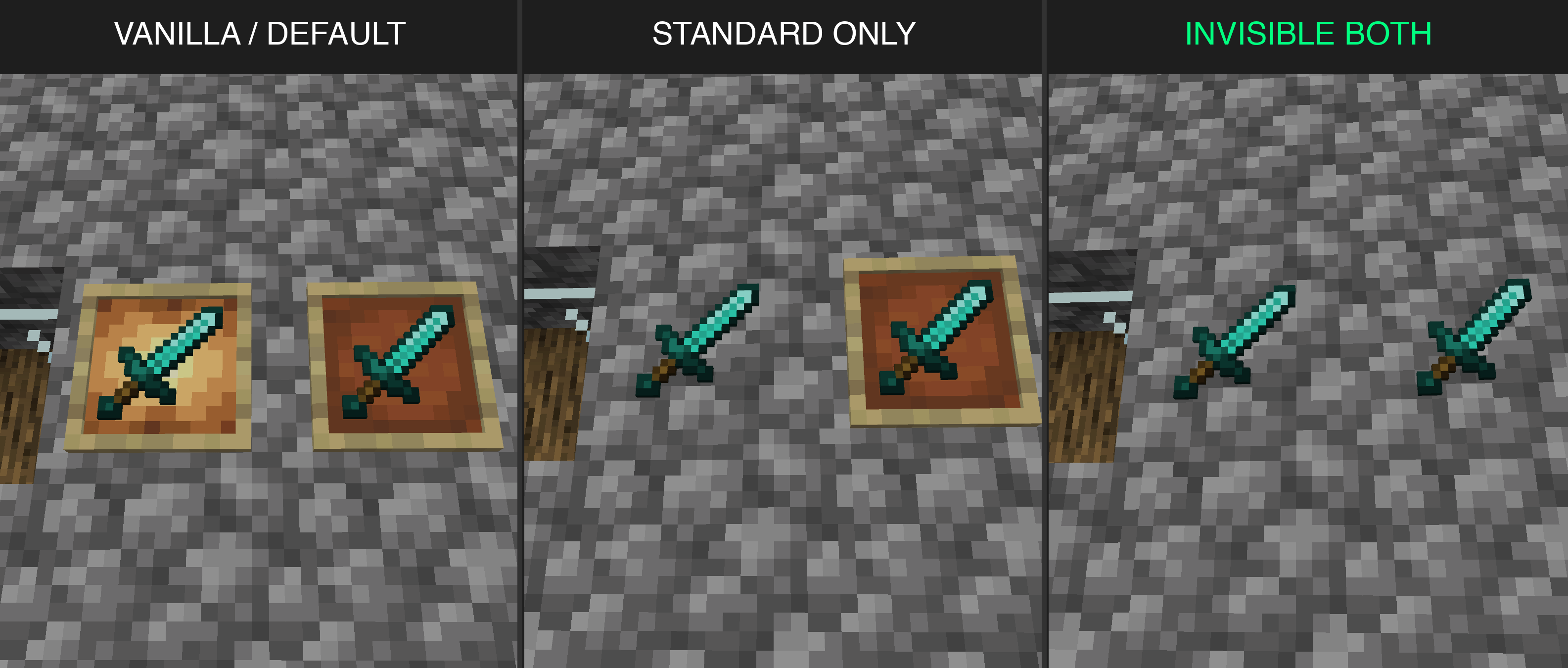
Invisible Item Frames is a visual resource pack that completely hides standard and glow item frames, making items inside them look as if they are floating in the air.
Perfect for builders, clean storage rooms, decorations, and showcase setups. It is client-side, lightweight, and can be activated through Global Resources for use in worlds, servers, and Realms.
Features
- Full Transparency: Makes the wooden border and the background backing of item frames completely invisible.
- Multiple Modes (Subpacks): Choose which frames you want to hide via settings:
- Invisible Both: Both standard and glow item frames are invisible.
- Standard Only: Hides only standard item frames; glow item frames remain visible.
- Glow Only: Hides only glow item frames; standard item frames remain visible.
- Pure Resource Pack: No behavior packs, no scripts, no experimental toggles, and no cheats required.
- Global Resources: Apply the pack client-side without installing a behavior pack on the server or Realm. Other resource packs that change item frames may override it.
- Vibrant Visuals Compatibility: Keeps Vibrant Visuals available when the pack is enabled on supported devices.
How to use
- Download and open the .mcaddon file to import it into Minecraft Bedrock.
- In the game settings, go to Global Resources (or your world settings) and activate Invisible Item Frames. The pack name is translated when using Russian or Spanish.
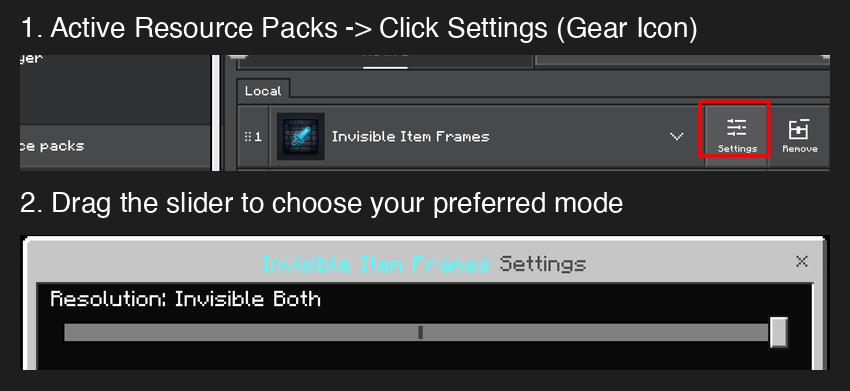
- Click the gear icon on the active pack to select your preferred mode (Both, Standard Only, or Glow Only).
- Restart the game client to apply the block configurations.
Notes
- This pack only affects the rendering of the frame itself; items placed inside remain fully visible and render normally.
- If you change the subpack mode, a full game restart is recommended to refresh the cache.
- If frames remain visible, check for other resource packs that change item frames and give this pack higher priority where possible.
Requirements
- Minecraft Bedrock Edition 1.26.50 or newer
- Vibrant Visuals is optional and requires a supported device.
Invisible Item Frames 설치 방법
With Millida Launcher
Install Millida Launcher
The launcher is free: download it at millida.net/launcher and sign in with any nickname.
Click “Install” on this page
The launcher opens and installs the resource pack for Minecraft 1.20–26.30 automatically.
Launch the game
A profile with it appears in the launcher: click “Play”.
Manually
Download the archive
Pick the file invisible-item-frames-v1.0.1.mcaddon (1.2 MB) for your game version. No need to unpack it.
Put it in the resourcepacks folder
The easiest way: “Options”, then “Resource Packs”, then “Open Pack Folder”, and drag the archive there.
Enable the pack
In the same window, move the pack to the right-hand “Selected” column and click “Done”.
버전
의존성 포함
| Minecraft | 로더 | 파일 | 날짜 | 작업 |
|---|---|---|---|---|
| 1.20.40 | — | invisible-item-frames-v1.0.1.mcaddon1.2 MB 3 |
FAQ
Which Minecraft versions does Invisible Item Frames work on?
There are files for 1.20–26.30, 52 versions in total. The newest is 26.30.
Where can I download Invisible Item Frames safely?
On this page: the file invisible-item-frames-v1.0.1.mcaddon (1.2 MB) is stored on Millida’s server, with no link shorteners. SHA-1 checksum: fef814edc810f3b48065ffc193f976ea76807912.
리뷰
Invisible Item Frames의 첫 평가를 남겨 보세요



