

Gui Revision 리소스 팩 정보
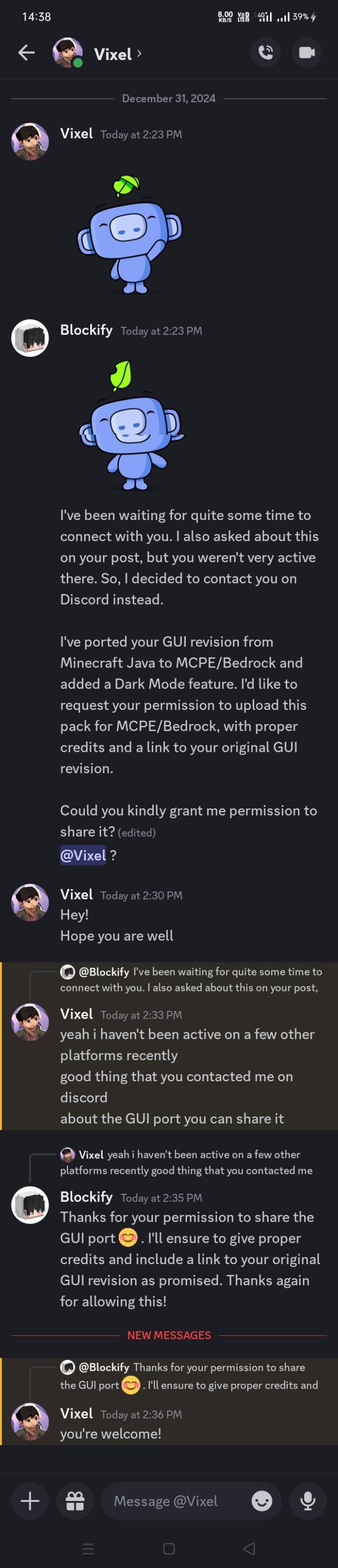
Message To Moderators: I have already uploaded the permission screenshot on the page. Please take note.

GUI REVISION - Bedrock / MCPE Port
Original version: OG GUI REVISION (Modrinth)
I have ported this pack for MCPE and Bedrock with the owner's permission.
Thanks to CrisXlot and Redstone Chicken for the code.

Features:
- Changes to containers of every usable block, including crafting table, smithing table, furnace, brewing stand, anvil, and more.
- The Java version of this pack didn’t have a dark mode, so a dark mode version has been created.
- Both dark and white modes are included; you can switch them using subpacks as per your preference.
Proof of permission:
Gui Revision 설치 방법
With Millida Launcher
Install Millida Launcher
The launcher is free: download it at millida.net/launcher and sign in with any nickname.
Click “Install” on this page
The launcher opens and installs the resource pack for Minecraft 1.19–1.21 automatically.
Launch the game
A profile with it appears in the launcher: click “Play”.
Manually
Download the archive
Pick the file GUI-Revision.mcpack (8.9 MB) for your game version. No need to unpack it.
Put it in the resourcepacks folder
The easiest way: “Options”, then “Resource Packs”, then “Open Pack Folder”, and drag the archive there.
Enable the pack
In the same window, move the pack to the right-hand “Selected” column and click “Done”.
버전
의존성 포함
| Minecraft | 로더 | 파일 | 날짜 | 작업 |
|---|---|---|---|---|
| 1.19 | — | GUI-Revision.mcpack8.9 MB |
FAQ
Which Minecraft versions does Gui Revision work on?
There are files for 1.21, 1.20, 1.19. The newest is 1.21.
Where can I download Gui Revision safely?
On this page: the file GUI-Revision.mcpack (8.9 MB) is stored on Millida’s server, with no link shorteners. SHA-1 checksum: 26c3b6633819c028106bd2c05881c9a2482853b0.
리뷰
Gui Revision의 첫 평가를 남겨 보세요


