

Minecraft 1.16.5, 1.19.2용 Essential UI 리소스 팩
모든 버튼과 핫바를 Essential 모드의 스타일에 맞게 변경하는 작은 텍스처팩. 이 텍스처팩을 사용하면 Essential 모드를 사용할 때 마인크래프트가 훨씬 깔끔해 보입니다
- 다운로드
- 6 다운로드
- 조회수
- 48 조회수
- 업데이트됨
- 업데이트됨 04.09.2026
- 1.16 — 26.2
 바닐라 게임
- 클라이언트
Essential UI
Essential UI is a small texturepack, that changes all buttons and the hotbar to fit the style of the Essential mod. With This texturepack, your Minecraft will look much cleaner when using the Essential mod.
If you want some preview images, check out the Gallery!

Compatibility
For this Resource Pack to work, you do not need Optifine!

Bugs and Suggestions
If you find any bugs or want to suggest something, you can join my Discord and message me there.
Hotbar
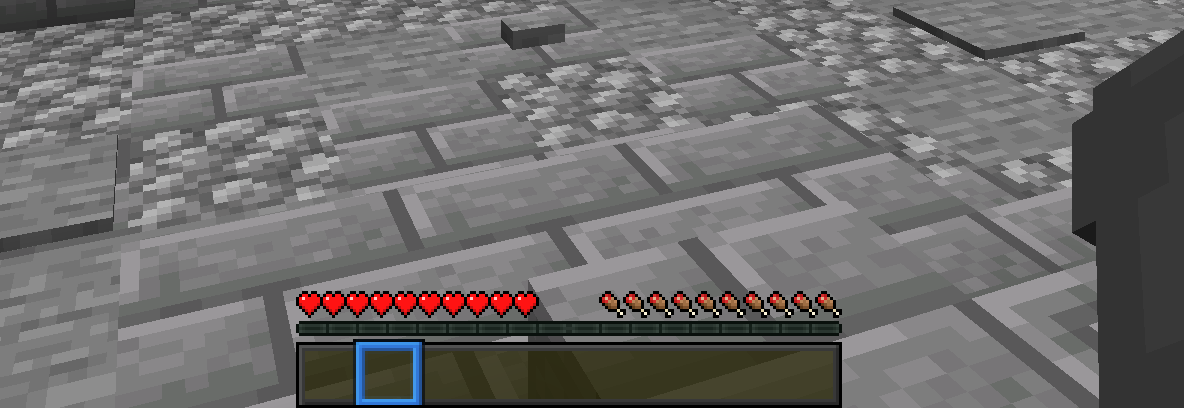
Essential UI 설치 방법
With Millida Launcher
Install Millida Launcher
The launcher is free: download it at millida.net/launcher and sign in with any nickname.
Click “Install” on this page
The launcher opens and installs the resource pack for Minecraft 1.16–26.2 automatically.
Launch the game
A profile with it appears in the launcher: click “Play”.
Manually
Download the archive
Pick the file EssentialUI.zip (91 KB) for your game version. No need to unpack it.
Put it in the resourcepacks folder
The easiest way: “Options”, then “Resource Packs”, then “Open Pack Folder”, and drag the archive there.
Enable the pack
In the same window, move the pack to the right-hand “Selected” column and click “Done”.
버전
의존성 포함
| Minecraft | 로더 | 파일 | 날짜 | 작업 |
|---|---|---|---|---|
| 1.21.11 | — | 1.21.1191 KB | ||
| 26.2 | — | 26.291 KB 5 | — | |
| 26.1 | — | 26.191 KB | — | |
| 1.19.2 | — | 1.19.214.7 KB | — | |
| 1.18.2 | — | 1.18.214.7 KB | — | |
| 1.16.5 | — | 1.16.514.7 KB | — |
리뷰
Essential UI의 첫 평가를 남겨 보세요



