

Minecraft 1.21, 26.10용 Durability Viewer 리소스 팩
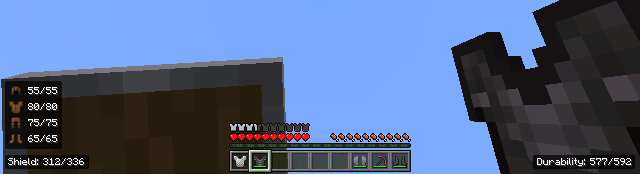
이 리소스 팩은 도구 내구도를 HUD와 인벤토리 화면에 직접 표시합니다. 행동 팩과 함께 사용하면 방어구와 방패의 내구도도 표시합니다.
Durability Viewer
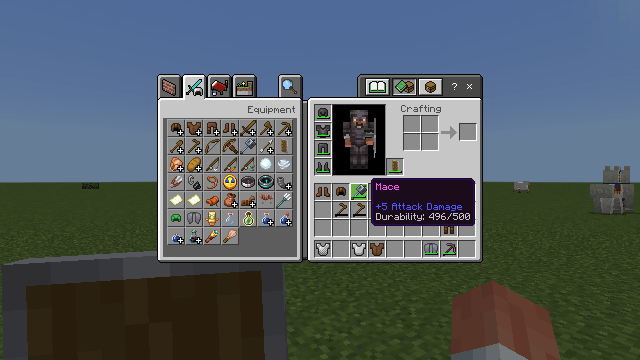
This resource pack shows durability of a tool in the hotbar and container screens. When the behavior pack is applied, the shield durability and armor durability is shown as well on the HUD screen.
So, it's mainly a resource pack. The behavior pack is required only if you want armor and shield durability to be shown (Bottom left corner of HUD screen). Achievements friendly.
Features
- Mainhand Item Durability in HUD
- Item Durability in hover text of container screens (Inventory, Chest etc.)
- Blink Animation when durability goes below 20%
- Armor Durability in HUD [Requires Behavior Pack]
- Shield Durability in HUD [Requires Behavior Pack]
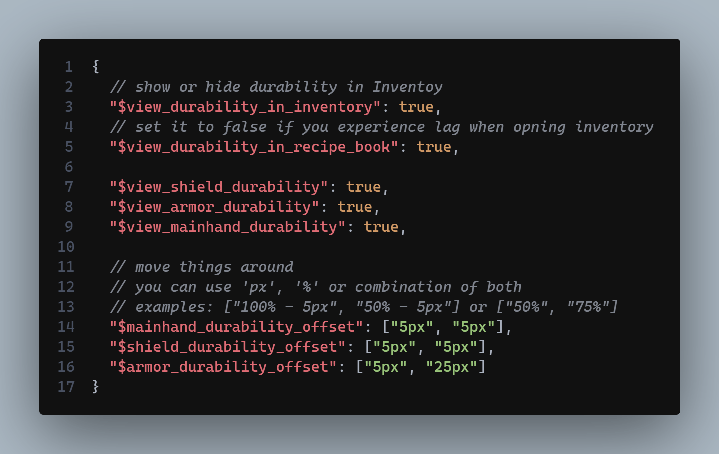
- Config Options [Through _global_variables.json File]
Usage:
- Download the RP file and activate in your world
- If you want to display Armor and Shield Durability, simply download and activate the BP file
Note: You can't use the behavior pack in servers. For PvP, use Utility HUD
Download Behavior Pack:
- CurseForge
- MCPEDL [File with BP in its name]
Config:
MCPEDL link - Durability Viewer
- You can modify the pack for your personal use only.
- You cannot use any code without permission or reupload the pack.
- If you find any bugs or have any suggestions for new features, feel free to contact me on Discord or join my Server!
Durability Viewer 설치 방법
With Millida Launcher
Install Millida Launcher
The launcher is free: download it at millida.net/launcher and sign in with any nickname.
Click “Install” on this page
The launcher opens and installs the resource pack for Minecraft 1.21–26.10 automatically.
Launch the game
A profile with it appears in the launcher: click “Play”.
Manually
Download the archive
Pick the file Durability Viewer V-2.4 [RP].mcpack (22 KB) for your game version. No need to unpack it.
Put it in the resourcepacks folder
The easiest way: “Options”, then “Resource Packs”, then “Open Pack Folder”, and drag the archive there.
Enable the pack
In the same window, move the pack to the right-hand “Selected” column and click “Done”.
버전
의존성 포함
| Minecraft | 로더 | 파일 | 날짜 | 작업 |
|---|---|---|---|---|
| 1.21 | — | Durability Viewer V-2.4 [RP]21.9 KB 117 |
리뷰
Durability Viewer의 첫 평가를 남겨 보세요



