
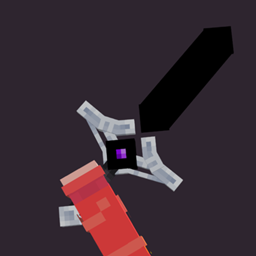
Dark Tools 리소스 팩 정보
This texture pack changes the appearance of your iron sword to 3D and better.
use Justanimation+ or Xnova for the perfect experience.
Make sure to turn off 3D tools in Justanimation+ or Xnova settings.
a few tips for a perfect experience
Dark Tools 설치 방법
Install Millida Launcher
The launcher is free: download it at millida.net/launcher and sign in with any nickname.
Click “Install” on this page
The launcher opens and installs the resource pack for Minecraft 26.0–26.40 automatically.
Launch the game
A profile with it appears in the launcher: click “Play”.
버전
의존성 포함
| Minecraft | 로더 | 파일 | 날짜 | 작업 |
|---|---|---|---|---|
| 26.0 | — | DarkTools.mcpack89.9 KB |
FAQ
Which Minecraft versions does Dark Tools work on?
There are files for 26.40, 26.0. The newest is 26.40.
How do I download Dark Tools?
With Millida Launcher: it installs Dark Tools into a modpack by itself, for the right game version and loader. The launcher is free.
리뷰
Dark Tools의 첫 평가를 남겨 보세요
댓글 0
댓글을 작성하려면 로그인하세요로그인


