
CameraHUD 리소스 팩 정보
Ever Wanted To Have A Slightly Camera-Esque GUI? Well Now You Can!
INCLUDES:
Camera Crosshair!

Battery Health Bar!

Mysterious Meter Hunger Bar! (idk what it's really meant to be)

Zoom Wheel XP Bar!

Clean And Tidy Inventory UI!
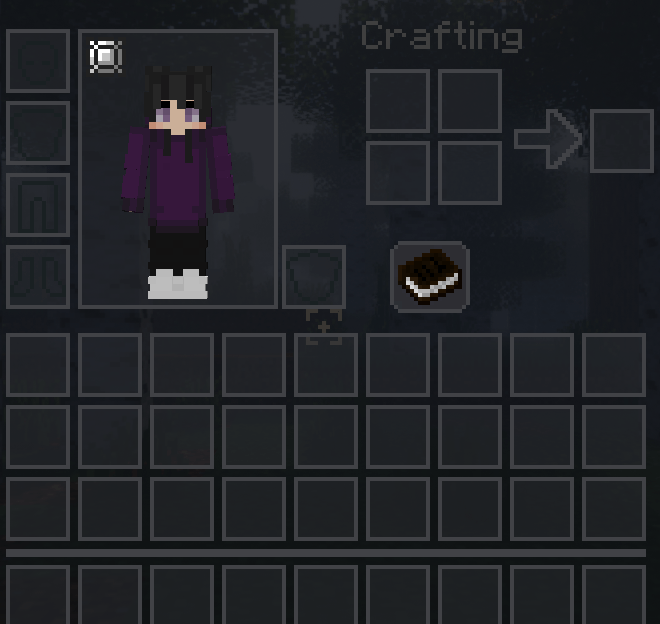
How Pleasant!
CameraHUD 설치 방법
Install Millida Launcher
The launcher is free: download it at millida.net/launcher and sign in with any nickname.
Click “Install” on this page
The launcher opens and installs the resource pack for Minecraft 1.19.2 automatically.
Launch the game
A profile with it appears in the launcher: click “Play”.
버전
의존성 포함
| Minecraft | 로더 | 파일 | 날짜 | 작업 |
|---|---|---|---|---|
| 1.19.2 | — | Camera HUD97.5 KB |
FAQ
Which Minecraft versions does CameraHUD work on?
Only Minecraft 1.19.2: there are no files for other versions.
How do I download CameraHUD?
With Millida Launcher: it installs CameraHUD into a modpack by itself, for the right game version and loader. The launcher is free.
리뷰
CameraHUD의 첫 평가를 남겨 보세요
댓글 0
댓글을 작성하려면 로그인하세요로그인


