

Minecraft 1.21.11용 Bright Plus 리소스 팩
Bright Plus 텍스처 팩으로 Minecraft에서 최대 밝기를 얻으세요 (PolyTone이 포함된 소듐 전용)
- 다운로드
- 5 다운로드
- 조회수
- 66 조회수
- 업데이트됨
- 업데이트됨 09.02.2026
- 1.21.11
 바닐라 게임
- 클라이언트
Bright Plus 리소스 팩 정보
Bright Plus is a Fullbright texture pack, which removes darkness from your game, making everything bright and easy to see. This is perfect for survival players, builders, and explorers who want a clearer view without using torches or night vision potions.
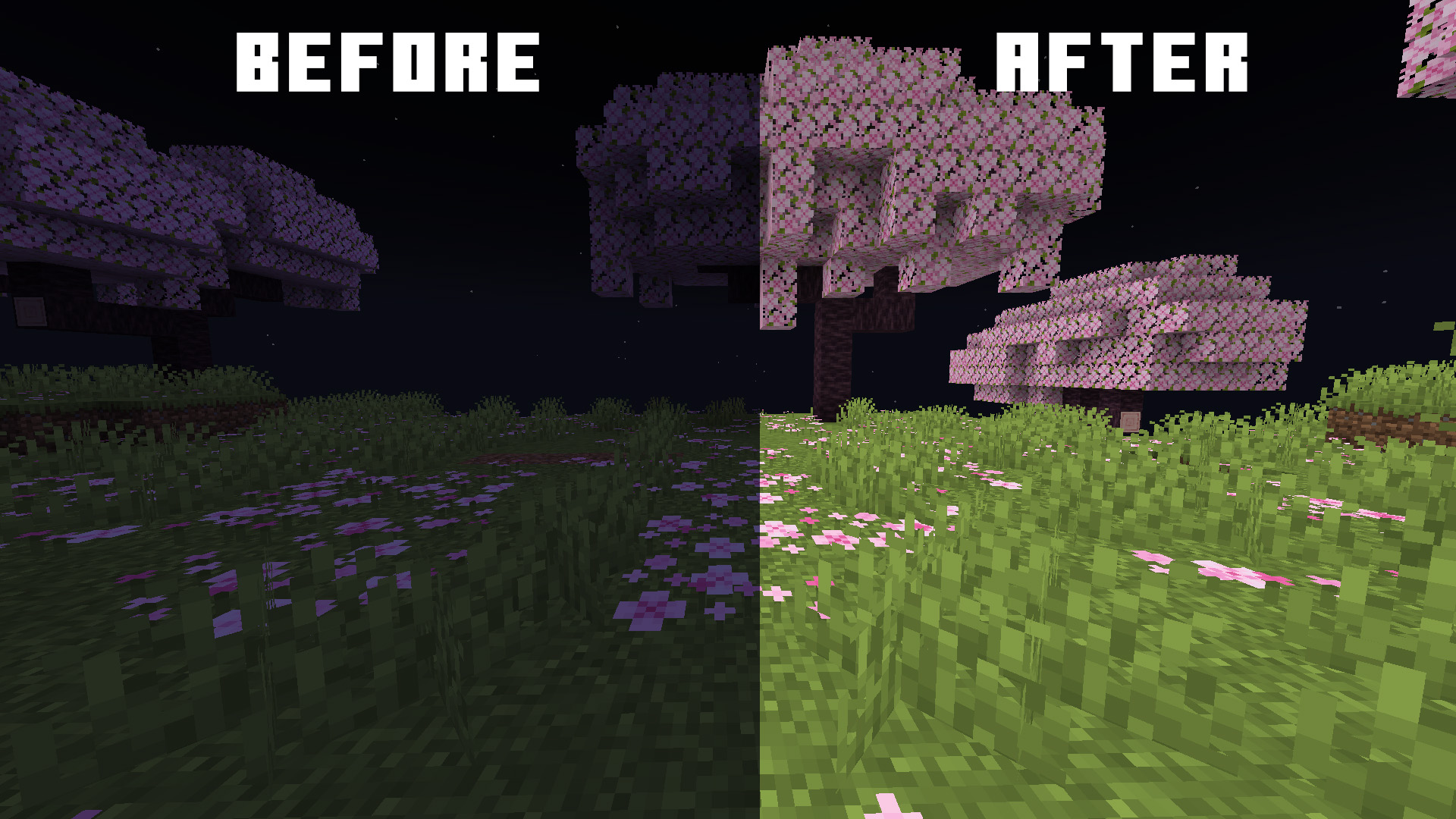
Requirements
To use Bright Plus, you’ll need to install the following mods:
- Sodium – a performance optimization mod for Minecraft.
- Polytone – a client-side customization mod which allows tweaking various aspect with the game via Resource Packs
These mods are essential for Bright Plus to work properly.

⚠️ Restart the game if Bright Plus is not working
Supported Versions
Bright Plus works on all Minecraft versions from 1.16.3 to the latest. No matter what version you’re playing, Bright Plus will brighten up your world!

Overview
- Fullbright support for Sodium (not available for OptiFine and vanilla)
- Works on all versions from 1.16.3 to Latest.
- Makes caves, underwater areas, and night-time exploration super easy.
Bright Plus 설치 방법
With Millida Launcher
Install Millida Launcher
The launcher is free: download it at millida.net/launcher and sign in with any nickname.
Click “Install” on this page
The launcher opens and installs the resource pack for Minecraft 1.21.11 automatically.
Launch the game
A profile with it appears in the launcher: click “Play”.
Manually
Download the archive
Pick the file Bright Plus 1.21.11.zip (71 KB) for your game version. No need to unpack it.
Put it in the resourcepacks folder
The easiest way: “Options”, then “Resource Packs”, then “Open Pack Folder”, and drag the archive there.
Enable the pack
In the same window, move the pack to the right-hand “Selected” column and click “Done”.
버전
의존성 포함
| Minecraft | 로더 | 파일 | 날짜 | 작업 |
|---|---|---|---|---|
| 1.21.11 | — | 1.21.1170.7 KB |
FAQ
Which Minecraft versions does Bright Plus work on?
Only Minecraft 1.21.11: there are no files for other versions.
Does Bright Plus need mods?
No, the resource pack works in the plain game without loaders: put it into the resourcepacks folder and enable it in the options.
Where can I download Bright Plus safely?
On this page: the file Bright Plus 1.21.11.zip (71 KB) is stored on Millida’s server, with no link shorteners. SHA-1 checksum: 8b425426e035c88eabd366cb78b4c53f5ea3d89c.
리뷰
Bright Plus의 첫 평가를 남겨 보세요


