

Minecraft 26.40용 Better Items 리소스 팩
이 팩은 다양한 옵션과 함께 1인칭 시점에서 아이템을 더 좋게 만듭니다
Better Items 리소스 팩 정보
This pack makes Most items look and move better in first person.
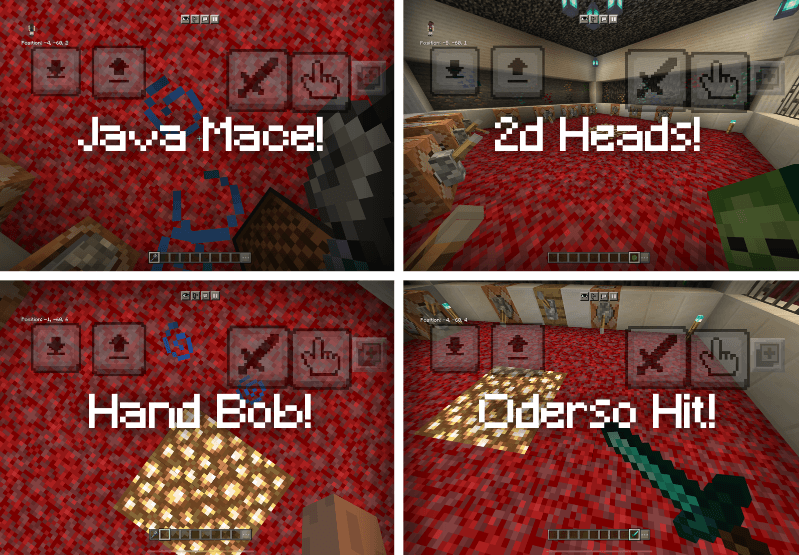
First theres minimal view bobbing version. Simply enable this from turning OFF view bobbing.
To get java view bobbing off version (sways with camera, but doesnt move when walking). Simply turn ON view bobbing and the effect will happen.
It also fixes items like wind charge to have the correct hitting animation
It also has the Java mace and fixed MAP hand animations
There are other subpacks aswell
- Default
- RTX Hand - Making your hand feel farther from your camera in first person, as if your using RTX.
- Vanilla hit, Want to change it up? Make the hitting animation to vanilla bedrock, instead of regular hitting
- Oderso Hit, Makes the hitting only do rotation, so it doesnt actually move, making it a bit cleaner.
- Position Hit, Want to change it up? Make the hitting only do position and never rotate.
- Hit V2 Make the hitting swing more downwards and rotate a bit more firm.
- 2D Item - Makes items like glass, mobheads, & spyglass 2d instead of 3d in first and 3rd person!
- Food Eating - Makes some foods modified to be an attachable, not the best remake for eating
- Hive hitting fix - adds player.entity so 1st person hitting with items I modified shows correctly on hive.
- Vanilla attachables - Normal bow, crossbow, trident, spyglass and shield
- There is alot of subpacks to choose from, chose wisely.
This only effects the hitting and first person.
NOTE: Capes or small/tall skins may break items, its a mojang problem. Nothing u can fix, and i created the first person hitting for all subpacks except hitting v2, subpacks like default, rtx, and 2d items try and replicate the hardcoded hitting, still may not be perfect but, its nothing you can really bicker about.
Better Items 설치 방법
With Millida Launcher
Install Millida Launcher
The launcher is free: download it at millida.net/launcher and sign in with any nickname.
Click “Install” on this page
The launcher opens and installs the resource pack for Minecraft 26.3–26.40 automatically.
Launch the game
A profile with it appears in the launcher: click “Play”.
Manually
Download the archive
Pick the file BetterItem1.4.mcpack (850 KB) for your game version. No need to unpack it.
Put it in the resourcepacks folder
The easiest way: “Options”, then “Resource Packs”, then “Open Pack Folder”, and drag the archive there.
Enable the pack
In the same window, move the pack to the right-hand “Selected” column and click “Done”.
버전
의존성 포함
| Minecraft | 로더 | 파일 | 날짜 | 작업 |
|---|---|---|---|---|
| 26.3 | — | BetterItem1.4.3.mcpack850 KB 4 |
FAQ
Which Minecraft versions does Better Items work on?
There are files for 26.3–26.40, 8 versions in total. The newest is 26.40.
Where can I download Better Items safely?
On this page: the file BetterItem1.4.mcpack (850 KB) is stored on Millida’s server, with no link shorteners. SHA-1 checksum: bc47f786798b7567d746ebb91a8b392ee38da3d5.
리뷰
Better Items의 첫 평가를 남겨 보세요



