
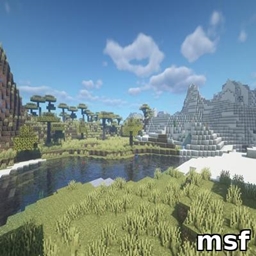
Minecraft 1.20.1, 1.21.1용 msf 셰이더
부드러운 파란 홍채 빛과 은은한 맥동을 만들어내는 가벼운 Minecraft 셰이더로, BSL보다 더 예쁘고 성능 친화적입니다.
msf 셰이더 정보
MSF - Lightweight & Beautiful Iris Glow Shader for Minecraft
MSF is a lightweight shader pack for Minecraft that adds a beautiful, smooth blue iris glow effect centered on the screen. Featuring subtle pulsing and soft lighting, this shader enhances visual immersion without sacrificing performance. It is optimized to run smoothly on most hardware, making it an excellent alternative to heavier shaders like BSL.
Features:
Smooth blue iris glow effect focused at screen center
Gentle pulsing animation for dynamic visuals
Soft glow lighting for natural appearance
Optimized for high FPS and low resource usage
Compatible with OptiFine and Fabric shader loaders
Easy to install and customize
Installation:
Place the MSF.zip file into your Minecraft shaderpacks folder.
Launch Minecraft with OptiFine or Fabric shader support.
Select "MSF" from the shaders menu.
Requirements:
Minecraft version 1.14 or higher
OptiFine or Fabric with shader support installed
Notes:
This shader focuses on minimalism and performance; it does not include complex lighting or shadows.
For best experience, use with lightweight resource packs.
msf 설치 방법
Install Millida Launcher
The launcher is free: download it at millida.net/launcher and sign in with any nickname.
Click “Install” on this page
The launcher opens and installs the shaders for Minecraft 1.19–1.21.8 automatically.
Launch the game
A profile with it appears in the launcher: click “Play”.
버전
의존성 포함
| Minecraft | 로더 | 파일 | 날짜 | 작업 |
|---|---|---|---|---|
| 1.19.3 | — | Byby_BedrockStyle_NonRT.zip3.3 KB |
FAQ
Which Minecraft versions does msf work on?
There are files for 1.19–1.21.8, 21 versions in total. The newest is 1.21.8.
How do I download msf?
With Millida Launcher: it installs msf into a modpack by itself, for the right game version and loader. The launcher is free.
리뷰
msf의 첫 평가를 남겨 보세요


