

- 다운로드
- 1 다운로드
- 조회수
- 34 조회수
- 업데이트됨
- 업데이트됨 04.09.2026
- 1.17 — 1.21.11
 Fabric
- 클라이언트
john
John is a really fast shader, high fps anywhere from intergrated graphics to high end GPU's! It looks best when you use PBR resource packs!
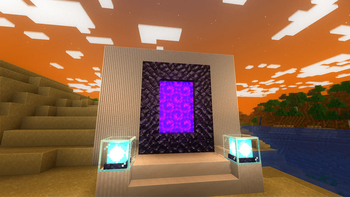
This shader has:
- waving plants/leaves/water
- simple specular sky reflections
- emmisive textures support
- colored shadows
- fog
- clouds
- outlines
- high fps on any machine
Iris only at the moment

john 설치 방법
With Millida Launcher
Install Millida Launcher
The launcher is free: download it at millida.net/launcher and sign in with any nickname.
Click “Install” on this page
The launcher opens and installs the shaders for Minecraft 1.17–1.21.11 automatically.
Launch the game
A profile with it appears in the launcher: click “Play”.
Manually
Install Iris
Without a shader mod the game cannot see shaders. Install it for the same Minecraft version.
Download the shader archive
Pick the file john v1.2.zip (10 KB) and do not unpack it.
Put it in the shaderpacks folder
“Options”, then “Video Settings”, then “Shader Packs”, then “Open Shader Pack Folder”, and drag the archive there.
Select the shaders
In the same window, click the pack name and “Apply”.
버전
의존성 포함
| Minecraft | 로더 | 파일 | 날짜 | 작업 |
|---|---|---|---|---|
| 1.17.1 | Iris | 1.17.110.1 KB 1 | ||
| 1.21.11 | Iris | 1.21.1110.1 KB | — | |
| 1.21 | Iris | 1.2110.1 KB | — | |
| 1.20.1 | Iris | 1.20.110.1 KB | — | |
| 1.19.2 | Iris | 1.19.210.1 KB | — | |
| 1.18.2 | Iris | 1.18.210.1 KB | — |
리뷰
john의 첫 평가를 남겨 보세요


