

Minecraft 1.20.1, 1.21.1용 EmberVoid Shader
EmberVoid 셰이더 – 높은 대비, 높은 성능 및 판타지 분위기
- 다운로드
- 2 다운로드
- 조회수
- 42 조회수
- 업데이트됨
- 업데이트됨 26.10.2026
- 1.19 — 26.3
 Fabric
- 클라이언트
EmberVoid redefines Minecraft's lighting by driving a striking visual wedge between day and night.
Designed to deliver a warm, sun-drenched summer ambiance rather than the typical soft spring aesthetic, EmberVoid combines high-contrast visuals with unique effects like dynamic heat haze, volumetric skies, and vivid atmospheric phenomena.
Built from the ground up for modern hardware, it packs advanced graphical features into an exceptionally high-performance package—with dedicated optimizations for Intel Arc graphics cards.

Key Features:
- Distinct Day & Night Contrast: Sunny, warm daytime atmospheres transitioning into deep, moody nights with high-contrast ambient lighting.
- Volumetric Dynamic Sky: Ray-marched volumetric clouds with Worley erosion, multiple scattering, adaptive step counts, dynamic sunset ember sparks, and realistic light lookup tables.
- Advanced Water Rendering: Screen-space reflections (SSR), caustics, depth-based shore foam with surf surges, dynamic wind/gust movement, and underwater godrays.
- Lighting & Atmospheric Depth: SSAO, aerial perspective, static distant shadows beyond standard render distance, terrain godrays, and colored Aurora Borealis that dynamically illuminates cloud layers.
- Unique Visual Effects: Integrated heat haze distortion, smooth foliage/grass shadows, and dynamic horizon coloration.
- Extreme Customization: Over 150 configurable menu options with full bilingual support (English & German).
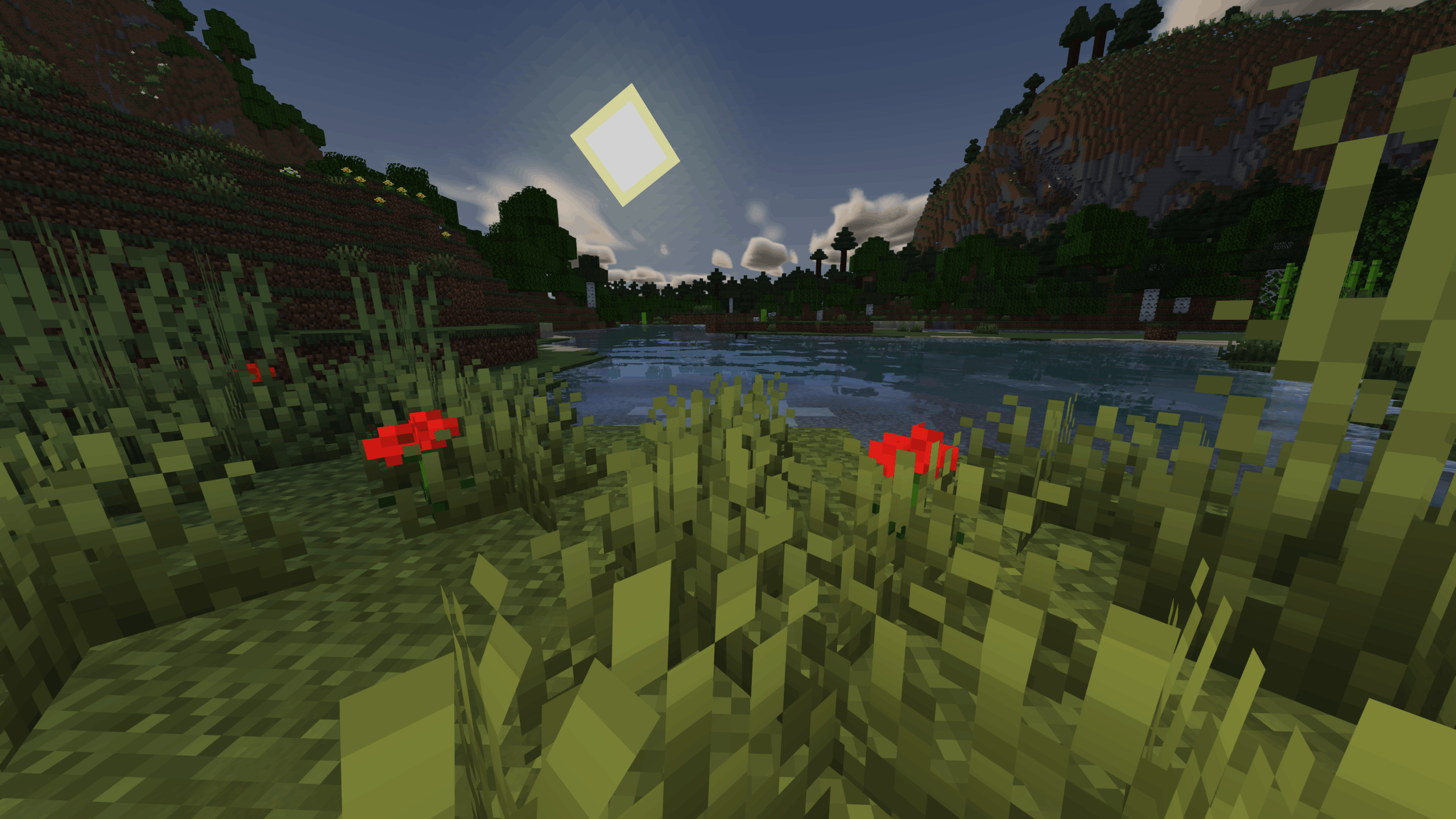
Hardware & Compatibility
- EmberVoid is engineered for extreme efficiency, targeting high frame rates even at steep render distances.
- Primary Platform: Designed exclusively for Iris Shader Loader. (OptiFine is currently unsupported).
- Intel Arc Optimized: Specifically tuned for Intel Xe-HPG architectures (handling register pressure and math pipeline optimization). Smooth performance tested up to 32 chunks (140–210 FPS on Intel Arc B580).
- Supported Dimensions: Overworld, Nether(WIP), and The End(WIP).
NVIDIA & AMD: Fully functional across all modern GPUs, though primary hardware tuning focuses on Intel Arc.

EmberVoid Shader 설치 방법
With Millida Launcher
Install Millida Launcher
The launcher is free: download it at millida.net/launcher and sign in with any nickname.
Click “Install” on this page
The launcher opens and installs the shaders for Minecraft 1.19–26.3 automatically.
Launch the game
A profile with it appears in the launcher: click “Play”.
Manually
Install Iris
Without a shader mod the game cannot see shaders. Install it for the same Minecraft version.
Download the shader archive
Pick the file EmberVoid-0.6.0.zip (1.8 MB) and do not unpack it.
Put it in the shaderpacks folder
“Options”, then “Video Settings”, then “Shader Packs”, then “Open Shader Pack Folder”, and drag the archive there.
Select the shaders
In the same window, click the pack name and “Apply”.
버전
의존성 포함
| Minecraft | 로더 | 파일 | 날짜 | 작업 |
|---|---|---|---|---|
| 26.3 | Iris | 26.31.8 MB | ||
| 26.2 | Iris | 26.2764 KB | ||
| 26.1 | Iris | 26.1758 KB | ||
| 1.21.11 | Iris | 1.21.11758 KB | ||
| 1.21 | Iris | 1.21758 KB | ||
| 26.2 | Iris | 26.2758 KB | — |
FAQ
Which Minecraft versions does EmberVoid Shader work on?
There are files for 1.19–26.3, 29 versions in total. The newest is 26.3.
What do I need to run EmberVoid Shader?
Shaders are loaded through Iris: without it the game cannot see them.
How do I download EmberVoid Shader?
With Millida Launcher: it installs EmberVoid Shader into a modpack by itself, for the right game version and loader. The launcher is free.
리뷰
EmberVoid Shader의 첫 평가를 남겨 보세요


