
The Enchant Box 플러그인 정보
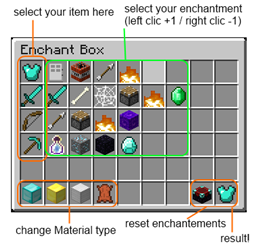
You're a server admin or moderator and tired of having to enchant items with enchantment plugins based on commands, you need too much time to add multiple enchantments on an item to one of your player has lost in a bug .. . Stop looking the Enchant Box is plugin you need, just use one command :/ebox and the Enchanting Box will appear !
Features
- fast and easy way to make multiple enchantments on items.
- respect the vanilla enchantments restrictions.
- customise the enchant icons in the config with the item ID you want.
- icons display the corresponding enchantments and the current level.
Command & Usage
- /ebox : open the Enchant Box.
Permission
- EnchantBox.use
Help
ToDo
- unsafe enchantment mode
Note: Sources are package with the .jar
The Enchant Box 설치 방법
A server on Paper or Spigot
The plugin runs on the server core; players do not need to install anything.
File goes into the plugins folder
Download the file EnchantBox.jar (29 KB) and put it into the server’s plugins folder.
Restart the server
On startup the plugin creates its own settings folder in plugins.
Use the “To server” button
On Millida Hosting, the button at the top of the page uploads the file to your server and restarts it for you.
버전
의존성 포함
| Minecraft | 로더 | 파일 | 날짜 | 작업 |
|---|---|---|---|---|
| — | — | The Enchant Box 1.428.8 KB | ||
| — | — | The Enchant Box 1.2.112.3 KB | ||
| — | — | The Enchant Box 1.0 Alpha9.4 KB |
FAQ
Do players need to install The Enchant Box?
No, the plugin goes only on the server, into the plugins folder: players do not need to download anything.
Where can I download The Enchant Box safely?
On this page: the file EnchantBox.jar (29 KB) is stored on Millida’s server, with no link shorteners. SHA-1 checksum: 2715b4cff2f50377ca9893f760c6d664f9ddcfae.
리뷰
The Enchant Box의 첫 평가를 남겨 보세요


