
ScriptCraft 플러그인 정보
ScriptCraft lets you create your own mods using Javascript. ScriptCraft uses the CommonJS module system (the same module loading system used by Node.js) so managing your code will be easier. You can also run Javascript code on the in-game command prompt or extend the game by writing plugins that use the Bukkit API in javascript.
Examples:
At the command prompt type:
/js 1 + 1 > 2
... Any javascript code can be evaluated at the in-game command prompt.
/js alert( 'Hello ' + self.name ) > Hello walterh
... Special bukkit variables are available via javascript , for example the server object is the instance of org.bukkit.Server . Writing event handlers in ScriptCraft is relatively easy...
events.blockBreak( function( event ) { echo(event.player, 'You broke a block!' ); }); events.playerJoin( function( event ) { echo( event.player, 'Welcome to the server!' ); });
... Any bukkit event can be handled. The above code prints the name of any player who breaks a block in the game. ScriptCraft comes with some built-in functions to make building easier...
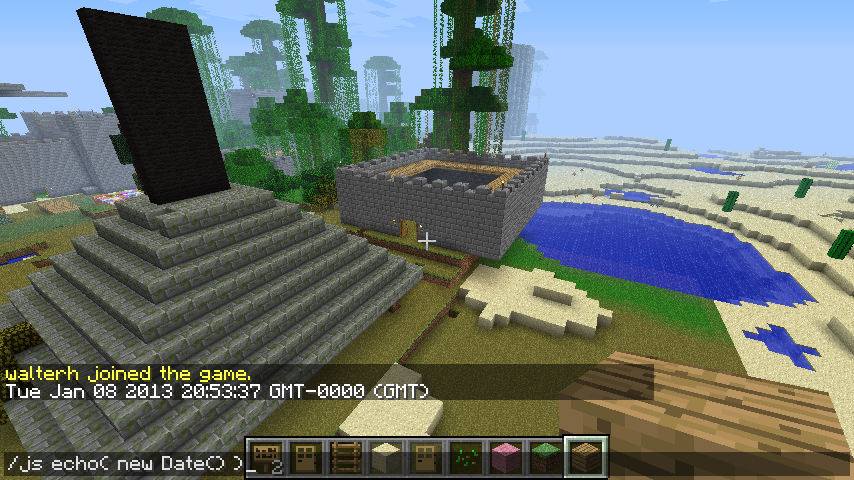
/js box( blocks.wool.black, 4, 9 , 1)
... creates a 2001 Monolith 4 blocks wide by 9 blocks high by 1 block long.
The full bukkit API can be used via javascript to write new mods. Yes - you can write bukkit plugins in javascript! See ScriptCraft on GitHub for more information. Full documentation is available on the github docs page.
A Youtube Video demonstrating Exploding Arrows in ScriptCraft A Youtube video demonstrating a mini-game (SnowBall Fight)
There's more information about ScriptCraft on my blog
ScriptCraft 설치 방법
A server on Paper or Spigot
The plugin runs on the server core for Minecraft 1.8–1.12; players do not need to install anything.
File goes into the plugins folder
Download the file scriptcraft.jar (165 KB) and put it into the server’s plugins folder.
Restart the server
On startup the plugin creates its own settings folder in plugins.
Use the “To server” button
On Millida Hosting, the button at the top of the page uploads the file to your server and restarts it for you.
Minecraft 1.12 runs on Java 8: with a different Java version the game may close right after launch.
버전
의존성 포함
| Minecraft | 로더 | 파일 | 날짜 | 작업 |
|---|---|---|---|---|
| 1.9 | — | scriptcraft.jar165 KB | ||
| — | — | ScriptCraft 2.0.2103 KB |
FAQ
Which Minecraft versions does ScriptCraft work on?
There are files for 1.12, 1.11, 1.10, 1.9, 1.8.1, 1.8. The newest is 1.12.
Do players need to install ScriptCraft?
No, the plugin goes only on the server, into the plugins folder: players do not need to download anything.
Which Java does ScriptCraft need?
Minecraft 1.12 runs on Java 8. If the game closes right after launch, the usual cause is the wrong Java version in the profile settings.
Where can I download ScriptCraft safely?
On this page: the file scriptcraft.jar (165 KB) is stored on Millida’s server, with no link shorteners. SHA-1 checksum: 345d602601fd24fc9587bdd8c739d6c84e8767a5.
리뷰
ScriptCraft의 첫 평가를 남겨 보세요



