

Description
RankPrefix+ is a powerful Chat/Rank/Scoreboard Manager which allows you to make your Chat a bit more fancy and also apply the Prefix and Suffix of the Ranks on your Server to your Player's TAB-List and NameTag. But since the Plugin is that big and advanced, its Config may seem a bit complicated, but dont worry! There is a documentation on this Page a bit further down.
Oh, and it also allows your Players to use Color codes with & in the Chat.
Example
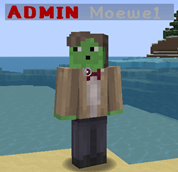
Using a Permissions Plugin and want to use the existing Groups from your Permissions Plugin? Here is an Example Config which is configured to simply use your existing Groups. But keep in mind that this Config requires Vault to work!

Commands/Permissions
Command Permission Description
/rpreload RankPrefixPlus.reload Allows you to reload the Config
RankPrefixPlus.chatcolors Allows you to use Color Codes in Chat
Configuration
options: auto-update: true ## Whether this Plugin should auto update use-scoreboard-teams: true ## Enable this to make the set Prefix appear in the TAB-List and above Player's names update-delay-in-seconds: 5 ## How frequent it will update the Scoreboard. variables: afk: afk: '&eAFK' ## This will replace {AFK} if the Player is AFK not-afk: '' ## This will replace {AFK} if the Player is not AFK notifications: name-in-chat: highlight: true ## Whether it should highlight mentioned Players (example: @Moewe1) sound: enabled: true ## Whether it should play a sound to the mentioned Player sound: NOTE_PLING ## Choose which sound to play chat: layout: '&7{PREFIX}{PLAYER}{SUFFIX}: {MESSAGE}' ## The Layout in the Chat. Check the Variables section for all Variables you can use. per-rank-layout: false ## Specify whether the individual Layout for Ranks will be used use-layout: true ## Whether it should use this Layout. force-lower-case: false ## Whether it should force the Message to be lower Case (Preventing CAPS) world-specific-layout: enabled: false ## Whether it should use a different chat layout depending on the World you are in. world: '&7{PREFIX}{PLAYER}{SUFFIX}: {MESSAGE}' ## Chat Layout in world "world" world_nether: '&7{PREFIX}{PLAYER}{SUFFIX}: {MESSAGE}' ## Chat Layout in world "world_nether" world_the_end: '&7{PREFIX}{PLAYER}{SUFFIX}: {MESSAGE}' ## To add a Chat Layout to more Worlds simply add their Name in here along with the Format local: enabled: false ## Whether the local Chat should be enabled per-world: false ## Whether each World has its own Chat radius: -1 ## The radius in which you can talk. Set it to -1 for an unlimited Radius sound: enabled: true ## Whether it should play a sound to someone who sends a message sound: CLICK ## Choose which sound to play ranks: default: ## The ID of the rank prefix: '&7[&eMember&7] ' ## The Chat-Prefix suffix: '' ## The Chat-Suffix scoreboard: enabled: true ## Whether this rank uses the scoreboard. prefix: '&7' ## The Scoreboard-Prefix suffix: '' ## The Scoreboard-Suffix tab-priority: 1 ## The Priority of this Rank in the TAB List. (1-52) The lower the priority the further down Players with this Rank will appear in the TAB List required-permission: '' ## The Permission required for this Rank. Make it '' to require no permission. message-color: '&7' ## The color in which the Message will be displayed. bypass-OP: false ## Specify whether this Group will bypass OP meaning it wont be assigned to OPs unless they have the permission for this chat-layout: '&7{PREFIX}{PLAYER}{SUFFIX}: {MESSAGE}'Rank admin: prefix: '&7[&cAdmin&7] ' suffix: '' scoreboard: enabled: true prefix: '&c' suffix: '' tab-priority: 10 ## Since this Rank has a higher Priority it will appear closer to the top of the TAB List required-permission: 'RankPrefixPlus.admin' message-color: '&7' ## The color in which the Message will be displayed. bypass-OP: true chat-layout: '&7{PREFIX}{PLAYER}{SUFFIX}: {MESSAGE}' order: ## The order in which the ranks exist. - admin ## Make sure to arrange them like this: HIGHEST - LOWEST - default
Variables
Those Variables can be used in the Chat as well as in the Scoreboard Prefix/Suffix
Variable Description Required Plugins
{PREFIX} Will be replaced with the Players Group Prefix None
{SUFFIX} Will be replaced with the Players Group Suffix None
{MESSAGE} Will be replaced with the message the Player sent None
{PLAYER} Will be replaced with the Players Username/Nickname None
{XPLEVEL} Will be replaced with the Players XP-Level None
{KILLS} Will be replaced with the Players Amount of killed Players None
{DEATHS} Will be replaced with the Players Amount of Deaths None
{KDR} Will be replaced with the Players Kill-Death-Ratio None
{MONEY} Will be replaced with your Balance Vault
{FACTION} Will be replaced with your Factions name Factions, MCore
{PRISONRANK} Will be replaced with your current Rank in PrisonRankup PrisonRankup
{CHATTITLE} Will be replaced with one of your Titles from ChatTitle ChatTitle
{RANK} Will be replaced with the name of your current Permissions Group Vault
{RANK-PREFIX} Will be replaced with the Prefix of your current Permissions Group Vault
{RANK-SUFFIX} Will be replaced with the Suffix of your current Permissions Group Vault
{AFK} Will be replaced with the AFK Status of a Player Essentials
{EZRANK} Will be replaced with your current Rank according to EzRanksLite EZRanksLite
{EZPRESTIGE} Will be replaced with your current Prestige Tag from EZPrestige EZPrestige
{TOWNY} Will be replaced with the Tag of your Town Towny
{ISLAND-LEVEL} Will be replaced with the Level of your Island uSkyBlock
{SLIMEFUN-TITLE} Will be replaced with your Slimefun Title Slimefun
[unicode: <hexadecimal> This will be replaced with the Unicode represented by the specified Hexadecimal. A full list of all supported Unicodes None
Feel free to suggest more Variables in the Comments.
Source Code
You want to take over this Project? Start so by submitting Pull Requests on GitHub!
Check out RankPrefix+'s Source Code, if you want to keep this Project alive, maybe even consider contributing to it by making a Pull Request!
Auto-Updater and Metrics
All my Plugins are using an Auto-Updater to make sure, you're always using the latest and hopefully most bug free version of my Plugin. If you don't want this Plugin to be auto-updated, you can turn it off in the config file at "options -> auto-update: true/false"
They also use a Metrics-System which collects the following Informations:
A unique identifier The server's version of Java Whether the server is in offline or online mode The plugin's version The server's version The OS version/name and architecture The core count for the CPU The number of players online The Metrics version Opting out of this service can be done by editing plugins/Plugin Metrics/config.yml and changing opt-out to true.
RankPrefix+ 설치 방법
A server on Paper or Spigot
The plugin runs on the server core for Minecraft 1.9–1.10; players do not need to install anything.
File goes into the plugins folder
Download the file RankPrefix__v1.7.2.jar (23 KB) and put it into the server’s plugins folder.
Restart the server
On startup the plugin creates its own settings folder in plugins.
Use the “To server” button
On Millida Hosting, the button at the top of the page uploads the file to your server and restarts it for you.
Minecraft 1.10 runs on Java 8: with a different Java version the game may close right after launch.
버전
의존성 포함
| Minecraft | 로더 | 파일 | 날짜 | 작업 |
|---|---|---|---|---|
| 1.9 | — | RankPrefix+ v1.7.223.5 KB |
FAQ
Which Minecraft versions does RankPrefix+ work on?
There are files for 1.10, 1.9. The newest is 1.10.
Do players need to install RankPrefix+?
No, the plugin goes only on the server, into the plugins folder: players do not need to download anything.
Which Java does RankPrefix+ need?
Minecraft 1.10 runs on Java 8. If the game closes right after launch, the usual cause is the wrong Java version in the profile settings.
Where can I download RankPrefix+ safely?
On this page: the file RankPrefix__v1.7.2.jar (23 KB) is stored on Millida’s server, with no link shorteners. SHA-1 checksum: 13994c2d02513aa4d93daf162064965c487c6a55.
리뷰
RankPrefix+의 첫 평가를 남겨 보세요


