
Minecraft용 RainbowChat 플러그인
aciid가 게임 내 플레이어 이름을 무지개 색으로 표시합니다
RainbowChat 플러그인 정보
RainbowChat by aciid
Commands: click here Config: click here
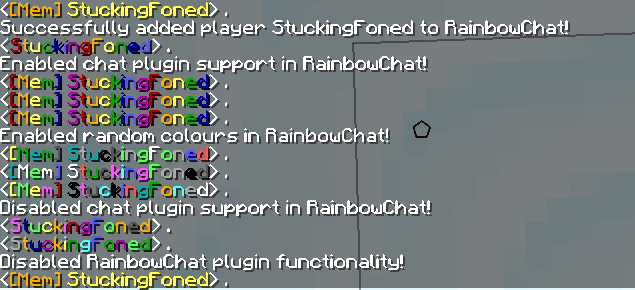
Give players a rainbow coloured name in game via permissions or commands.
The plugin RainbowChat was a remake of daviga404's original plugin but has since been modified so much it's virtually a different plugin. The plugin's purpose is to colour a players in game name and has a few different features, you can either define the colours and what order you'd like to use them in or you can enable a random mode which will make a players name change colour every time they send a message. Note this plugin will only affect the main chat messages. You can also use a custom permission to give players the rainbow coloured name!
Videos: (PM me if you want me to list your video about this plugin) https://www.youtube.com/watch?v=xT31_1Xsl3M
Changelog:
Quote from RainbowChat v0.6:
REGENERATE YOUR CONFIG!!!
+Added option to enable support for chat managers/plugins like PEX This will parse a player's display name including prefix/suffix/etc, removing any colours/formatting from chat plugins and then colour the name and output it with coloured prefix/suffix/etc +Added command to toggle this chat support /rainbowchat chat|pex|chatsupport - Requires OP
Quote from RainbowChat v0.5:
REGENERATE YOUR CONFIG!!!
Changed to allow more permissions (customizable)
- rainbowchat.rainbow
- rainbowchat.random
Also the "Random Colours" option obviously only affects players listed in the config (else use permissions)
Quote from RainbowChat v0.4:
- Added random colours feature
- Added new commands: toggle/enable/disable/on/off/list/random
- Added to mcstats.org's Plugin Metrics: CLICK HERE
Quote from RainbowChat v0.3:
- Added chat handler priority option
Quote from RainbowChat v0.2:
- Added permissions option and custom permission
- Added basic add,del,list commands
- Removed all code except name colouring method
Quote from RainbowChat v0.1:
RainbowChat by daviga404
RainbowChat 설치 방법
A server on Paper or Spigot
The plugin runs on the server core; players do not need to install anything.
File goes into the plugins folder
Download the file RainbowChat_0.6.zip (23 KB) and put it into the server’s plugins folder.
Restart the server
On startup the plugin creates its own settings folder in plugins.
Use the “To server” button
On Millida Hosting, the button at the top of the page uploads the file to your server and restarts it for you.
버전
의존성 포함
| Minecraft | 로더 | 파일 | 날짜 | 작업 |
|---|---|---|---|---|
| — | — | RainbowChat_0.623.4 KB |
FAQ
Do players need to install RainbowChat?
No, the plugin goes only on the server, into the plugins folder: players do not need to download anything.
Where can I download RainbowChat safely?
On this page: the file RainbowChat_0.6.zip (23 KB) is stored on Millida’s server, with no link shorteners. SHA-1 checksum: 91deb50fcd7fa29ecf17eab513336811f57f4ef8.
리뷰
RainbowChat의 첫 평가를 남겨 보세요


