
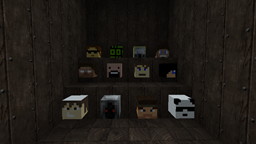
Face your Skull
With MySkull you can give any Skull a custom face using a very simple command. For the first, you place the skull, then you target the crossfade on the skull and type in the command /myskull set <playername>. Now the skull takes the face from the given player.
Why it's useful?
For example: You have a Minecraft Server with a hotel for new players. For better assignment you can put a custom Skull on every room door in the hotel ;) Now you can see, which players are currently living in the hotel rooms.
Available Commands
Currently only one command is included.
- /myskull set <player>
Available Permissions
One command, one permission ... ;)
- myskull.set
Planned features
- The command /myskull create [player] for creating a skull (on targeted position)
New ideas are welcome! :-) Enjoy this plugin!
MySkull 설치 방법
A server on Paper or Spigot
The plugin runs on the server core; players do not need to install anything.
File goes into the plugins folder
Download the file MySkull.zip (5 KB) and put it into the server’s plugins folder.
Restart the server
On startup the plugin creates its own settings folder in plugins.
Use the “To server” button
On Millida Hosting, the button at the top of the page uploads the file to your server and restarts it for you.
버전
의존성 포함
| Minecraft | 로더 | 파일 | 날짜 | 작업 |
|---|---|---|---|---|
| — | — | MySkull 0.24.7 KB |
FAQ
Do players need to install MySkull?
No, the plugin goes only on the server, into the plugins folder: players do not need to download anything.
Where can I download MySkull safely?
On this page: the file MySkull.zip (5 KB) is stored on Millida’s server, with no link shorteners. SHA-1 checksum: d752606d72fbf1dd57f1712a66558a8374f58e5f.
리뷰
MySkull의 첫 평가를 남겨 보세요


