

Minecraft 1.20.1, 1.21.1용 LPC Minimessage - Chat Formatter 플러그인
LuckPerms를 위한 Minimessage 지원 채팅 포맷팅 플러그인.
 Bukkit
 Folia
Folia Paper
Paper Purpur
 Spigot
LPC – LuckPerms Chat Formatter ✨
A flexible chat formatting plugin with MiniMessage support for LuckPerms
Modern chat formatting powered by MiniMessage, full LuckPerms metadata support, group/track formats, and PlaceholderAPI.

🧩 Compatibility
Minecraft - 26.1.2 Server - Paper (recommended) or Spigot Java - 25+

🔧 Requirements
- LuckPerms (Required) – Permissions plugin
- PlaceholderAPI (Optional) – Additional placeholders
✅ Features
Formatting
- Full MiniMessage support, with group- and track-specific formats
- Optional PlaceholderAPI integration and [item] placeholder (hover tooltip on Paper)
- Per-rank message styling and per-rank gradient names ({gradient-name})
- Per-world toggle via disabled-worlds
Social (on by default)
- @Mention pings – highlight online names + sound/action-bar ping (Paper)
- Emoji shortcuts – e.g. :heart: → ❤ (fully configurable)
- Clickable links – URLs become openUrl links on Paper, coloured on Spigot
Moderation (off by default)
- Anti-spam cooldown, repeated-message blocker, caps filter, profanity mask, anti-advertising
- Per-player mute (/lpc mute) + LuckPerms mute node for punishment plugins
Server messages (off by default)
- MiniMessage join / quit / first-join / death messages
Quality of life
- /lpc reload · version · help · mute · unmute with tab completion
- Built-in Modrinth update checker
- Safe by design – player messages can never inject click/hover/command components
- Works on both Paper (Adventure rendering) and Spigot (legacy fallback)
⌨️ Commands
Command - Permission - Description
/lpc reload - lpc.reload - Reload the configuration /lpc version - – - Show the installed version /lpc help - – - List available commands /lpc mute [duration] - lpc.mute - Mute a player (e.g. 10m, 2h; omit for permanent) /lpc unmute - lpc.mute - Unmute a player
🧑💼 Permissions
Permission - Default - Description
lpc.reload - op - Reload the configuration lpc.chatcolor - false - Use colour codes & cosmetic MiniMessage tags in chat lpc.itemplaceholder - false - Use the [item] placeholder in chat lpc.update - op - Receive an update notification on join lpc.emoji - true - Use emoji shortcuts (only enforced if emoji.require-permission) lpc.chatlinks - true - Have URLs turned into clickable links lpc.mention.exempt - false - Opt out of receiving mention pings lpc.mute - op - Use /lpc mute and /lpc unmute lpc.muted - false - Marks a player as muted (usually set by a punishment plugin) lpc.bypass.spam / .repeat / .caps / .profanity / .advert - op - Bypass the matching moderation filter
ℹ️ Even with lpc.chatcolor, only cosmetic tags (colours, decorations, and optionally gradients/rainbow) are honoured in player messages. Interactive tags (click, hover, insertion, …) are always stripped.
⚙️ Configuration (config.yml)
Main chat format (MiniMessage!)
chat-format: "{prefix}{name} » {message}"
Per-group formats (optional)
group-formats:
default: "[User] {name} » {message}"
admin: "[Admin] {name} » {message}"
Per-track formats (optional) – groups take priority over tracks
track-formats:
staff_track: "[Staff] {name} » {message}"
Enable the [item] placeholder
use-item-placeholder: true
Allow / for players with lpc.chatcolor
allow-gradient-tags: true
Worlds where LPC does NOT format chat
disabled-worlds: []
Check Modrinth for updates on startup
update-checker: true
Reload message
reload-message: "Reloaded LPC configuration!"
🪄 Available Placeholders
Placeholder - Description
{message} - The chat message (inserted safely, never re-parsed) {name} - Player's name {displayname} - Display name / nickname {world} - Player's current world {prefix} / {suffix} - Highest priority prefix / suffix {prefixes} / {suffixes} - All prefixes / suffixes, highest priority first {username-color} / {message-color} - Colour values from LuckPerms meta
ℹ️ All colour values (prefix, suffix, etc.) must be in MiniMessage format – no legacy codes (&a, §b).
🚀 Installation
- Stop your server
- Drop LPC-.jar into your /plugins folder
- Start the server to generate config.yml
- Edit the config to your liking
- Run /lpc reload to apply changes ✅
🛠️ Building
./gradlew shadowJar
output: build/libs/LPC-.jar
Requires JDK 25.
📌 Notes
- Not affiliated with LuckPerms – please do not contact the LuckPerms author for support.
- Legacy version available at: GitHub Legacy LPC
📸 Previews
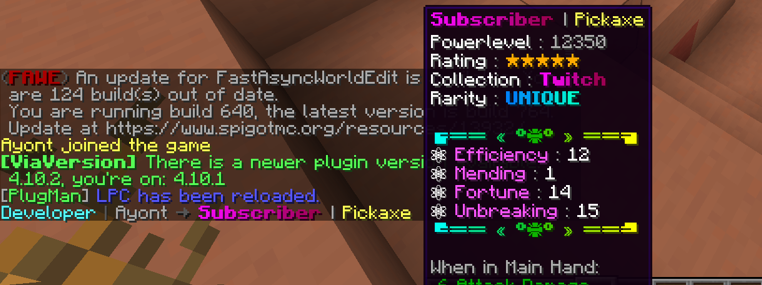
Chat Format Example

[ITEM] Placeholder Example
🚀 Installation
- Stop your server
- Place the LPC.jar into your /plugins folder
- Start the server to generate configuration files
- Edit the config.yml to your liking
- Use /lpc reload to apply your changes ✅
LPC Minimessage - Chat Formatter 설치 방법
A server on Paper, Purpur, Spigot, Bukkit or Folia
The plugin runs on the server core for Minecraft 1.20–26.2; players do not need to install anything.
File goes into the plugins folder
Download the file LPC-4.4.0.jar (758 KB) and put it into the server’s plugins folder.
Restart the server
On startup the plugin creates its own settings folder in plugins.
Use the “To server” button
On Millida Hosting, the button at the top of the page uploads the file to your server and restarts it for you.
버전
의존성 포함
| Minecraft | 로더 | 파일 | 작업 |
|---|---|---|---|
| 26.2 | Bukkit, Folia, Paper, Purpur, Spigot | 26.2758 KB 6 | |
| 26.1 | Bukkit, Folia, Paper, Purpur, Spigot | 26.1758 KB | |
| 1.21.11 | Bukkit, Folia, Paper, Purpur, Spigot | 1.21.11758 KB 2 | |
| 1.21 | Bukkit, Folia, Paper, Purpur, Spigot | 1.21758 KB | |
| 1.20.1 | Bukkit, Folia, Paper, Purpur, Spigot | 1.20.1758 KB 3 |
리뷰
LPC Minimessage - Chat Formatter의 첫 평가를 남겨 보세요



