
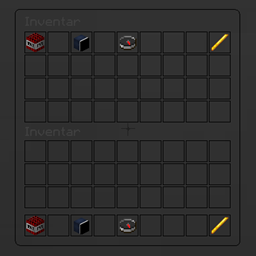
Minecraft 1.10용 InvSee 플러그인
플레이어가 치트를 썼는지 확인하고 싶으신가요? 그렇다면 이 플러그인을 받아서 확인해보세요!
This is a Plugin for Admins/Owner. With this Plugin you can see what in Inventorys other Players is.
Permissions:
invsee.use
Commands:
/invsee <Player-Name>
If you still have suggestions what you can still improve, simply in the comments with it.
InvSee 설치 방법
A server on Paper or Spigot
The plugin runs on the server core for Minecraft 1.9–1.10; players do not need to install anything.
File goes into the plugins folder
Download the file InvSee.jar (6 KB) and put it into the server’s plugins folder.
Restart the server
On startup the plugin creates its own settings folder in plugins.
Use the “To server” button
On Millida Hosting, the button at the top of the page uploads the file to your server and restarts it for you.
Minecraft 1.10 runs on Java 8: with a different Java version the game may close right after launch.
버전
의존성 포함
| Minecraft | 로더 | 파일 | 날짜 | 작업 |
|---|---|---|---|---|
| 1.9 | — | InvSee5.6 KB |
리뷰
InvSee의 첫 평가를 남겨 보세요
댓글 0
댓글을 작성하려면 로그인하세요로그인


