

Minecraft 1.20.1, 1.21.1용 Donut Pay 플러그인
Minecraft 서버를 위한 즉각적인 경제 업그레이드. 표준 경제를 현대적이고 사용자 지정 가능한 결제 시스템으로 즉시 전환하세요.
 Bukkit
 Paper
Paper Purpur
 Spigot
Donut Pay
Instant Economy Upgrade for your Minecraft Server. Turn your standard economy into a modern, customizable payment system instantly. #

Preview
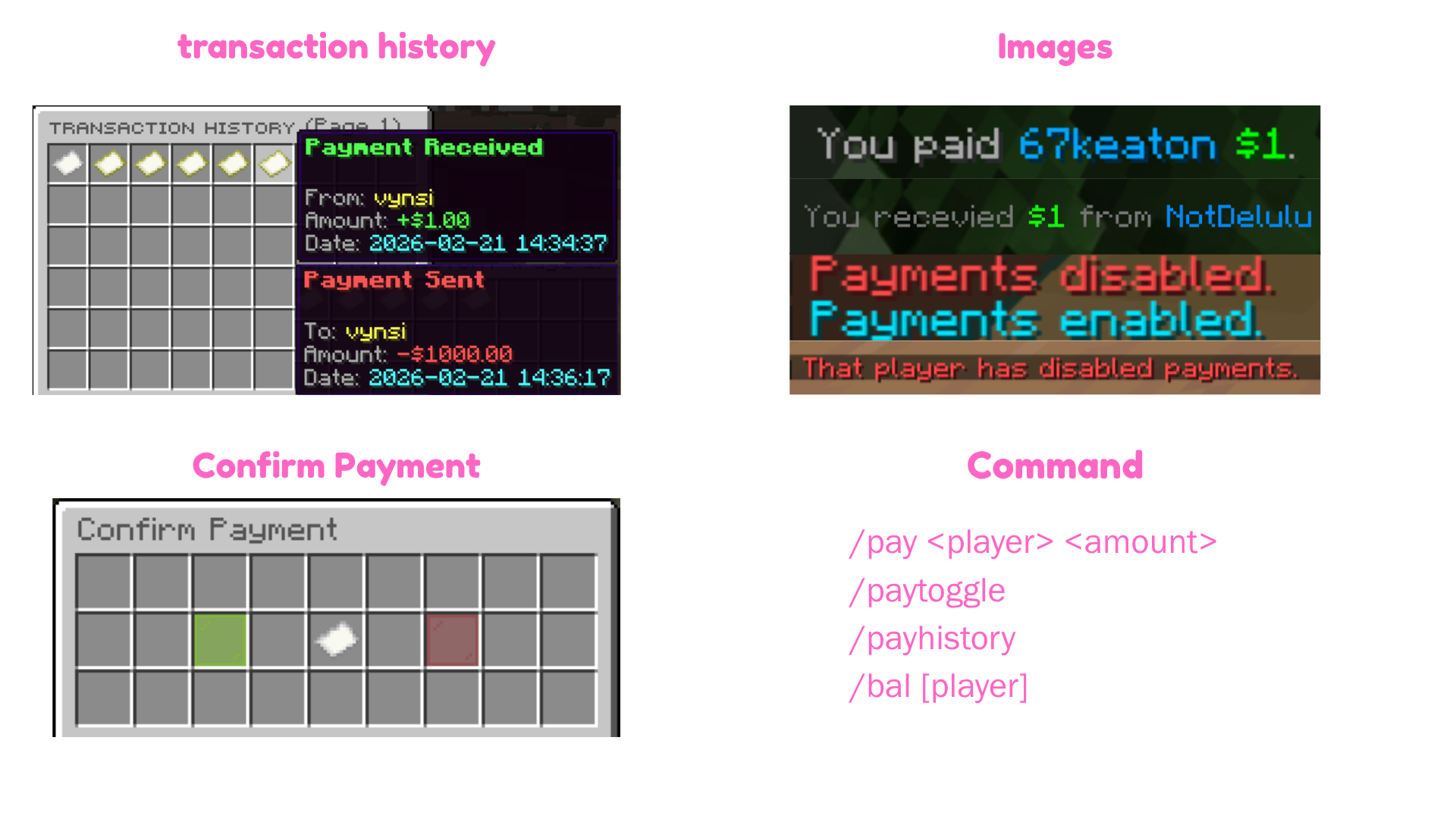
📥 Installation
Prerequisites: Ensure you have Vault and EssentialsX or something installed on your server.
- Download DonutPay.jar.
- Upload it to your /plugins folder.
- Restart your server.
- Done! Start managing transactions with ease.

Example GUI Command: /payhistory
⚙️ Configuration
The config.yml is generated automatically on first run:
DonutPay Configuration
Author: NotDelulu
Version: 2.3
Date: 10/5/2026
settings:
Maximum number of transactions to keep per player
history-limit: 999
Should we play a sound when someone receives money?
play-sound: true
Should payment confirmations be ON by default for all players?
default-confirm: true
gui:
The base title of the inventory (Page numbers will be added automatically)
title: "&8ᴛʀᴀɴsᴀᴄᴛɪᴏɴ ʜɪsᴛᴏʀʏ"
Must be a multiple of 9 (e.g., 27, 36, 45, 54). 54 is recommended.
size: 54 items: sent-material: "PAPER" received-material: "MAP" back-material: "ARROW" back-name: "&c&lPrevious Page" next-material: "ARROW" next-name: "&a&lNext Page"
confirm-gui:
Global setting to enable/disable the Confirm GUI system server-wide
enabled: true
Title of the confirmation menu
title: "&8Confirm Payment"
🎮 Commands & Usage
1. Pay a Player
- Send money using smart shorthands (e.g., 1.5k, 2m).
- Command: /pay
- Permission: donutpay.pay
2. View Transaction History
- Open an interactive, paginated GUI of your past sent/received payments.
- Command: /payhistory (Alias: /phistory)
- Permission: donutpay.history
3. Toggle Incoming Payments
- Control your privacy by blocking incoming payments from other players.
- Command: /paytoggle
- Permission: donutpay.toggle
4. Check Balances
- Quickly view formatted balances for yourself or others.
- Command: /bal [player]
- Permission: donutpay.bal / donutpay.bal.other
- Pull requests are welcome. For major changes, please open an issue first
- to discuss what you would like to change.
Please make sure to update tests as appropriate.
🛠 Features & Technical Info
Core Features:
- Number Shorthands: Players type 1.5k instead of 1500, or 2m for 2,000,000!
- Hex Color Engine: Fully supports modern #RRGGBB and &#RRGGBB colors in chat, GUIs, and Action
Bars.
- Action Bar Alerts: Non-intrusive action bar popups mirroring customized chat messages.
- PlaceholderAPI Hook: Use PAPI placeholders seamlessly inside your messages.yml.
Technical:
- Built for Spigot, Paper, and Purpur (1.13 - 1.21.11).
- Lightweight asynchronous transaction logging (history.yml).
- Fast UUID-based player toggle storage (userdata.yml).
Thank for support
Made with ❤️ by NotDelulu and Ly_No
Donut Pay 설치 방법
A server on Paper, Purpur, Spigot or Bukkit
The plugin runs on the server core for Minecraft 1.8–1.21.11; players do not need to install anything.
File goes into the plugins folder
Download the file DonutPay-2.1.1.jar (25 KB) and put it into the server’s plugins folder.
Restart the server
On startup the plugin creates its own settings folder in plugins.
Use the “To server” button
On Millida Hosting, the button at the top of the page uploads the file to your server and restarts it for you.
Minecraft 1.21.11 runs on Java 21: with a different Java version the game may close right after launch.
버전
의존성 포함
| Minecraft | 로더 | 파일 | 작업 |
|---|---|---|---|
| 1.12.2 | Bukkit, Paper, Purpur, Spigot | 1.12.225.1 KB 1 |
리뷰
Donut Pay의 첫 평가를 남겨 보세요


