
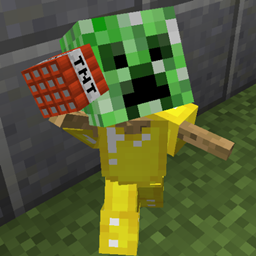
Armor Stand Edit 플러그인 정보
Allows players in survival to easily edit armor stand pose and attributes. I hated that there was no way to edit armor stands without using command blocks or giving players permission to use dangerous(if given to everyone) cumbersome commands. That is why I created this tool!
Features
- Easily edit armor stands with no commands
- Quick to learn
- Rotate all armorstand parts along each axis.
- Rotate the entire armorstand after it is placed.
- Open up the armorstand's inventory to place items where they wouldn't normally go. (Allows for dual wielding, banners on heads, pumpkins in had, etc.)
- Crouch+Scroll to change axis on the fly without opening the menu.
- Fine adjustment allows you to fine tune a body part's position while coarse adjustment allows you to quickly get it close to the intended position.
- Toggle show arms, invisibility, baseplate, normal/small size, and gravity.
- Move armor stands around to get them exactly where you want them.
- Copy settings of one armor stand and paste them to another.
- Survival-friendly pasting: It does not copy/paste/duplicate items unless the player is in creative mode.
- Store the copied settings in one of 9 copy slots.
- Name armor stands with name tags, just like with vanilla mobs.
- Now with colored names!
- Respects protection plugins such as Worldguard, Towny, GriefPrevention and Residence.
How to use
- Hold the editing tool in your main hand. (flint by default)
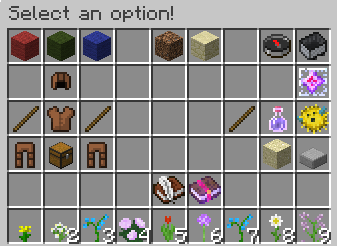
- Left/right click away from an armor stand to open menu.
- Select the labeled menu options.
- Left/Right Click the armor stand with the tool in hand to apply those options.
Tips
- Shift+scroll wheel up/down changes axis quickly
- Remeber that when rotating body parts left click rotates one direction and right clicking the armor stand rotates it the opposite way.
- Coarse adjustment rotates body parts quickly, while fine adjustment allows you fine-tune the position once it is close.
- When you copy armor stand settings, the tool automatically switches to paste mode
- Other ArmorStands getting in the way? Press the switch-items key (default F) to target a specific armorstand.
Commands
All commands are both not required and not recommended; using the editing tool is much easier than typing these commands. However, if you wish to use these commands for other plugins (eg your own chest menu GUI) you can do so.
/ase mode <mode> Sets the mode of the editing tool.
/ase axis <axis> Sets the axis used when rotating armorstand body parts
/ase adj <adjustment> Set the editing tool to rotate in large increments or small increments.
/ase slot <slot> Sets the edit tool's copy slot which will be used to either copy or paste armorstand attributes.
Permissions
asedit.basic: Allow use armorstand edit functions. If set to false it will override all other functions. asedit.invisible: Toggle armorstand visible/invisible. asedit.rename: Allows player to rename armorstands with nametag (use & for colored names)
Configuration
coarse: The number of rotations (and clicks) it takes to rotate a body part in a full circle using coarse adjustment. Default: 12 fine: The number of rotations to come full circle using fine adjustment. Default: 120 tool: Name of the edit tool's item Material. Default: FLINT lang: The name of the language file to use. The file should be in plugins/ArmorStandEditor/lang/. Default: en_US.yml sendMessagesToActionBar: If true, send most plugin messages to the action bar instead of chat. Default: true
Source
https://github.com/RypoFalem/ArmorStandEditor
Planned Features:
- Disabled slots (disable taking off armor)
- Marker switch: Make the armorstand have no hitbox
- ???? Suggest some!
Armor Stand Edit 설치 방법
A server on Paper or Spigot
The plugin runs on the server core for Minecraft 1.9–1.16; players do not need to install anything.
File goes into the plugins folder
Download the file armorstandeditor-1.16-25.jar (61 KB) and put it into the server’s plugins folder.
Restart the server
On startup the plugin creates its own settings folder in plugins.
Use the “To server” button
On Millida Hosting, the button at the top of the page uploads the file to your server and restarts it for you.
Minecraft 1.16 runs on Java 8: with a different Java version the game may close right after launch.
버전
의존성 포함
| Minecraft | 로더 | 파일 | 날짜 | 작업 |
|---|---|---|---|---|
| 1.16 | — | 1.16-2560.6 KB | ||
| 1.9 | — | 1.9.4-0.1.11102 KB |
FAQ
Which Minecraft versions does Armor Stand Edit work on?
There are files for 1.16, 1.9. The newest is 1.16.
Do players need to install Armor Stand Edit?
No, the plugin goes only on the server, into the plugins folder: players do not need to download anything.
Which Java does Armor Stand Edit need?
Minecraft 1.16 runs on Java 8. If the game closes right after launch, the usual cause is the wrong Java version in the profile settings.
Where can I download Armor Stand Edit safely?
On this page: the file armorstandeditor-1.16-25.jar (61 KB) is stored on Millida’s server, with no link shorteners. SHA-1 checksum: ee9e87492a87d1912f36bfbb5d1186fb00fe951e.
리뷰
Armor Stand Edit의 첫 평가를 남겨 보세요


