
- 다운로드
- 1 다운로드
- 조회수
- 16 조회수
- 업데이트됨
- 업데이트됨 17.10.2026
- 1.12.2 — 1.16.5
 Forge
Forge
Woot 모드 정보
참고:
1.15/1.16은 게임 내 가이드 북을 위해 Patchouli를 지원합니다
1.12는 게임 내 가이드 북을 위해 Guide-API를 지원합니다
변경 로그
1.16 변경 로그 https://github.com/Ipsis/Woot/blob/1.16.x/CHANGELOG.md
1.15 변경 로그 https://github.com/Ipsis/Woot/blob/1.15.x/CHANGELOG.md
1.12 변경 로그 https://github.com/Ipsis/Woot/wiki/Woot-Changelog-1.12
RGSha의 모드 소개
우리 모두 마인크래프트에서 몹 농장을 지어본 경험이 있을 것입니다.
그것들은 모두 같은 결론에 도달합니다.
- 몹 생성
- 몹 처치
- XP와 전리품 수집
- 생성되는 수많은 엔티티 처리
Woot은 조금 다르게 작동합니다..... 세계에 어떤 몹도 생성하지 않습니다.... 뭐라고?!
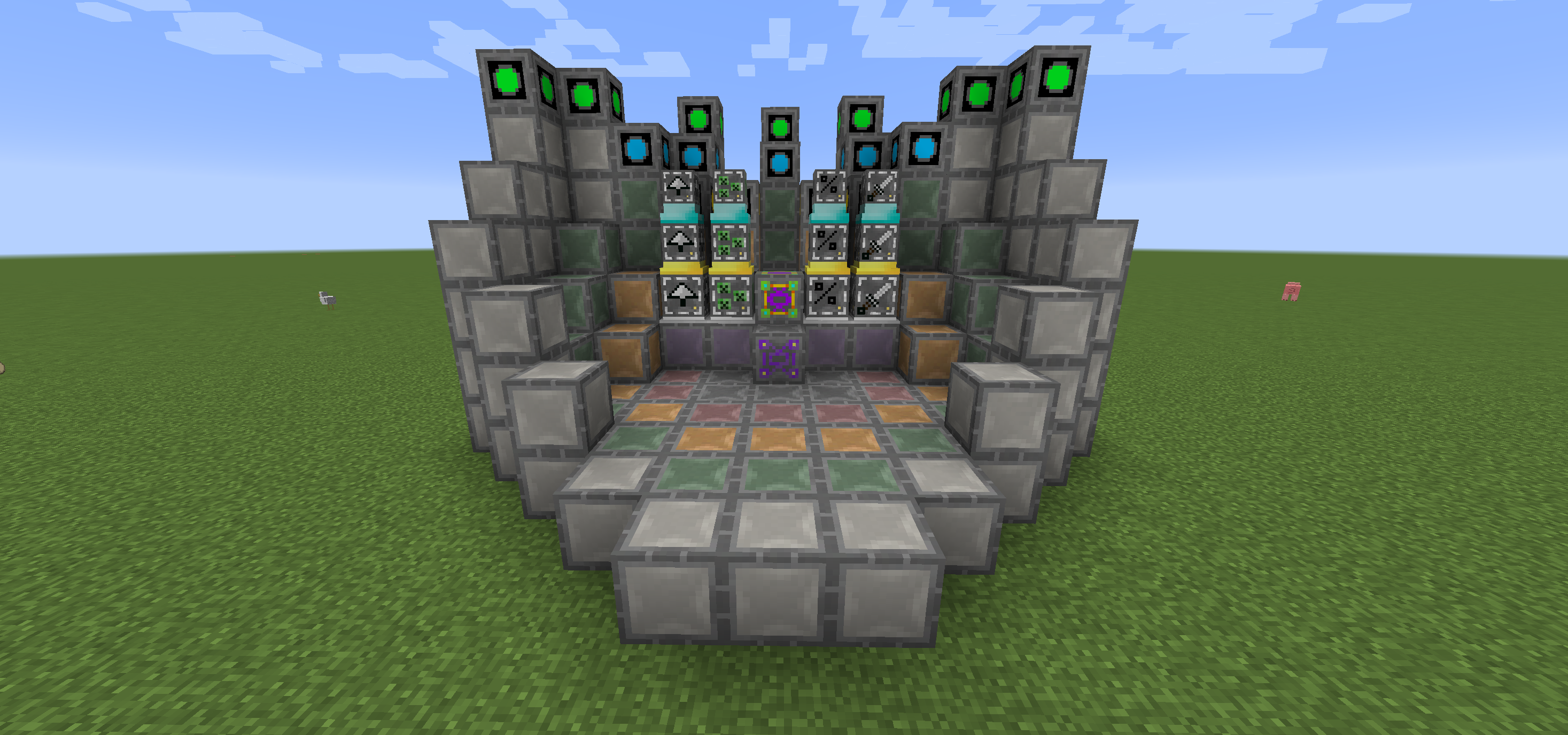
Woot에서는 공장을 지은 다음 원하는 몹으로 프로그래밍합니다. 그런 다음 전력을 공급하고, 그 몹이 생성했을 전리품을 모두 넣을 인벤토리를 제공합니다.
더 높은 등급의 몹을 처리하기 위한 여러 등급의 공장이 있습니다. 그래서 네, Wither를 생성하려면 큰 공장이 필요합니다!
생활을 조금 더 편하게 하기 위해, 각 등급의 멀티블록에서 모든 블록을 어디에 배치해야 하는지 보여주는 레이아웃 블록이 있습니다.
공장을 업그레이드하여 추가 혜택을 줄 수도 있으며, 모두 추가 전력이 필요합니다.
- Looting I/II/III - 몹 처치에 약탈 적용
- Rate I/II/III - 몹을 더 빠르게 생성
- Mass I/II/III - 더 많은 몹 생성
- Decapitate I/II/III - 머리 드롭률 증가
- XP I/II/III - XP 조각 생성
- Efficiency I/II/III - 공장의 전력 비용을 조금 더 저렴하게 만듦
- BloodMagic I/II/III - 의식을 통한 Life Essence 생성
https://github.com/Ipsis/Woot/wiki
http://www.minecraftforum.net/forums/mapping-and-modding/minecraft-mods/2659457-woot-the-alternative-mob-factory

Woot 설치 방법
With Millida Launcher
Install Millida Launcher
The launcher is free: download it at millida.net/launcher and sign in with any nickname.
Click “Install” on this page
The launcher opens and installs the mod for Minecraft 1.12.2–1.16.5 on Forge automatically.
Launch the game
A profile with it appears in the launcher: click “Play”.
Manually
Install Forge
The loader must match the game version of the mod file, for example Minecraft 1.16.5. After installing it, a separate profile appears in your launcher.
Download the file for your version
In the version list above, pick the file woot-1.16.5-1.0.8.4.jar (1.1 MB) for your game version.
Put it in the mods folder
The folder is inside .minecraft (Windows: %appdata%\.minecraft\mods). If it does not exist, create it.
Launch the loader profile
Open “Mods” in the main menu: Woot should be in the list.
Minecraft 1.16.5 runs on Java 8: with a different Java version the game may close right after launch.
버전
의존성 포함
| Minecraft | 로더 | 파일 | 날짜 | 작업 |
|---|---|---|---|---|
| 1.16.5 | Forge | woot-1.16.5-1.0.8.4.jar1.1 MB 1 | ||
| 1.16.2 | Forge | woot-1.16.2-1.0.0.0.jar903 KB | ||
| 1.15.2 | — | woot-1.15.2-1.1.1.0.jar888 KB | ||
| 1.12.2 | — | woot-1.12.2-1.4.11.jar859 KB | ||
| 1.12.2 | — | woot-1.12.2-0.0.10.jar741 KB |
리뷰
Woot의 첫 평가를 남겨 보세요


