

 NeoForge
 Fabric
 Forge
ForgeTime in a Bottle 모드 정보
MangoRage 코드를 사용하면 모든 구매에서 20% 할인을 받을 수 있습니다 https://sodiumhosting.com/mangorage
광석이 마침내 제련되기를 기다리는 데 지치셨나요? 밀이 자라는 것을 지켜보며 굶어 죽어가고 계신가요? (이론상의) 페인트가 마르는 것을 지켜보는 데 지치셨나요? 시간 낭비를 멈추고 Time In A Bottle을 사용해 보세요! 화로, 작물, 양조기 등 틱이 작동하는 블록을 클릭하기만 하면 됩니다!
기능
- 블록이 틱되는 속도를 가속합니다!
- 시간을 수동적으로 수집합니다
- 사용하기 쉬운 관리자 명령어
- TIAB Curio Support Mod를 통한 Curio 및 키바인드 지원
- Forge, Fabric, NeoForge 지원! (1.20.6+)
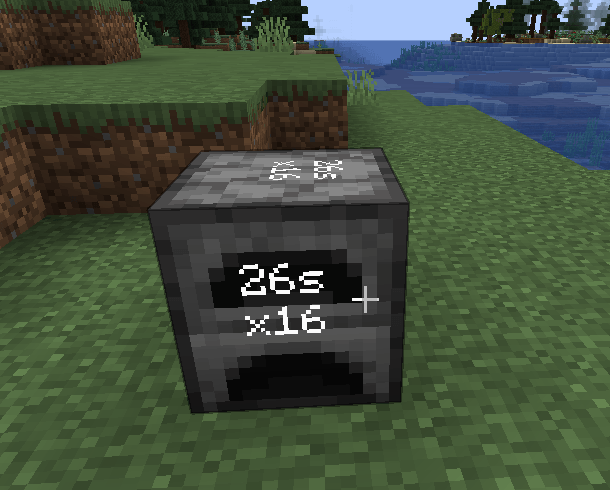
초고속 화로
제작 레시피
명령어로 병에 시간을 추가/제거
밀을 빠르게 키우기!
사용법
먼저 "Time in a bottle" 아이템이 필요합니다.
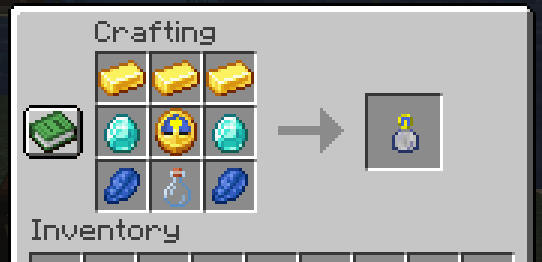
획득한 후에는 시간이 증가할 때까지 기다리세요.
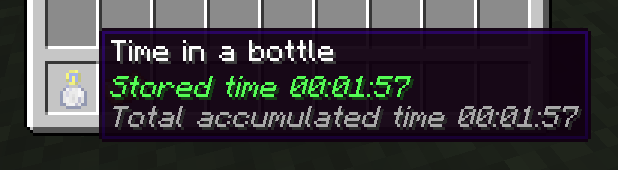
시간이 증가하면 우클릭(화로 같은 블록은 Shift 우클릭)하면 블록이 가속됩니다! 클릭할 때마다 적용되는 속도가 두 배가 되며 30초 동안 지속됩니다.
명령어
병에 시간을 추가/제거하는 명령어가 하나 있습니다
/tiab <addTime/removeTime> <seconds>
필요한 시간
각 "x2"마다 30초의 저장된 시간이 필요합니다. 각 클릭에는 다음 시간이 필요합니다.
x2 - 30초 x4 - 30초 x8 - 60초 x16 - 120초 x32 - 240초 x64 - 480초 등
설정
설정 파일은 <world folder>/serverconfig/tiab-server.toml에서 찾을 수 있습니다
Max Stored Time Possible in ticks maxstoredtime = 622080000 Ticks constant in ticks ticksconst = 20 Each use Duration in seconds eachuseduration = 30 Define maximum time the items can be used continuously. Corresponding to maximum times faster: Eg. 2^8=256 maxratemulti = 8
참고
1.20.1 이상만 지원되며, 이전 버전은 이 모드의 원본인 Time in a bottle standalone을 사용하세요.
저를 후원하고 싶으시다면 Patreon에 후원하거나 구독하실 수 있습니다.
지원
지원은 디스코드 서버 또는 GitHub 저장소에서 받을 수 있습니다
크레딧
haoict의 Time in a bottle standalone에서 포크되었습니다
원래 아이디어는 Lumien231의 Random Things Mod에서 비롯되었습니다
설명 작성: JustDoom ;)
Time in a Bottle 설치 방법
With Millida Launcher
Install Millida Launcher
The launcher is free: download it at millida.net/launcher and sign in with any nickname.
Click “Install” on this page
The launcher opens and installs the mod for Minecraft 1.20.1–26.3 on Fabric, Forge or NeoForge automatically.
Launch the game
A profile with it appears in the launcher: click “Play”.
Manually
Install Fabric, Forge or NeoForge
The loader must match the game version of the mod file, for example Minecraft 26.3. After installing it, a separate profile appears in your launcher.
Download the file for your version
In the version list above, pick the file tiab-neoforge-8.0.0.jar (74 KB) for your game version and loader.
Put it in the mods folder
The folder is inside .minecraft (Windows: %appdata%\.minecraft\mods). If it does not exist, create it.
Launch the loader profile
Open “Mods” in the main menu: Time in a Bottle should be in the list.
버전
의존성 포함
| Minecraft | 로더 | 파일 | 날짜 | 작업 |
|---|---|---|---|---|
| 1.20.1 | Forge | Time in a bottle 4.1.156.1 KB 1 | ||
| 26.1 | NeoForge | Time in a bottle 8.0.074.1 KB 3 | ||
| 26.1 | Fabric | Time in a bottle 8.0.078.4 KB 28 |
리뷰
Time in a Bottle의 첫 평가를 남겨 보세요


