
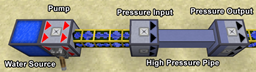
기능
- 어떤 양의 유체든 전송 가능
- 무제한 입력/출력
- 모든 Forge 유체 및 다른 모드의 모든 파이프/탱크와 호환
- 같은 파이프에서 여러 액체 전송 가능
- 입력과 출력에서 유체 유형별 필터링
- 같은 파이프에 여러 입력과 출력
- 유효한 출력 간 스마트 분배
- Forge Multipart 완전 지원 (1.7.2+ 버전)
- 멀티블록 자유형 탱크
- 편리한 수동 펌프와 용기
요구사항
- Minecraft 1.7.10
- Forge 10.13.0.1180 +
- BdLib (최신 릴리스)
블록
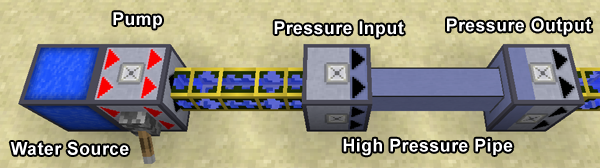
- 고압 입력
- 뒤쪽(화살표가 없는 밝은 면)에서 파이프로부터 유체를 받음
- 앞쪽(화살표가 있는 어두운 면)의 압력 파이프에 연결됨
- 유효한 출력이 고압 파이프로 연결된 경우에만 유체를 받음
- 여러 출력이 연결된 경우 - 유체를 최대한 고르게 분배하려고 함
- 고압 출력
- 뒤쪽(화살표가 없는 어두운 면)의 압력 파이프에 연결됨
- 앞쪽(화살표가 있는 밝은 면)의 파이프/탱크로 유체를 출력함
- 고압 배관
- 출력과 입력을 연결함
- 어떤 모양으로도 놓을 수 있으며, 루프와 교차점도 문제를 일으키지 않음
- 고압 펌프
- 탱크, 파이프 또는 고압 입력 사이에서 유체를 펌프질함
- 틱당 가능한 한 많은 유체를 펌프질함
- 활성화하려면 레드스톤 신호가 필요함
- 무한 물 공급원
- 이름 그대로임
- 실질적으로 모든 목적에서 정말 무한함
- 고압 펌프나 다른 모드의 파이프를 사용해 물을 빼낼 수 있음
필터링
입력, 출력과 파이프에는 필터를 설정할 수 있으며, 필터를 설정하려면 해당 유체로 채워진 양동이(또는 기타 유효한 용기)로 우클릭하세요. 필터를 제거하려면 빈 양동이를 든 상태로 우클릭하세요.
오픈 소스
이 모드는 MMPL-1.0에 따라 라이선스가 부여되며, 소스 코드는 GitHub에서 확인할 수 있습니다. 즉, 공개 또는 비공개 모드팩에 이 모드를 추가할 권한이 있습니다.
Pressure Pipes 설치 방법
With Millida Launcher
Install Millida Launcher
The launcher is free: download it at millida.net/launcher and sign in with any nickname.
Click “Install” on this page
The launcher opens and installs the mod for Minecraft 1.7.10–1.12.2 automatically.
Launch the game
A profile with it appears in the launcher: click “Play”.
Manually
Download the file for your version
In the version list above, pick the file pressure-1.3.1.9-mc1.12.2.jar (1.3 MB) for your game version.
Put it in the mods folder
The folder is inside .minecraft (Windows: %appdata%\.minecraft\mods). If it does not exist, create it.
Launch the loader profile
Open “Mods” in the main menu: Pressure Pipes should be in the list.
Minecraft 1.12.2 runs on Java 8: with a different Java version the game may close right after launch.
버전
의존성 포함
| Minecraft | 로더 | 파일 | 날짜 | 작업 |
|---|---|---|---|---|
| 1.12.1 | — | Pressure Pipes 1.3.1.9 (MC 1.12.2)1.3 MB | ||
| 1.12.1 | — | Pressure Pipes 1.3.1.6 (MC 1.12.1)1.3 MB | ||
| 1.7.10 | — | pressure-1.3.0.fix1-mc1.7.10.jar1.4 MB |
FAQ
Which Minecraft versions does Pressure Pipes work on?
There are files for 1.12.2, 1.12.1, 1.12, 1.7.10. The newest is 1.12.2.
Which Java does Pressure Pipes need?
Minecraft 1.12.2 runs on Java 8. If the game closes right after launch, the usual cause is the wrong Java version in the profile settings.
Where can I download Pressure Pipes safely?
On this page: the file pressure-1.3.1.9-mc1.12.2.jar (1.3 MB) is stored on Millida’s server, with no link shorteners. SHA-1 checksum: 5a067d4b289f50c9b3915bb1c69ffdb65eac5078.
리뷰
Pressure Pipes의 첫 평가를 남겨 보세요


