
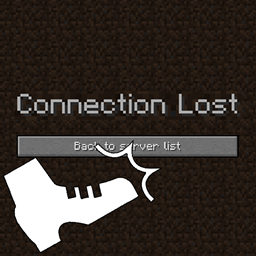
Minecraft 26.3용 Player Death Kick 모드
💀 사망 시 플레이어를 추방하며, 추방 메시지를 사용자 지정할 수 있습니다.
 Fabric
 Forge
 NeoForge
 Quilt
Player Death Kick 모드 정보
Kicks players on death with a customizable disconnect message. This can be useful on tournament servers, where the server is locked at the start and disconnected players are unable to join again.
All available config options:
disconnectMessage default "You died by %death%! You have been disconnected from the server." The message players will receive when disconnected on death.
addDeathCauseToMessage default true If enabled, replaces %death% in the disconnect message with the death cause.
exemptAdminPlayers default true If enabled, exempts admin players (with cheat access, OPs) from being kicked on death.
broadcastKickToServer default true If enabled, sends a message to all players online with who was kicked.
Example messages:
You may freely use this mod in any modpack, as long as the download remains hosted within the CurseForge or Modrinth ecosystem.
Serilum.com contains an overview and more information on all mods available.
Comments are disabled as I'm unable to keep track of them across so many separate mod pages. For issues, ideas, suggestions or anything else there is the Github repo. Thanks!
Player Death Kick 설치 방법
With Millida Launcher
Install Millida Launcher
The launcher is free: download it at millida.net/launcher and sign in with any nickname.
Click “Install” on this page
The launcher opens and installs the mod for Minecraft 1.19.3–26.3 on Fabric, Forge, NeoForge or Quilt automatically.
Launch the game
A profile with it appears in the launcher: click “Play”.
Manually
Install Fabric, Forge, NeoForge or Quilt
The loader must match the game version of the mod file, for example Minecraft 26.3. After installing it, a separate profile appears in your launcher.
Download the file for your version
In the version list above, pick the file playerdeathkick-26.3.0-3.5.jar (43 KB) for your game version and loader.
Put it in the mods folder
The folder is inside .minecraft (Windows: %appdata%\.minecraft\mods). If it does not exist, create it.
Launch the loader profile
Open “Mods” in the main menu: Player Death Kick should be in the list.
버전
의존성 포함
| Minecraft | 로더 | 파일 | 날짜 | 작업 |
|---|---|---|---|---|
| 26.3 | Fabric, Forge, NeoForge, Quilt | [Fabric/Forge/Neo] 26.3.0-3.5 | Player Death Kick42.5 KB | ||
| 1.19.3 | Forge | playerdeathkick_1.19.3-1.8.jar8.4 KB |
FAQ
Which Minecraft versions does Player Death Kick work on?
There are files for 26.3, 1.19.3. The newest is 26.3.
Is Player Death Kick for Forge or Fabric?
There are files for Fabric: 26.3, for Forge: 1.19.3–26.3, for NeoForge: 26.3 and for Quilt: 26.3.
Does Player Death Kick need other mods?
The author lists no required dependencies: the Fabric, Forge, NeoForge or Quilt loader is enough.
Where can I download Player Death Kick safely?
On this page: the file playerdeathkick-26.3.0-3.5.jar (43 KB) is stored on Millida’s server, with no link shorteners. SHA-1 checksum: 2c8b4c81ebe95c7c5c56130f93c239338b0a9715.
리뷰
Player Death Kick의 첫 평가를 남겨 보세요


