

 Fabric
 NeoForge
 Forge
ForgeParticle Rain 모드 정보
Particle Rain은 기본 날씨를 더 예쁜 파티클 효과로 대체하고, 안개, 바람, 모래폭풍 날씨 효과를 추가합니다. 게임 내 설정 메뉴에서 날씨 효과를 비활성화하거나 추가하거나 커스터마이즈할 수 있습니다.
Fabric 버전은 Fabric API가 필요합니다.
설정은 /particlerain 명령어 또는 사용 중인 로더의 모드 목록 메뉴를 사용하세요.
일반적인 모드 호환성 문제는 여기를 참고하세요.
영상: (오래됨, 대신 갤러리를 참고하세요) https://www.youtube-nocookie.com/embed/oan4xH5RvH0

비 파티클
바람에 날려 비스듬히 떨어집니다.

폭풍우 날씨에는 바람이 더 강해지고 비가 더 빽빽해 보입니다.

눈 파티클
떨어지면서 천천히 회전합니다. 바람의 영향을 크게 받지 않아 바닐라 눈의 고요한 느낌을 유지하면서도 시각적으로 덜 어수선합니다. 비처럼 폭풍 시 무거운 변형이 있습니다.


모래폭풍
먼지와 관목이 사막과 다른 건조한 바이옴을 가로질러 날립니다.

먼지는 아래 블록의 색상과 일치하여 추가 설정 없이 다양한 바이옴을 지원하며, 다른 모드가 추가한 바이옴도 포함됩니다.

안개
c:isspooky / c:iswet 태그가 붙은 바이옴에서 나타납니다. 이는 설정 가능합니다.

때때로 비가 온 후 안개가 나타납니다. 이것도 설정 가능합니다.

물결
비가 물 위에 떨어질 때 나타납니다. 리소스 팩의 해상도와 일치합니다.

물줄기
비가 단단한 재료로 된 벽에 부딪힐 때 나타납니다. (모든 블록에 나타나도록 설정 가능)

바이옴 색조
강한 색조를 가진 모드 바이옴은 비와 다른 물 파티클에도 영향을 줍니다.

설정 및 커스텀 효과
내장 설정 메뉴를 사용하여 특정 블록과 바이옴에 다양한 분위기의 파티클 효과를 만들거나 기존 효과를 편집할 수 있습니다.
/particlerain 명령어 또는 모드 메뉴를 통해 메뉴에 접근하세요.
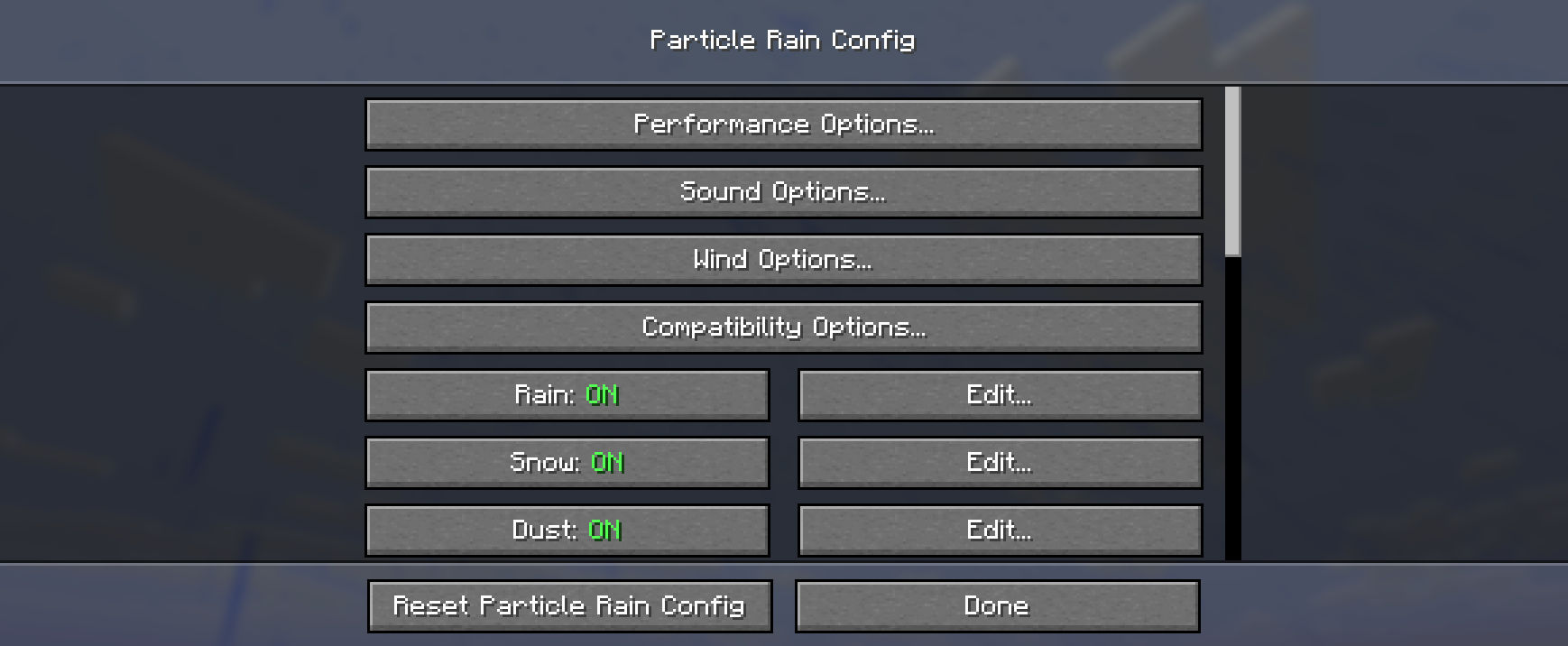
물웅덩이
물웅덩이 기능은 자체 모드로 이동했습니다: https://modrinth.com/mod/puddles-floods/

모드 호환성 참고 사항
이름 문제 해결 방법
Serene Seasons 및 유사 모드 사막에 비가 옴 이는 일반적으로 계절을 추가하는 모드의 기능이며, 버그나 비호환성이 아닙니다.
Particull 날씨 효과 누락 ¯\(ツ)/¯ Particull 제거
Particle Core 효과 깜빡임 또는 사라짐 particle core 설정에서 컬링 모드를 경계 상자로 설정하거나 파티클을 블랙리스트에 추가하세요.
Particle Tweaks Minecraft 1.20에서 충돌 최신 버전 대신 particle tweaks 1.1.1을 사용하세요.
Complementary & Astrocraft 검은 태양 Complementary 설정에서 '비 중 태양/달'을 비활성화하세요.
Eureka 헬름 Eureka 헬름은 때때로 난수 생성을 깨뜨려 일부 상황에서 효과가 잘못 배치될 수 있습니다. ¯\(ツ)/¯
기타 셰이더 팩 문제
셰이더 팩 지원은 마인크래프트 버전에 따라 다릅니다. 일부 셰이더 팩은 파티클을 완전히 지원하지 않습니다.
다른 문제가 발생하면 확인하거나 이슈를 제출해 주세요!
리소스 팩 지원
Particle Rain은 게임의 날씨 텍스처를 사용하여 눈과 비 텍스처를 생성하므로, 리소스 팩이 추가 파티클 텍스처를 포함할 필요 없이 호환성을 유지합니다.
커스텀 날씨 효과 포함
리소스 팩은 assets/particlerain/particles.json에 파일을 제공하여 커스텀 날씨 효과를 포함하거나 기존 효과를 덮어쓸 수 있습니다. 이 파일의 기본 버전은 여기를 참고하세요.
파티클 효과는 팩(또는 다른 모드와 팩)의 particles 폴더에 제공된 모든 텍스처를 사용할 수 있습니다.
게임 내 메뉴로 파티클을 만들거나 편집할 수 있으며, 완료되면 config/particlerain의 particles.json을 리소스 팩에 복사-붙여넣기하면 됩니다!
Particle Rain 설치 방법
With Millida Launcher
Install Millida Launcher
The launcher is free: download it at millida.net/launcher and sign in with any nickname.
Click “Install” on this page
The launcher opens and installs the mod for Minecraft 1.20–26.3 on Fabric, Forge or NeoForge automatically, together with its dependencies: Cloth Config API, Fabric API.
Launch the game
A profile with it appears in the launcher: click “Play”.
Manually
Install Fabric, Forge or NeoForge
The loader must match the game version of the mod file, for example Minecraft 26.3. After installing it, a separate profile appears in your launcher.
Download the file for your version
In the version list above, pick the file particlerain-4.0.2+26.3-fabric.jar (612 KB) for your game version and loader.
Put it in the mods folder
The folder is inside .minecraft (Windows: %appdata%\.minecraft\mods). If it does not exist, create it. Required dependencies go there too: Cloth Config API, Fabric API.
Launch the loader profile
Open “Mods” in the main menu: Particle Rain should be in the list.
Particle Rain works on the player’s side only: there is no need to install it on a server.
버전
의존성 포함
| Minecraft | 로더 | 파일 | 날짜 | 작업 |
|---|---|---|---|---|
| 1.20.1 | Forge | 1.20.11.2 MB 21 | ||
| 1.21.1 | NeoForge | 1.21.1609 KB 31 | ||
| 1.20.1 | Fabric | 1.20.1612 KB 12 | ||
| 1.21.10 | Fabric | 1.21.10611 KB 9 | ||
| 26.3 | Fabric | 26.3612 KB 143 | ||
| 26.2 | Fabric | 26.2612 KB 43 | ||
| 26.1.2 | Fabric | 26.1.2612 KB 15 | ||
| 1.21.11 | Fabric | 1.21.11611 KB 128 |
실행에 필요한 것
- Dependency선택 사항
- Cloth Config API필수
- Fabric API필수
- Mod Menu선택 사항
이것이 필요한 콘텐츠
FAQ
Which Minecraft versions does Particle Rain work on?
There are files for 1.20–26.3, 12 versions in total. The newest is 26.3.
Is Particle Rain for Forge or Fabric?
There are files for Fabric: 1.20–26.3, for Forge: 1.20–1.20.1 and for NeoForge: 1.21.1.
What does Particle Rain need to work?
Required: Cloth Config API, Fabric API. Without them the mod will not start: dependencies go into the same mods folder. Optional: Dependency, Mod Menu.
Do I need to install Particle Rain on a server?
No. Particle Rain works on the player’s side only: there is no need to install it on a server.
Where can I download Particle Rain safely?
On this page: the file particlerain-4.0.2+26.3-fabric.jar (612 KB) is stored on Millida’s server, with no link shorteners. SHA-1 checksum: e6737febb57e31837d74bede3ce788783b381e23.
리뷰
Particle Rain의 첫 평가를 남겨 보세요


